Teamwork is the heart of every successful workplace, but let’s face it, many workplaces still struggle with lagging video calls, fragmented tools and inefficiencies. With the adoption of innovative technologies, artificial intelligence (AI) is changing how employees collaborate, communicate and conduct their tasks. The use of AI PCs equipped with Neural Processing Units (NPUs) is part of this shift, providing increased efficiency and creative capabilities. Paired with smart tools in Microsoft Teams, Windows Studio Effects and Zoom, AI PCs help teams communicate better, stay focused and get more done, without the lag or distractions.
Why the workplace needs a tech upgrade
The shift to remote work during the COVID-19 pandemic exposed limitations of traditional computing. Employees relied heavily on video conferencing, screen sharing and cloud-based tools – often pushing their CPUs and GPUs to the limit, resulting in decreased system responsiveness. This created performance issues and revealed the need for more advanced technological solutions to facilitate effective and seamless collaboration for remote work settings.
AI PCs with NPUs: smarter devices for smarter teams
Collaboration actually works better with AI PCs, as they offer distinctive features not found in other PCs. These are some examples of how Dell AI PCs improve visual presentation, audio quality and streamline access to collaborative functions:
- Look: Users on-camera look polished, with the only commercial laptop featuring a standard 8MP + IR camera with HDR technology 1
- Sound: Deliver superior sound quality with two top-firing speakers and two bottom-firing speakers, Hi-Fi Audio and sound up to 29% louder 2
- Collaboration Touchpad: Provides access to conference controls such as mute/unmute, video sharing, screen sharing and chat3.

In addition, AI PCs equipped with NPUs represent a notable advancement in computational power and functionality. These purpose-built processors are engineered to efficiently execute sophisticated AI algorithms and tasks, positioning them as valuable assets for enhancing workplace collaboration. They enable tasks like:
- Enhanced communication and collaboration: With real-time language translation, voice recognition,and sentiment analysis, employees can overcome language barriers and communicate more naturally and intuitively.
- Real-time data sharing and analysis: AI PCs can manage large volumes of data swiftly, providing insights and actionable information instantly.
- Personalized Workspaces: AI PCs can learn from user behavior and adapt settings accordingly, such as optimizing lighting, adjusting screen resolution and suggesting productivity tools.
With multiple devices across the Dell, Dell Pro or Dell Pro Max portfolio, Dell is at the forefront of the AI PC evolution, offering a range of PCs featuring Intel, AMD and Qualcomm processors optimized for these advanced AI functions.
Dell AI PCs drive AI collaboration with Microsoft Teams
Microsoft Teams has become one of the top platforms for workplace collaboration, integrating AI features that enhance communication, project management and teamwork. AI enhancements in Teams include:
- Smart scheduling: AI-driven scheduling tools within Teams can analyze calendars, availability and priorities to suggest optimal meeting times. This minimizes scheduling conflicts and makes it easier to find times that work for the whole team.
- Intelligent meeting insights: Meeting summaries generate automatically, highlighting key action items and takeaways. This helps everyone stay on the same page without spending extra time taking notes, so team members can focus on other work.
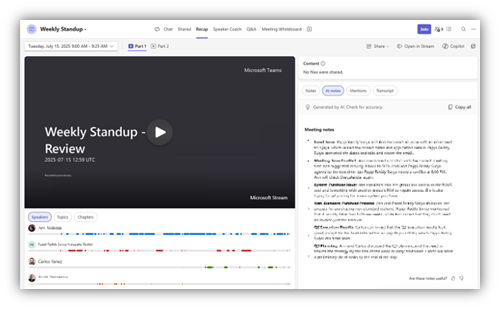
Enhancing virtual presence with Dell AI PCs and Windows Studio Effects
Dell AI PCs using Windows Studio Effects consume up to 42% less power for select AI-enhanced collaboration 4. Also, Windows Studio Effects leverage AI to improve the quality of virtual interactions, making remote collaboration more engaging and effective. The following are some notable features:
- Background Blur: Blurs your background to keep focus on you, so your appearance stays polished, even if you don’t have a dedicated office space.
- Auto-Framing: AI keeps you centered in the frame during video calls, making the experience more natural.
- Eye Contact Correction: This feature adjusts the appearance of your gaze so it looks like you are making eye contact with the camera, even if you’re looking elsewhere on your screen.
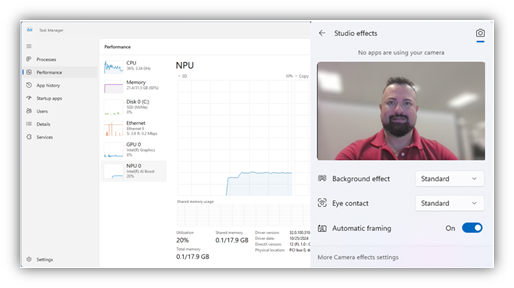
Dell AI PCs support all these features while delivering impressive performance, using 40% less power for Standard Blur 5, 36% less for Eye Contact Correction 6, and 42% less for Automatic Framing 7.
Zoom: Innovative AI features for collaboration with Dell AI PCs
Zoom also incorporates AI features that streamline collaboration and improve user experience. Here are a few ways AI improves your Zoom experience:
- Noise Suppression: AI-driven noise suppression filters out background noise so your conversations stay clear, even if you are working from a not-so-zen environment.
- Transcription and Translation: Zoom’s AI-driven transcription and translation services provide real-time subtitles and translations, breaking down language barriers and making it easier for everyone to follow along.
- Virtual Backgrounds and Filters: AI-powered virtual backgrounds and filters allow users to customize their video appearance, adding a layer of creativity and personalization to virtual interactions.
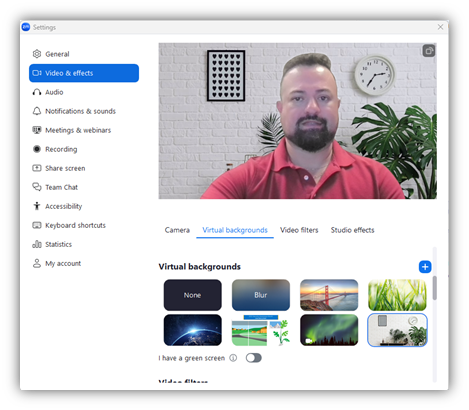
These Zoom AI features run efficiently on Dell AI PCs, cutting power consumption by 42% when using Zoom’s Blur and Portrait Lighting 8, and a 41% reduction with the virtual background feature 9, helping you collaborate longer without draining your device.
Ready to redefine collaboration?
AI PCs are changing the way we work together. With smarter tools built into the devices we use every day, collaboration becomes easier, faster and more natural – whether you are in the office, at home or anywhere in between. Platforms like Microsoft Teams, Windows Studio Effects and Zoom are harnessing AI to break barriers and boost productivity.
And with AI PCs delivering this power efficiently, people can focus less on technical glitches and more on getting things done. As AI continues to evolve, the way we collaborate will only improve. Embracing AI PCs is a step toward a future where teamwork is redefined in the way we connect, create and succeed.
At Dell Technologies, we help organizations of all sizes advance AI innovation and better collaborate. Our products and services are built to support demanding AI workloads, enabling you to reach your goals faster.
Explore how our technology can drive results—learn about Dell’s AI PCs and accelerate your AI journey with Dell APEX PC as a Service.
(1)Based on Dell analysis of publicly available information, November 2024.
(2) Based on Dell internal testing, November 2024
(3) Collaboration icons are only visible during Zoom or Microsoft Teams calls. Compatible video conferencing platforms are subject to change.
(4) CLM-012823: Use up to 42% less power for select AI-enhanced collaboration workloads when using Dell Pro Notebooks
(5) CLM-012809: Use up to 40% less power for AI-enhanced collaboration with an Intel® Core™ Ultra 200V series processor when utilizing Microsoft Teams and the Standard Blur effect from Windows Studio Effects.
(6) CLM-012805: Use up to 36% less power for AI-enhanced collaboration with an Intel® Core™ Ultra 200V Series Processors when utilizing Microsoft Teams and the Eye Contact correction effect from Windows Studio Effects.
(7) CLM-012811: Use up to 42% less power for AI-enhanced collaboration with an Intel® Core™ Ultra 200V series processor when utilizing Microsoft Teams and the Automatic Framing feature from Windows Studio Effects.
(8) CLM-012812: Use up to 42% less power for AI-enhanced collaboration with an Intel® Core™ Ultra 200V series processor when utilizing Zoom’s Blur and Portrait Lighting.
(9) CLM-012813: Use up to 41% less power for AI-enhanced collaboration with an Intel® Core™ Ultra 200V series processor when utilizing Zoom’s virtual background feature.