Dell Pro Max
Professional vs. Consumer GPUs: The Card for Your Workflow
Everything you need to know about what professional and consumer GPUs deliver for CAD, DCC, local AI, and your most common workflows.
Key takeaways: We compare the NVIDIA RTX PRO 6000 Blackwell Workstation Edition and the GeForce RTX 5090 across professional workloads to help you choose the card that’s right for you based on your needs.
-
- Interactive workloads: The RTX PRO 6000 leads in CAD applications (SolidWorks, Creo, Energy and Medical) due to ISV-certified driver optimization and OpenGL features like Order Independent Transparency. The GeForce RTX 5090 posts strong viewport numbers in Maya and Unreal Engine benchmarks, where its rasterization architecture excels.
- Local AI/LLM workloads: The GeForce RTX 5090 is a powerhouse for standard interactions that fit within its 32GB VRAM. The RTX PRO 6000’s 96GB VRAM extends that capability to full-precision 70B+ parameter models, extended context windows, and sustained inference on large-scale tasks.
- The bottom line: The right card depends on your workflow requirements and memory demands.
The GeForce RTX 5090 one of the most powerful consumer GPUs ever built. It dominates gaming benchmarks, delivers exceptional rasterization throughput, and posts impressive numbers in several professional application tests. If you’re evaluating hardware purely by benchmark charts, it may look like a compelling option for professional work.
However, benchmarks only offer partial insight. Professional workloads, from CAD modeling and visual effects to running large language models locally, place demands on a GPU that benchmark suites don’t always capture. Driver optimization, hardware feature support, VRAM capacity, and sustained performance under production conditions all factor into whether a card reliably completes your actual work.
The RTX PRO 6000 Blackwell is available in two configurations: a 600W Workstation Edition and a 300W Max-Q Workstation Edition. Both feature 96GB of VRAM. This article compares the 600W NVIDIA RTX PRO 6000 Blackwell Workstation Edition with the GeForce RTX 5090 across two categories of professional workloads: interactive application performance and local AI/LLM inference. Our goal isn’t to declare a winner; it’s to help you understand where each card excels and why, so you can make an informed decision based on your specific workflow.
Part 1: Interactive application performance
To compare real-world application performance, we used SPECviewperf 15.0.1 , which replays GPU traces captured from actual professional applications. Unlike synthetic benchmarks, these workloads reproduce the specific rendering calls, state changes, and viewport operations that applications like SOLIDWORKS, Creo, Maya, and Unreal Engine make during normal use.
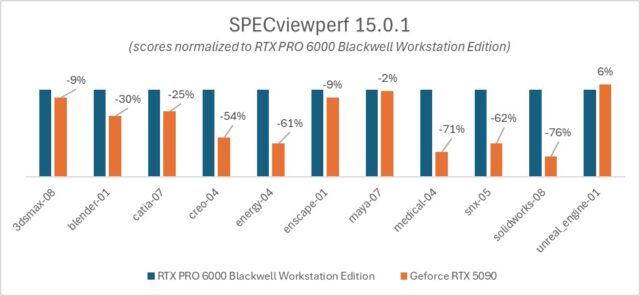
The results split clearly along workflow lines. Some workloads favor the professional card, while others perform well with the consumer card. Understanding why reveals something important about how these GPUs are fundamentally different.
Driver-Optimized Workloads on the RTX PRO 6000:
In the Energy, Medical, SOLIDWORKS, and Blender workloads, the RTX PRO 6000 outperforms the GeForce RTX 5090, in some cases by a substantial margin. Energy and Medical workloads show particularly large advantages for the professional card.
It’s notable that this performance gap seen in Energy and Medical isn’t due to memory. The VRAM usage in these workloads fits comfortably within both GPUs’ memory capacity. And both cards are utilized at 100%. Therefore, the delta isn’t attributable to more memory on the professional card, and it isn’t a raw compute power issue either.
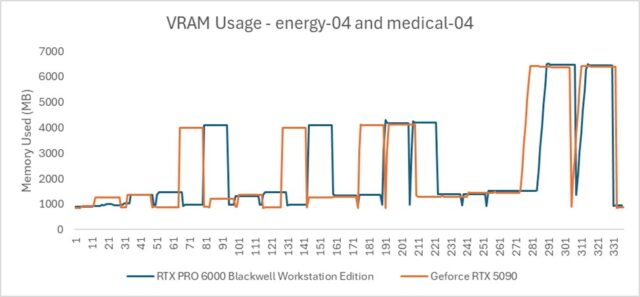
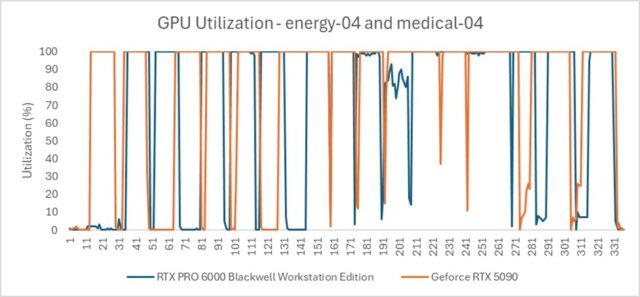
Think of it like digging a ditch with a shovel versus a backhoe. Both can be utilized to their full potential, but one is fundamentally more efficient at the task. The RTX PRO 6000 routes data through a highly optimized hardware path, with ISV-certified enterprise drivers engineered for the complex state changes that professional applications demand: transparency, anti-aliasing (AA/MSAA), shading variants, and other rendering operations that are routine in production viewports.
SOLIDWORKS is a clear example. It relies heavily on OpenGL, with driver-level optimizations that simply don’t exist in the consumer driver. The RTX PRO 6000 handles hardware-accelerated Order Independent Transparency (OIT) significantly better than the GeForce RTX 5090, which could suffer immense performance degradation if transparency, a standard feature in engineering visualization workflows, is enabled.
Where the GeForce RTX 5090 leads: Game-engine-style workloads
Unlike the other tests in the SPECviewperf suite, like CATIA or SNX, which simulate engineering precision, the Unreal Engine workload is effectively running a high-end video game. It utilizes Lumen (Global Illumination), Nanite (virtualized geometry), and deferred rendering. This is the exact environment that GeForce cards are designed for. Game engines favor raw clock speed and rasterization throughput over the double-precision compute or line-drawing accuracy required by CAD software.
Maya’s viewport behavior follows a similar pattern. The application essentially tells the GPU to run the viewport as fast as possible, much like a game engine. The GeForce RTX 5090’s gaming architecture allows it to perform comparatively well based on the results.
The takeaway for interactive workloads is straightforward: if your daily tools are CAD-oriented applications like SOLIDWORKS, Creo, or engineering visualization software that depend on OpenGL and driver-level optimization, the RTX PRO 6000 delivers measurably better performance. If you work primarily in game-engine-based environments like Unreal Engine, the GeForce RTX 5090’s rasterization throughput gives it an edge in viewport speed, within its memory limits. However, once scene complexity exceeds 32GB, performance degrades sharply as the system offloads data to system RAM.
Part 2: Local AI and LLM performance

Running large language models locally is an increasingly common workflow for professionals, whether for research, code analysis, content generation, or working with sensitive data that can’t be sent to cloud APIs. This is where VRAM capacity becomes the dominant factor, and where the difference between 32GB and 96GB produces the most dramatic results.
We ran three tests designed to isolate specific aspects of local LLM performance: raw throughput, model quality at different precisions, and sustained performance under extended context.
Core Concept: How LLMs Use VRAM
Before diving into results, it helps to understand how a large language model actually uses GPU memory. VRAM should be viewed as two distinct allocations.
Static Weights: The fixed size of the model itself. For example, a high-quality Llama 3 70B model at Q8 precision requires approximately 75GB. This number doesn’t change regardless of conversation length or prompt size.
Dynamic KV Cache: Often described as the GPU’s “short-term memory” for an active session. The KV (Key-Value) Cache stores the mathematical representations of all previous tokens in a conversation. Transformers generate text one token at a time, and without a cache, the model would have to recalculate attention scores for every previous word each time it generates a new one, a computationally expensive process that grows quadratically. By storing the Keys and Values in VRAM, the model only needs to calculate the new token and look up previous ones in the cache, drastically increasing generation speed.
This two-bucket model is critical for understanding the test results that follow. A model might technically “fit” on a consumer card, but if there’s no room left for the KV Cache, the card becomes impractical for long-form tasks like coding assistance, document analysis, look dev, or deep research. When VRAM is exhausted, the system offloads data to system RAM over the PCIe bus, causing a massive drop in tokens per second and often making the model feel sluggish or completely unresponsive.
Test 1: The VRAM Ceiling | Throughput Comparison
This test demonstrates what happens when a model’s weight size exceeds the physical VRAM of the consumer card, forcing the system to rely on the PCIe bus and system RAM.
Model: llama3.1:70b-instruct-q8_0 (~75GB weight size)
Prompt: “Explain the chemical process of nuclear fusion in stars and its role in nucleosynthesis. Provide a detailed step-by-step breakdown of the proton-proton chain reaction.”
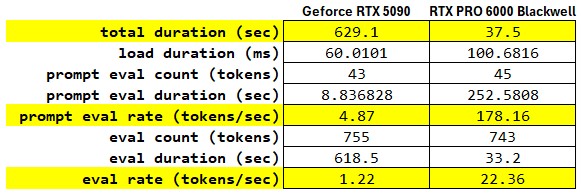
The most jarring statistic is the Prompt Evaluation Rate. The RTX PRO 6000 processed the prompt at 178.16 tokens/s, while the GeForce RTX 5090 managed only 4.87 tokens/s. In a technical context, a sub-5 tokens/s rate on a card as powerful as the GeForce RTX 5090 typically points to the model weights exceeding the card’s onboard VRAM, forcing the system to offload layers to system RAM. This creates a massive bottleneck over the PCIe bus.
When we move to the Eval phase with the actual generation of text, the GeForce RTX 5090 produces output at 1.22 tokens/s. For a human reader, this is slower than reading speed, making the model feel unusable for real-time interaction. The RTX PRO 6000 delivers 22.36 tokens/s, fast enough to outpace human reading speed and provide a fluid user experience. The 18.3x speedup suggests that the RTX PRO 6000 is keeping the entire model resident in its VRAM, maintaining high utilization of its tensor cores.
The total execution time tells the practical story: waiting 10 minutes and 29 seconds, for a response that the RTX PRO 6000 delivers in 37 seconds is the difference between an iterative research workflow and a broken one.
Test 2: The Fidelity Stress Test
If the GeForce RTX 5090 can’t run a 75GB model at full precision, the natural question is: what if you reduce the model’s precision until it fits? This is called Quantization, reducing the precision of a model’s weights to reduce its memory footprint and improve inference efficiency. The trade-off is that aggressive quantization degrades the model’s reasoning quality.
To test this, we ran the same 70B parameter model on both cards at the highest precision each could support:
GeForce RTX 5090: llama3.1:70b-instruct-q2_K, the most aggressively quantized version, and the highest-precision 70B variant that fits within 32GB.
RTX PRO 6000: llama3.1:70b-instruct-q8_0, professional-grade precision with minimal quality loss.
We gave both a deceptively simple logic prompt: “I have 3 shirts. I need 3 hours to dry them outside in the sun. How long does it take to dry 30 shirts under the same conditions? Explain your reasoning step-by-step.”
The correct answer is 3 hours. All 30 shirts dry simultaneously in the sun. This tests whether the model can reason through a common-sense problem rather than defaulting to linear mathematical scaling.
GeForce RTX 5090 (Q2_K) output: The model fell into the linear scaling trap. It treated the problem as a simple ratio: if 3 shirts take 3 hours, then 30 shirts must take 30 hours. It set up a proportion, cross-multiplied, and arrived at the wrong answer with mathematical confidence. The aggressive quantization introduced enough noise into the model’s reasoning that it couldn’t distinguish between a parallelizable task and a sequential one.
RTX PRO 6000 (Q8_0) output: The model correctly identified the key insight: drying time depends on environmental conditions (sun, air, temperature), not the number of shirts. Since all shirts are drying simultaneously, the total time remains 3 hours regardless of how many shirts are outside. The higher-precision model maintained the reasoning capability to catch the common-sense nuance.
The lesson here extends beyond a single logic puzzle. Fitting a model on a card isn’t the same as fitting a smart model. When VRAM constraints force aggressive quantization, the model’s ability to handle nuanced reasoning, complex code, or multi-step analysis degrades, sometimes in ways that aren’t immediately obvious. For professionals relying on local LLMs for substantive work, the quality of the output matters as much as the speed.
Test 3: The Smoking Gun (VRAM vs. Context Capacity)
Memory-Bound Measurements
Test 3 isolates the memory-bound nature of Large Language Models (LLMs). While standard benchmarks focus on raw compute, real-world professional tasks like analyzing a massive Django codebase are dictated by VRAM capacity.
As the context window (KV Cache) grows, it consumes VRAM alongside the model weights. This test identifies the “Performance Cliff“: the exact moment where physical VRAM is exhausted, forcing the system to offload data to System RAM (DDR5) via the slow PCIe bus.
Phase 1: The Baseline (Standard Chat)
To establish a control, we ran a standard interaction on the GeForce RTX 5090 with a minimal context window.
Model: Llama 3.1 70B (Q2_K)
Task: Basic Greeting (“Hi. How are you?”)
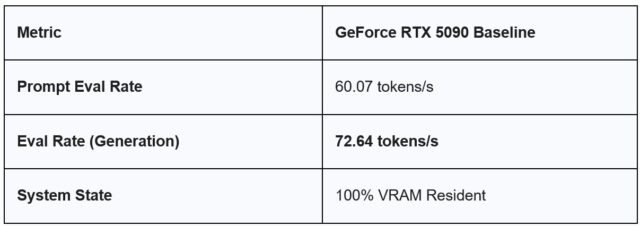
Observation: In this state, the 5090 is incredibly fast. With only 16 tokens of context, the ~26GB model fits comfortably within the 32GB VRAM buffer, leaving plenty of “headroom.”
The “Simple Chat” Mirage
As shown in the Baseline, the GeForce RTX 5090 is a powerhouse for standard interactions, clocking in at 72.64 t/s. In this state, the model and its tiny KV cache fit entirely within the 32GB VRAM. This is what most consumer users experience, leading to the misconception that “32GB is plenty for 70B models.”
Phase 2: The Stress Test (32k Context)
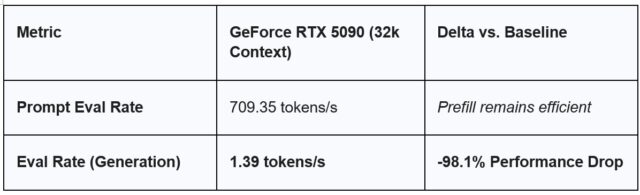
We then pushed the same model on the GeForce RTX 5090 by providing a ~32,000-token Django codebase for analysis. As soon as the 32k context was introduced, the total memory requirement (Weights + KV Cache) exceeded the GeForce RTX 5090’s 32GB capacity. The generation speed collapsed from 72 t/s to 1.39 t/s, a result of the GPU waiting for data to travel over the PCIe bus from System RAM.
Task: Security audit of django_context.txt
Phase 3: The Professional Standard (RTX PRO 6000)
When we move this same 32k workload to the RTX PRO 6000, the “Cliff” disappears.
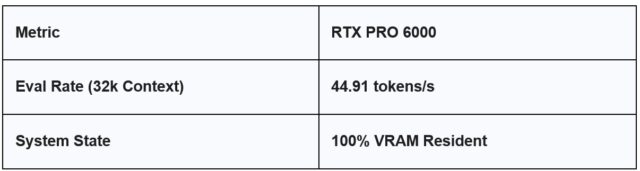
With 96GB of GDDR7 VRAM, the RTX PRO 6000 treats the 32k context workload with the same native speed as a simple greeting. Because the data never leaves the high-speed VRAM buffer, we maintain a usable, professional-grade workflow.
FED Segments
In the Federal segment, AI is often deployed for “Document Intelligence“—digesting massive PDFs, legal briefs, or code repositories.
-
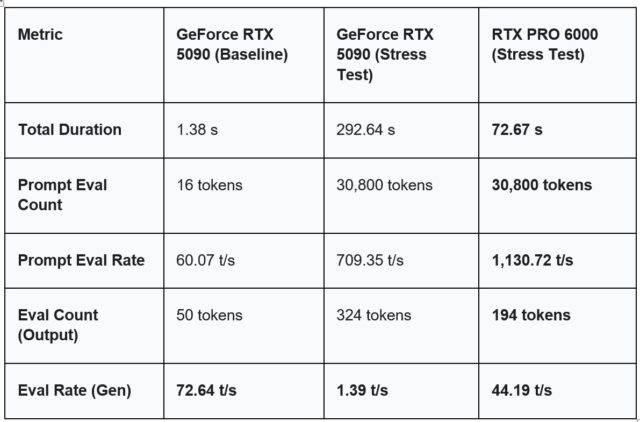
- The GeForce RTX 5090 Result: 1.39 tokens/s is roughly the speed of a slow human typist. For an engineer waiting for a security audit, this is a productivity killer.
- The RTX PRO 6000 Result: Maintaining 40+ tokens/s means the AI can keep up with human thought processes, enabling real-time collaboration on large-scale datasets.
Summary Table
Choosing the right card for your workflow
The GeForce RTX 5090 is an excellent GPU. It excels at what it’s designed for: gaming, real-time rendering in game-engine environments, and workloads that stay within its 32GB memory capacity. For professionals working primarily in Unreal Engine or Maya-style viewport workflows with manageable scene complexity, it delivers strong performance at a consumer price point.
The RTX PRO 6000 addresses a different set of requirements. Its ISV-certified enterprise drivers deliver measurable advantages in CAD and engineering applications that depend on OpenGL optimization and hardware features like Order Independent Transparency. And its 96GB of GDDR7 VRAM removes the memory ceiling that constrains local AI workflows, enabling full-precision large language models, extended context windows, and sustained inference performance that the GeForce RTX 5090 physically cannot support.
The right card depends on your work. The data in this article is intended to help you evaluate that decision based on what each GPU delivers in the workflows that are important for you.
Learn more about the Dell Pro Max Tower T2 with NVIDIA RTX PRO GPUS and stay tuned for our upcoming blog comparing 300W to 600W cards and the advantages of using multiple GPUs.