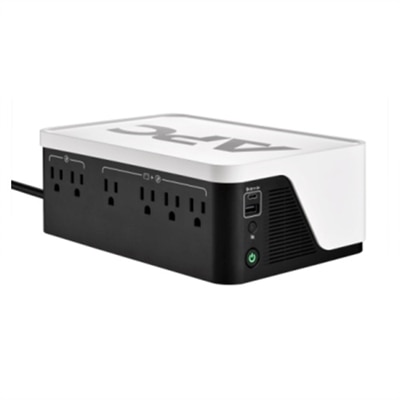
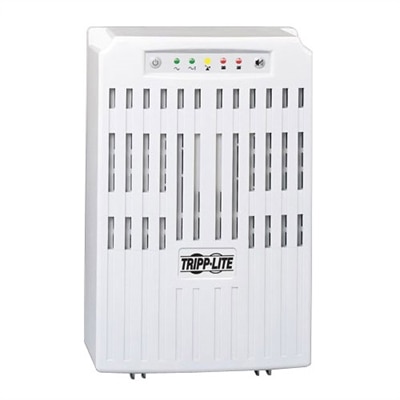
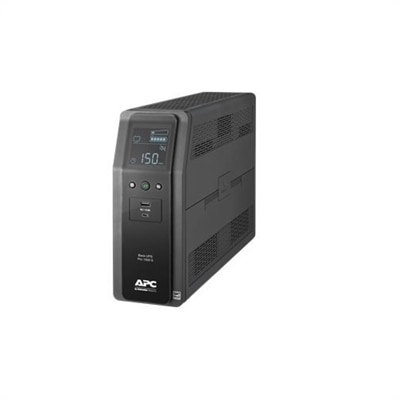
600 Watt UPS
600 watt UPS solutions offer essential backup power and reliable protection for your valuable electronics during unexpected outages or voltage fluctuations. Ideal for home offices, small businesses, and critical devices, these units help maintain productivity and prevent data loss when the power goes out. Explore a range of 600 watt UPS options designed to keep your equipment running smoothly and provide peace of mind in any environment.
This product is not available
Check out the following recommendations.




600 Watt UPS
A 600 watt UPS, or uninterruptible power supply, provides temporary battery power for compatible electronics with a combined electrical load within its rated output limits. Its purpose is to bridge brief power interruptions and give connected equipment time for an orderly shutdown during a longer outage. At a desk, that can mean keeping a desktop computer and monitor running long enough to save an unfinished document, close a design project, or finish a critical file transfer. The 600 watt rating describes the maximum real power the UPS can supply, not the amount of energy its battery holds or how long connected equipment will run. Runtime depends on battery capacity, the connected load, battery condition, and operating conditions. A lightly loaded UPS generally runs longer than the same unit powering equipment near its output limit, so manufacturer runtime charts are more useful than a single broad estimate. At higher loads, backup time may be measured in just a few minutes; these accessories are generally intended for short interruptions and controlled shutdowns rather than hours of uninterrupted desktop use. Watts and volt-amperes, abbreviated VA, also describe different electrical limits, and connected equipment must remain within both ratings. Two UPS units with the same 600 watt output can have different VA ratings, battery capacities, and runtime characteristics. For a home office, study space, or creative workspace, the relevant load includes every device connected to a battery-backed outlet. A desktop power supply labeled 600 watts does not necessarily consume 600 watts continuously: actual demand changes with the components inside and the work they are doing. A computer displaying a spreadsheet may draw substantially less power than it does while rendering video or running a demanding game. Allowing room below the UPS output ceiling helps accommodate changing demand, while accounting for a monitor and essential accessories gives a more realistic picture of the complete setup. Measured power consumption under representative workloads provides a stronger starting point than a computer power supply label alone.
The practical differences among 600 watt UPS options often come down to power handling, outlet configuration, and the information visible at a glance. Some designs use automatic voltage regulation to correct certain low- or high-voltage conditions without switching to battery power, which can reduce unnecessary battery cycling when incoming voltage fluctuates. Battery output waveform is another compatibility consideration. Pure sine wave output can be important for computers with particular power supply requirements, including some designs with active power factor correction; the computer and UPS manufacturers’ compatibility information remains the deciding reference. Simulated or stepped sine wave output may suit other equipment, but the same wattage rating does not make every UPS electrically interchangeable. Transfer time also matters because many UPS designs briefly switch from utility power to battery power rather than providing a completely interruption-free transition. Outlet labels make a meaningful difference in everyday use: battery-backed outlets provide temporary power during an outage, while surge-only outlets do not. A desktop and its main monitor usually benefit more from limited battery capacity than a desk lamp or another nonessential accessory. High-draw equipment, such as space heaters and many laser printers, is generally unsuitable for battery-backed computer UPS outlets unless the manufacturer explicitly permits the connection. For a laptop-centered desk, the laptop’s internal battery may already cover the computer itself, while a compatible UPS can keep an external monitor and other essential low-power peripherals operating briefly. Displays and status lights can show load, battery charge, operating mode, or estimated remaining runtime, depending on the design. Audible alarms make a power event noticeable even when the unit sits beneath a desk, although their volume and muting options vary. Compatible USB communication and shutdown software can add another layer of convenience by initiating an orderly computer shutdown before the battery is exhausted. That function depends on operating system support, configuration, and the communication connection, rather than simply plugging the computer into a backup outlet.
Physical fit and long-term care are just as relevant as electrical specifications when a UPS becomes part of a daily workspace. A compact tower may sit beside a desk, while a lower-profile enclosure may fit elsewhere within the manufacturer’s placement requirements. Exterior dimensions alone do not tell the whole story: power plugs, bulky adapters, cable bends, and ventilation clearances all need space. Battery components can make even a modest enclosure surprisingly heavy, so a stable surface and easy access are preferable to a cramped shelf. Durable plastic or metal housings, depending on the design, protect internal components during normal use, but they do not make a UPS resistant to spilled drinks, blocked vents, or excessive heat. A dry, ventilated position away from direct sunlight and heating equipment supports more consistent operation and battery longevity. Routine care generally involves keeping exterior vents free of dust, checking status indicators, and following the manufacturer’s cleaning and testing instructions. A UPS should not be opened for internal cleaning or connected through improvised extension arrangements; installation should follow its requirements for a grounded wall outlet and supported equipment. Many desktop UPS designs use sealed rechargeable batteries, and some allow battery replacement when capacity declines. Replacement access, the specified battery type, and clear service instructions can influence how practical a unit remains over time. Battery life varies with temperature, age, and discharge history, so a successful self-test does not establish that an older battery will provide the same runtime it did when new. Periodic checks using the manufacturer’s approved procedure help reveal whether the available backup time still matches the workspace’s needs. Spent batteries require appropriate recycling rather than disposal with ordinary household trash. For comparisons across output categories, a 750VA UPS is rated by apparent power, so its watt capacity must be checked separately; 750VA should not be read as 750 watts or assumed to match a 600 watt unit. For remote workers, students, desktop gamers, and people creating digital artwork, a well-matched UPS offers a useful buffer between a sudden darkened room and an abruptly interrupted computer session. Its value lies in matching electrical compatibility, realistic backup time, and a manageable footprint to the equipment used every day.
FAQs:
A 600 Watt UPS is ideal for protecting desktops, monitors, networking equipment like modems and routers, as well as smaller peripherals such as external hard drives or speakers. It can also support gaming consoles and home entertainment components, provided the total connected load does not exceed the unit’s wattage rating.
The runtime of a 600 Watt UPS depends on the total wattage of the devices connected. Generally, for a mid-range PC and monitor, you can expect about 5 to 10 minutes of backup power—enough time to save your work and shut down devices safely.
Yes, a 600 Watt UPS can be a good match for many gaming PCs, especially if you select a model with pure sine wave output for clean power supply. Be sure to consider the total power draw of your system, including the monitor and any accessories, to ensure compatibility.
Battery-backed outlets provide both surge protection and backup power during outages, keeping your critical devices running. Surge-only outlets protect against voltage spikes but do not supply backup power, making them suitable for less essential equipment.
Many 600 Watt UPS units act as a power inverter, converting stored battery energy into AC power for your devices. For sensitive electronics, look for models that offer pure sine wave output, which delivers a cleaner and more stable power supply.