$2402.00
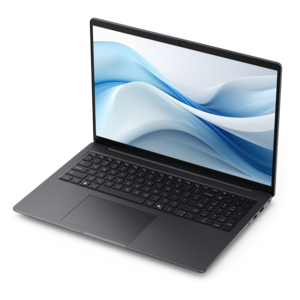
A productivity-focused Copilot+ PC powered by a capable AMD CPU, GPU and NPU combination.
Discover powerful performance and stunning visuals with AMD graphics laptops, designed to elevate your computing experience whether you're working, creating, or gaming. These laptops offer seamless multitasking and vibrant displays, making them an excellent choice for users seeking reliable graphics capabilities. Explore a wide selection of AMD graphics laptops to find the perfect match for your needs and enjoy enhanced productivity and entertainment on the go.
A productivity-focused Copilot+ PC powered by a capable AMD CPU, GPU and NPU combination.
A thin, lightweight Copilot+ PC combining powerful AMD CPU, GPU, and NPU performance for enhanced productivity.
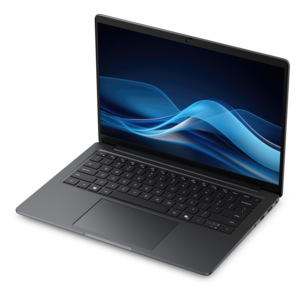
A sleek laptop powered by AMD Ryzen AI 400, delivering capable performance for modern multitasking.
A sleek laptop powered by the latest AMD Ryzen™ AI 400 Series processors for demanding users.
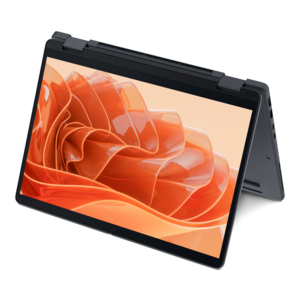
A remarkably thin 2-in-1 laptop powered by AMD Ryzen AI PRO 400 Series processors for performance.
AMD graphics laptops bring visual computing into a portable format, supporting everything from everyday multitasking and streaming to gaming, photography, and video production. The category includes laptops with integrated graphics built into the processor and configurations with a separate, dedicated graphics processor. Integrated graphics typically share system memory with the CPU and can support compact designs that balance responsiveness, power efficiency, and portability. Dedicated graphics generally have their own video memory and additional cooling requirements, making them a common fit for demanding games, complex visual projects, and sustained rendering work. Neither design alone determines how fast a laptop will feel: graphics architecture, memory configuration, power limits, cooling, and software all influence the result. Some advanced integrated graphics can handle workloads that once required a separate graphics chip, but performance varies substantially by configuration and application. Likewise, two laptops with similar graphics specifications can behave differently during a long gaming session because their chassis and cooling systems allow different levels of sustained power. For everyday use, graphics help deliver smooth desktop animation, video playback, and responsive visuals across supported applications. More demanding uses include navigating a detailed three-dimensional scene, applying supported effects to a video timeline, or maintaining consistent frame rates while moving through a busy game environment. Hardware acceleration can make compatible creative applications more responsive, although not every task uses the graphics processor equally. A student moving between lectures, a photographer reviewing images away from a desk, and a player settling into an evening match may all benefit from graphics capability, but their priorities will differ. Portability and battery life often matter most between classes, while display accuracy supports photo work and sustained graphics performance matters during gaming. The useful distinction is not simply integrated versus dedicated graphics, but how the complete laptop fits the applications, surroundings, and length of use that define a typical day.
Graphics performance is closely connected to the screen, memory, and processor surrounding it. A higher-resolution display can reveal fine details in photographs and provide more room for editing tools, but rendering games at that resolution also places a heavier load on the graphics hardware. A high refresh rate can make motion look smoother when the system produces enough frames to take advantage of it. Support for variable refresh rate may further improve the experience by reducing visible tearing with compatible hardware and settings. Brightness, contrast, and color coverage matter for different reasons: a brighter screen can be easier to see near a sunny window, while a suitable color gamut and accurate calibration are valuable for image work. A matte finish can reduce distracting reflections, though screen finish alone does not determine visibility. For gaming, performance at the intended resolution and quality settings is more informative than a graphics name in isolation. Advanced lighting effects can significantly increase processing demands, and supported upscaling technologies may improve frame rates by reconstructing an image from a lower internal resolution. The visual result depends on the game, implementation, and selected mode. Video memory also matters because detailed textures, larger scenes, and certain creative workloads need room for graphics assets; a larger memory capacity, however, does not automatically mean a faster GPU. With integrated graphics, system memory capacity and bandwidth can affect both graphics performance and the space left for other applications. The CPU remains important for simulation, compiling projects, and the portions of creative work that do not run on the GPU. The related Laptops With Latest AMD Processors category provides another way to explore processor-focused configurations, while the graphics specifications remain essential to understanding each laptop’s visual capabilities. Processor branding alone does not establish whether a configuration has integrated graphics, dedicated graphics, or both. Application requirements and configuration-level specifications provide a clearer picture of suitability than broad category labels, especially for specialized design software or graphics-intensive coursework.
The physical design of a graphics laptop shapes how comfortably that capability travels and how consistently it performs. Aluminum, magnesium alloy, and reinforced plastic are common chassis materials, each offering different combinations of weight, rigidity, finish, and feel. Material alone is not a guarantee of durability; hinge construction, panel support, and the way a laptop is carried also matter. A slim chassis can slip easily into a commuter bag, while a larger body may provide more room for cooling, a wider keyboard, and a more expansive screen. The total travel weight includes the power adapter, an important detail for someone carrying the laptop across campus or between workspaces. Keyboard spacing, touchpad responsiveness, and palm-rest comfort become noticeable during an afternoon of writing or editing, even when graphics performance is the main attraction. At a desk, an external monitor, mouse, or keyboard can create a more comfortable setup, provided the laptop has the appropriate connections. External display support depends on the ports, their capabilities, and the system configuration, not just the graphics processor. Cooling deserves similar attention: demanding work generates heat, and fans may become more audible as they move that heat out of the chassis. A firm, flat surface helps keep ventilation openings clear, whereas a blanket or cushion can obstruct airflow. Battery runtime varies with screen brightness, workload, power settings, and graphics activity; intensive gaming or rendering typically uses considerably more energy than reading documents. Maximum sustained performance may also require connection to external power. Routine care includes cleaning the screen with an appropriate soft cloth, following the manufacturer’s cleaning directions, and keeping vents free of obstructions. A padded sleeve helps protect the finish during travel, and supported software and driver updates can address compatibility or stability issues. These practical details matter whether the laptop is a personal workstation, a graduation gift for a college-bound student, or a creative companion for someone developing a photography hobby. A configuration suited to its recipient’s software, daily routine, and preferred workspace is more meaningful than an impressive specification that rarely gets used.
Laptops equipped with AMD graphics provide robust performance for creative applications such as photo editing, video rendering, and 3D modeling. Their advanced architecture is optimized for multitasking and handling demanding graphical workloads, resulting in smoother workflows and faster processing times. This makes them an excellent choice for artists, designers, and content creators who need reliable hardware for professional projects.
Yes, AMD graphics laptops are well-suited for gaming. They support modern game titles with high frame rates and detailed visuals, delivering immersive experiences. Many models also feature technologies like adaptive sync and high-refresh-rate displays, which help reduce screen tearing and provide a smoother gaming experience, whether you’re playing fast-paced shooters or expansive open-world games.
Absolutely. AMD graphics laptops are designed to handle multitasking efficiently, allowing users to run several applications simultaneously without significant slowdowns. This is especially beneficial for professionals and students who need to switch between tasks such as video conferencing, document editing, and streaming content throughout the day.
Software that relies heavily on graphical processing, such as video editing suites, 3D rendering programs, CAD software, and modern games, benefits greatly from AMD graphics technology. The enhanced processing power and advanced features help accelerate rendering times, improve visual quality, and boost overall productivity in these demanding applications.
An AMD graphics laptop is an excellent choice for students, especially those studying in fields like engineering, design, computer science, or digital media. These laptops offer a balance of portability, battery life, and performance, making them ideal for both classroom tasks and extracurricular activities such as gaming or creative projects.
Add the products you would like to compare, and quickly determine which is best for your needs.