Architectural Printers
Architectural printers are essential tools for professionals who demand precision and clarity in their large-format designs, blueprints, and technical drawings. Designed to handle high-volume output and complex projects, these specialized printers help architects, engineers, and designers bring their visions to life with sharp detail and reliable performance. Explore a wide selection of architectural printers to find the ideal solution for your workspace and project needs.
This product is not available
Check out the following recommendations.




Architectural Printers
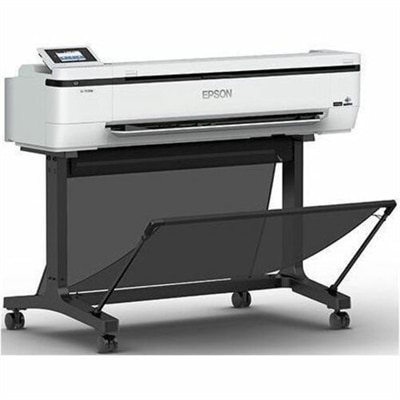
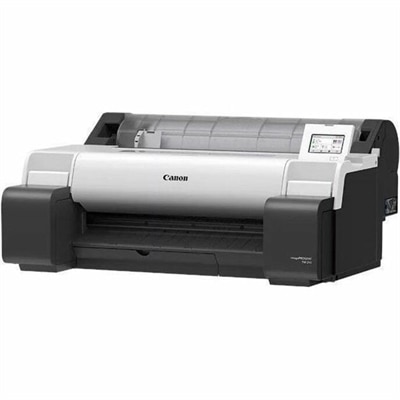
Architectural printers, often called wide-format printers or plotters, are designed for producing the large, precise documents used in architecture, engineering, construction, interior design, landscape planning and related fields. Unlike standard office printers, these devices can work with oversized paper rolls and sheets, making it possible to print detailed floor plans, elevations, site plans, technical drawings, presentation boards and high-resolution renderings at useful working dimensions. A compact 24-inch model is commonly suited to a home office, classroom, small practice or satellite workspace, while a 36-inch printer can accommodate larger ARCH D and ARCH E drawings with fewer page divisions and less assembly. When evaluating options, begin with the paper sizes used most often in your workflow, then consider the available floor or tabletop space, the location of the printer and the volume of pages expected each week. A smaller office may benefit from a space-conscious design with wireless connectivity, while a busy studio may place greater value on fast output, large ink capacities, multiple media paths and straightforward network management. Print resolution also matters when a drawing combines thin vector lines, small annotations, hatch patterns, dimensions and shaded renderings. A resolution of at least 2400 x 1200 dpi can help preserve crisp lines and fine text, although practical image quality also depends on the printhead, ink formulation, paper surface and the source file. For teams that move between technical documents and polished client presentations, look for support for both plain bond paper and coated or glossy media. Roll printing is efficient for long drawing sets and repeated output, while automatic roll-to-sheet handling can be helpful when a project includes standard-size documents alongside wide plans. Some architectural printers also support borderless output, stackers or catch baskets, which can reduce curling and keep freshly printed pages organized as they leave the device. Before choosing, confirm compatibility with the file formats and design applications used by your team, along with the operating systems and connection methods available in the workspace. Wireless printing can simplify placement and support laptops throughout a studio, while wired network connections may be preferred for dependable access to large files. A printer that works smoothly with the existing workflow can save more time than one with impressive specifications that require frequent file conversion or manual adjustments. For additional options related to technical drawing output, explore Printers For CAD Drawings.
The right architectural printer should also match the demands placed on the finished page. Pigment-based inks are often a practical choice for drawings that may encounter handling, humidity or the occasional trip to a job site, because they generally provide strong resistance to fading and moisture compared with many dye-based formulations. For presentation renderings, a wider color range and careful media selection can bring out the warm tones of wood, the cool surfaces of glass and the subtle differences between concrete, stone and planted areas. For construction documents, consistent black density and accurate line reproduction may matter more than photographic color. If several people share one printer, intuitive controls, permission settings and clear status information can help prevent interruptions, especially when a large set is waiting behind a smaller print job. Automatic cutting is another useful feature for roll media, producing clean edges without requiring a separate trimming step. Consider the cost and availability of replacement ink, maintenance supplies and compatible paper before committing to a printer, since ongoing materials can influence the total ownership experience. Regular use is beneficial for inkjet plotters; occasional test pages and routine maintenance can help keep nozzles clear and reduce the risk of dried printheads after a quiet stretch. Adequate ventilation, a stable surface and enough clearance for paper movement are important as well. A roll of wide-format paper needs room to feed evenly, and printed plans should have a clean, flat place to rest before they are folded, trimmed or placed in a plan set. These printers are useful for architects preparing review sets, contractors checking dimensions in the field, students pinning up studio work, real estate professionals presenting development concepts and homeowners working with designers on renovations. They can also make a thoughtful practical gift for a graduating design student, a newly established practice or a creative professional building a dedicated studio, provided the recipient has room for the equipment and a clear need for oversized output. In smaller workspaces, a compact model can support occasional plan printing without taking over the room; in a larger practice, a high-capacity unit can help keep production in-house and reduce dependence on outside print services. During the cooler months, when more work may happen indoors, an architectural printer can become a dependable part of a focused project area, turning digital drawings into tangible documents that are easier to mark up, compare and share. Whether the priority is precise CAD linework, richly colored renderings, large construction sheets or flexible everyday output, choosing the right width, ink system, media handling, connectivity and maintenance features will help ensure that the printer fits the way the workspace actually operates.
FAQs:
When selecting an architectural printer, consider features such as high print resolution for detailed line work, compatibility with various media types, fast print speeds for larger projects, and connectivity options like wireless or cloud integration. Advanced color management and support for large format prints are also valuable for producing accurate and impressive design documents.
Large format printers are especially beneficial for architects, engineers, contractors, interior designers, and students in design-related fields. These professionals rely on precise and scalable prints for blueprints, site plans, and presentations, making large format printers a staple in both professional offices and educational settings.
High print quality ensures that every detail of a design, from fine lines to subtle shading, is clearly visible and accurately represented. This level of clarity is essential for effective communication during presentations and client meetings, helping to convey ideas with professionalism and precision.
Yes, many architectural printers are designed with collaboration in mind, offering features like network connectivity, shared access, and support for multiple file formats. These capabilities allow teams to efficiently print, review, and share design documents, streamlining project workflows.
Most modern architectural printers are versatile, supporting both monochrome and color printing. This flexibility allows users to produce technical line drawings as well as vibrant, full-color renderings and presentations, accommodating a wide range of design needs.