Back Support For Gamers
This product is not available
Check out the following recommendations.




Back Support For Gamers
Back support for gamers can make a meaningful difference during long sessions at a desk, whether you are exploring a new world, competing online, or settling in for a favorite strategy game. A supportive setup helps you maintain a comfortable seated position so you can stay focused on play instead of constantly shifting, slouching, or rubbing your lower back. The right solution may be a lumbar cushion that attaches to an existing chair, a posture-focused support worn over clothing, a structured pillow for couch or bed gaming, or an ergonomic gaming chair with built-in adjustments. Each option serves a different space and playing style. External lumbar cushions are often a practical choice for a standard desk chair because they can add support without replacing the entire seat. Look for a shape that gently fills the natural inward curve of the lower spine, with materials such as memory foam or breathable mesh depending on whether you prefer a more conforming feel or increased airflow. A support that is too thick may push you forward, while one that is too thin may not provide enough contact, so adjustability and secure straps can be especially useful. Gaming from a sofa or bed calls for a different approach: an arm-supported cushion or structured backrest can help create a more upright position and provide a stable place for your arms, although it should still allow you to change position comfortably. These products can be useful gifts for PC gamers, console players, students, remote workers who also game, or anyone creating a more comfortable entertainment area during the warmer or cooler seasons.
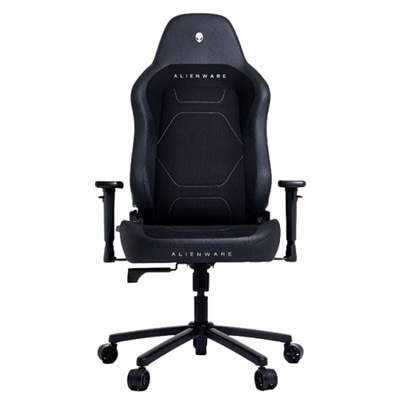
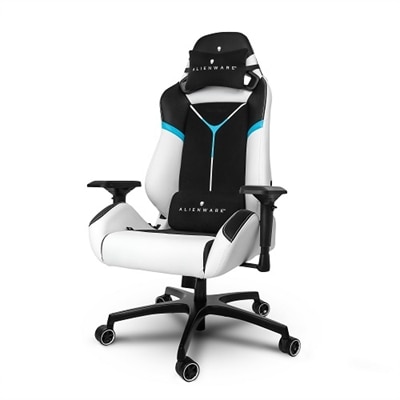
When comparing back support for gamers, begin with fit, adjustability, and the way the support works with the rest of the seating arrangement. An adjustable chair can be helpful for households where more than one person uses the same setup, or for players who alternate between a keyboard and mouse, a controller, and other accessories. Explore Adjustable Gaming Chairs with features such as seat-height adjustment, a backrest that reclines, movable armrests, and lumbar support that can be positioned for the small of the back rather than left in a fixed location. A chair should allow your hips to sit fully back against the seat and your spine to rest naturally against the backrest. When seated, aim to keep your feet flat on the floor or on a stable footrest, with your knees comfortably bent and close to a right angle. Armrests should support your forearms without forcing your shoulders upward, and your screen should be positioned so you are not continually bending your neck toward your lap. Pay attention to seat depth as well; if the front edge presses behind your knees, the seat may be too deep, while insufficient depth can leave your thighs unsupported. Breathable materials may feel more comfortable during extended sessions or warmer weather, while cushioned surfaces can add warmth and softness during cooler months. A sturdy base, smooth adjustment controls, and easy-to-clean upholstery can also matter when the chair is part of a busy gaming room, study area, or shared home office.
Back support works best when it complements healthy movement rather than encouraging one fixed posture for hours at a time. Even with a well-fitted cushion or chair, make room for brief pauses to stand, walk, stretch gently, and relax your shoulders. Before starting a session, slide your hips all the way back, place the lumbar support in the natural curve of your lower back, and check that your feet feel firmly supported. Avoid tightening a posture brace so much that breathing or movement feels restricted, and treat wearable supports as a reminder to notice your alignment rather than a substitute for strengthening, mobility, or professional care. If you experience persistent, worsening, sharp, or radiating pain, consult a qualified healthcare professional instead of relying solely on gaming accessories. Players who switch between desk and couch setups may benefit from keeping one support solution in each location, while families can look for adjustable designs that accommodate different heights and seating preferences. For gift-givers, a comfortable back-support accessory can be a thoughtful addition to a gaming room, especially when paired with practical improvements such as a properly positioned display, supportive desk setup, or comfortable headset. With the right fit and regular changes in position, back support can help create a more inviting place to play, work, and relax throughout the season.
FAQs:
When selecting back support for gamers, look for ergonomic design, adjustable lumbar support, high backrests, memory foam padding, and breathable materials. These features help maintain proper posture, provide comfort during long sessions, and reduce the risk of fatigue or discomfort.
Most back support accessories, such as memory foam lumbar pillows or seat cushions, are designed to be versatile and can be used with a wide range of chairs, including office chairs, gaming chairs, and even couches or beds. Always check the product details for compatibility with your preferred seating arrangement.
Back support products are beneficial for anyone who spends extended periods seated while gaming, including students, professionals, streamers, and casual players. They are also a thoughtful gift for friends or family members who enjoy gaming or work at a desk.
Memory foam is a popular choice for back support due to its ability to contour to your body and relieve pressure points. Breathable fabrics are also recommended, as they help keep you cool and comfortable during long or intense gaming sessions.
Yes, proper back support can significantly enhance the gaming experience by improving comfort, reducing distractions caused by discomfort, and allowing for longer, more focused sessions. Ergonomic support helps maintain good posture, which can lead to better performance and enjoyment.