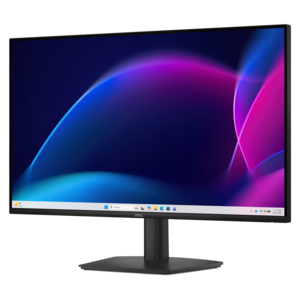
$264.99
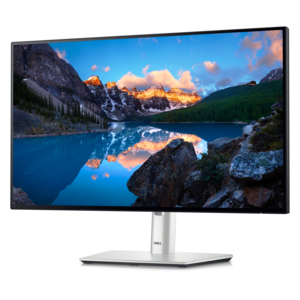
A TÜV-certified monitor offering 4-star eye comfort, enhanced productivity, and extensive connectivity.
Get ready for a successful school year with back to school computer monitors designed to support your academic goals. Whether you’re setting up a study space at home or outfitting a dorm room, the right monitor can make all the difference for homework, virtual classes, and creative projects. Explore a variety of sizes and styles to find the perfect fit for your workspace and study needs as you prepare to head back to school.
A TÜV-certified monitor offering 4-star eye comfort, enhanced productivity, and extensive connectivity.
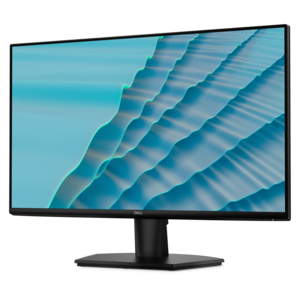
A productivity-focused fixed-stand monitor certified by TÜV Rheinland® for 3-star eye comfort.
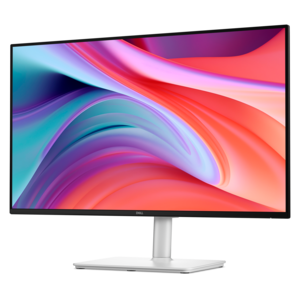
A 27-inch monitor with TÜV-certified eye comfort, 144Hz refresh rate, low blue light, and compact design.
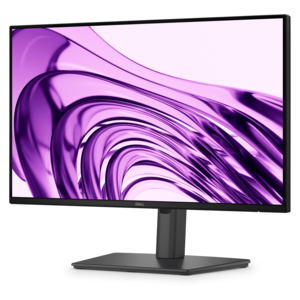
A Full HD monitor with 144Hz refresh rate, built-in speakers, and TÜV 4-star eye comfort certification.
A productivity-focused FHD monitor with extensive connectivity, high refresh rate, and TÜV-certified four-star eye comfort.
A QHD QD-OLED gaming monitor delivering 360Hz refresh rates and VESA DisplayHDR True Black 400 visuals.
Back-to-school computer monitors can help turn a compact desk, dorm room, or shared work area into a more comfortable place for studying, creating, and staying connected. A separate monitor gives students more room than a laptop screen alone, making it easier to read digital textbooks while taking notes, compare research sources, organize spreadsheets, attend virtual classes, or keep reference material visible during a project. It can also be a thoughtful gift for a student moving into a new academic routine, especially when a reliable display supports both schoolwork and personal interests after class. Start by considering the available desk space. A 24-inch monitor is often a practical choice for a shallow dorm desk or a small bedroom workspace, while a 27-inch screen can provide more room for side-by-side documents on a deeper desk. Larger displays may be useful for creative work, detailed timelines, or shared viewing, but they also require more surface area and a comfortable viewing distance. Measure the desk before choosing a screen, including the space needed for a stand, laptop, keyboard, notebook, and any desk lamp. A monitor with a slim bezel can make a small setup feel less crowded, and a stand with height, tilt, or swivel adjustment can help position the display so the top edge sits near eye level. For students who move between study locations, a monitor that is simple to connect and easy to adjust can make the transition from home to campus more manageable. Think about how the display will fit into the entire workstation rather than considering screen size in isolation; the best choice is one that leaves enough room to write, charge devices, and keep everyday supplies within reach.
Display quality matters during long reading and writing sessions. An IPS panel is a strong choice for general schoolwork because it typically offers vibrant color and wide viewing angles, allowing text and images to remain consistent even when someone is sitting slightly off-center. Resolution also affects clarity: Full HD is well suited to common school tasks on compact and mid-size screens, while a higher resolution can make fine text, diagrams, photographs, and creative applications appear more detailed on a larger display. Refresh rate is another consideration. A standard refresh rate works well for email, documents, research, and video lessons, while a higher refresh rate can make scrolling, movement, and casual gaming feel smoother. Students who spend hours reading articles or writing papers may appreciate eye-comfort features such as flicker-free operation, low-blue-light settings, and a reader mode that softens the display for extended text viewing. These tools do not replace sensible habits, so pair the monitor with regular breaks, comfortable room lighting, and a viewing position that reduces glare. A matte or low-reflection screen can be helpful near windows or overhead lights, while brightness controls make it easier to adapt the display from a sunny afternoon to a quiet evening study session. Color accuracy may be especially important for photography, design, art, and media assignments, whereas a clear, high-contrast image may be the priority for reading, coding, and general productivity. Students who enjoy games or streaming in their free time can look for smooth motion support and responsive performance without giving up features that make schoolwork easier. When comparing options, balance the specifications with the way the monitor will actually be used, since an impressive feature list has less value if the screen is uncomfortable, difficult to position, or too large for the workspace.
Connectivity can determine whether a monitor feels convenient throughout the school year. HDMI is a widely supported connection for laptops, desktop computers, game systems, and other everyday devices, while USB-C can simplify setups with compatible laptops by carrying video, audio, and sometimes power through one cable. Before choosing a display, check the ports on the computer and any adapters that may be needed. Built-in speakers can reduce clutter for video lessons and casual listening, though headphones or separate audio equipment may be preferable in a shared room. USB ports can make it easier to connect a mouse, webcam, or other accessory, and a monitor with cable-management features can keep a small desk looking orderly. A height-adjustable stand is useful when several people share the workspace, and a VESA-compatible design can offer additional mounting flexibility when desk space is limited. Students working with a laptop may also benefit from a setup that lets them use the laptop as a second screen, placing notes, a calendar, or communication tools on one display while the main assignment remains open on the other. Pairing the monitor with a comfortable keyboard, such as those found on the Back To School Computer Keyboards page, can create a more natural posture and a roomier typing area for essays, coding exercises, and online coursework. Keep the total setup in mind, including cables, adapters, a mouse, and a power source. During the cooler months, a dependable monitor can support early-morning assignments, evening study sessions, remote collaboration, and relaxing entertainment from the same familiar desk. Prioritize the screen size that fits, the connections that match existing devices, and the comfort features that will make repeated use feel easy; those practical details often matter more than choosing the most advanced specifications.
Add the products you would like to compare, and quickly determine which is best for your needs.