$99.99
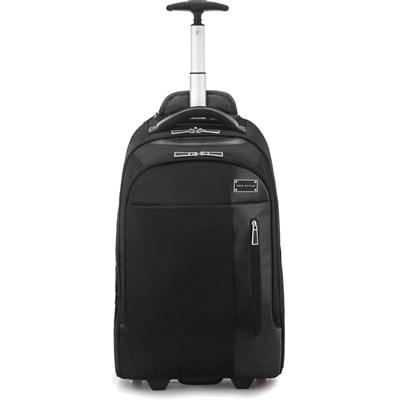
A sleek black rolling backpack with ergonomic straps, protective laptop and tablet compartments, plus overnight storage.
Backpacks for techies are designed to keep your devices organized and protected wherever your day takes you. Whether you're commuting to the office, heading to class, or traveling for business, these backpacks offer smart storage solutions tailored for laptops, tablets, and accessories. With a focus on convenience and style, they make it easy to carry everything you need for work or play. Explore the selection of backpacks for techies and find the perfect companion for your technology-driven lifestyle.
A sleek black rolling backpack with ergonomic straps, protective laptop and tablet compartments, plus overnight storage.
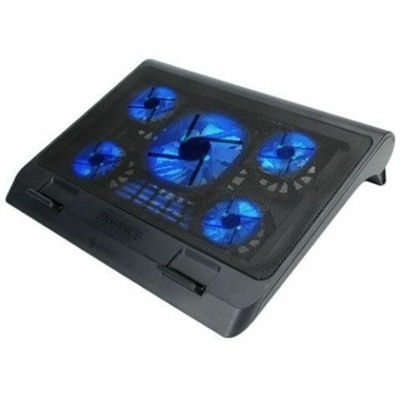
A protective gaming backpack that organizes and safeguards devices and accessories while traveling.
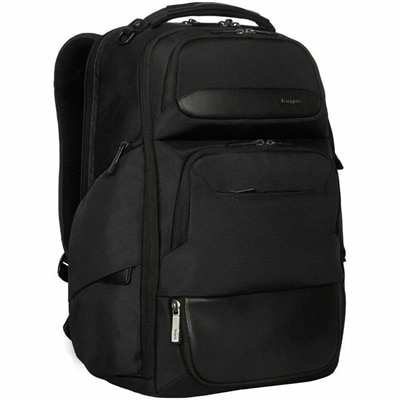
A black backpack with leather accents, protective laptop storage, adaptable compartments, RFID-blocking pocket, and travel-friendly features.
Backpacks for techies bring laptop protection, accessory organization, and hands-free carrying together in a format that suits commutes, campus days, business travel, and on-site support visits. A tech-focused backpack typically has a padded laptop compartment, separate pockets for smaller electronics, and adjustable shoulder straps that help keep the load close to the body. The difference becomes clear during an ordinary morning: a laptop stays separated from a lunch container, a charging cable comes out without pulling everything onto a café table, and a mouse does not disappear beneath a sweatshirt. For people who move between desks, classrooms, and client locations, that organization can matter as much as overall capacity. Laptop fit deserves particular attention because screen size alone does not establish compatibility. The device’s exterior dimensions, including any protective case, need to fit within the compartment’s stated measurements without forcing the zipper or leaving excessive room for movement. Padding along the sides and bottom helps cushion everyday bumps, while a suspended sleeve can keep a computer from resting directly against the backpack’s base. A separate sleeve for a tablet or portable display may be useful for a two-screen workday, provided the compartment is sized appropriately. Smaller pockets give adapters, earbuds, a wireless mouse, and charging equipment their own places; a removable accessory pouch can make switching between a backpack and a desk setup easier. Light-colored interior fabric can also make a dark cable or small connector easier to spot. For technicians supporting laptops and desktop computers, a dedicated compartment for compact hand tools helps keep hard edges away from screens and device housings. Vertical organizers can prevent those tools from collecting in a heap at the bottom. The most useful layout follows the equipment carried regularly, rather than simply offering the highest pocket count. A streamlined pack may suit a laptop and charger, while a more structured design can accommodate peripherals, paperwork, and the extras needed for a full day away.
Materials and construction shape how a technology backpack handles crowded trains, rough pavement, and repeated trips from the car to the office. Nylon and polyester are common shell fabrics, but fiber type alone does not tell the whole durability story. Fabric weight, weave, seam construction, and reinforcement at stress points all contribute to how a bag wears. A tightly woven shell can help resist scuffing, while reinforced stitching around shoulder-strap attachments and grab handles supports the areas that are pulled most often. Zippers should move smoothly around corners without catching the lining, and their openings should allow a laptop to slide out without scraping against exposed hardware. Water-resistant fabric or a surface treatment may help shed light moisture, but neither automatically makes the entire backpack waterproof. Water can still enter through seams, zipper tracks, or an open pocket, so weather protection needs to match the intended use. A rain cover can add coverage during a walk between buildings, although electronics still need protection from prolonged exposure. For field support work, a molded polymer base can provide a wipe-clean barrier between the bag and a damp floor; its protection applies to the base, not necessarily the full pack. A broad, structured bottom can also help a backpack stand upright, though balance depends on the design and how it is packed. Comfort is equally practical. Wide, padded shoulder straps distribute contact across the shoulders, while an adjustable sternum strap can help limit shifting during longer walks. Back-panel padding and airflow channels may make carrying more comfortable, but they cannot eliminate heat or compensate for excess weight. Placing a laptop and other dense equipment near the back panel generally keeps the load from pulling as far away from the body. Fit should allow the backpack to sit securely without hanging well below the waist or restricting arm movement. For a commute with stairs and standing-room-only transit, a manageable packed weight and a modest profile can be more useful than extra capacity that encourages unnecessary additions.
Intended use helps distinguish an everyday laptop backpack from a more specialized technician pack. A hybrid worker might appreciate a clean exterior, a quick-access pocket for a badge, and enough room for headphones and a compact keyboard. A student may need space for notebooks alongside a computer, with an external bottle pocket that keeps beverages separate from electronics. Teachers moving between classrooms often have similar needs, especially when carrying a laptop, charging accessories, and lesson materials; Laptop Backpacks For Teachers reflects that overlap between device protection and everyday organization. For a support technician making several stops, a wide-opening compartment and visible accessory pockets can reduce rummaging when setting up at an unfamiliar desk. Separate, secured sections are particularly useful when small tools travel alongside a laptop, since loose metal objects can scratch surfaces or put pressure on a screen. Frequent travelers may value a luggage pass-through and a compartment that is easy to open during screening, while still checking current security requirements and airline baggage dimensions. A backpack can also make a thoughtful graduation, birthday, or new-job gift when its laptop fit, carrying style, and capacity reflect the recipient’s actual routine. Understated colors may suit office environments, while a distinctive lining or exterior accent can make a bag easier to recognize in a shared workspace. Regular care helps preserve both appearance and function. Emptying pockets, shaking out crumbs, and gently removing grit from zipper tracks can prevent small annoyances from becoming lasting wear. Cleaning should follow the care label; many structured backpacks call for spot cleaning with a mild solution rather than soaking or machine washing. Air-drying thoroughly before repacking helps keep dampness away from electronics. Checking seams, strap adjusters, and the base periodically can reveal wear before a busy travel day. Liquids belong in securely closed containers, and a protective sleeve can add separation when a compartment lacks sufficient padding. With suitable dimensions, sensible organization, and construction matched to the journey, a tech backpack becomes a dependable part of moving between places without leaving essential equipment behind.
Add the products you would like to compare, and quickly determine which is best for your needs.