$109.99
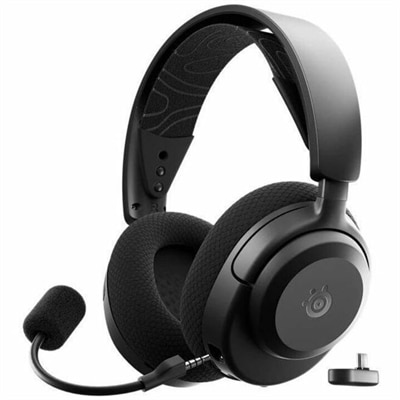
A black wireless gaming headset with 40-hour battery life, Bluetooth 5.3, presets, and USB-C cross-platform connectivity.
Black gaming headsets combine sleek style with immersive audio, making them a top choice for gamers seeking both performance and aesthetics. Whether you're diving into intense multiplayer battles or exploring open-world adventures, these headsets offer comfort and versatility for extended gaming sessions. Explore a wide selection of black gaming headsets designed to enhance your setup and keep you connected with your team, all while complementing any gaming environment.
A black wireless gaming headset with 40-hour battery life, Bluetooth 5.3, presets, and USB-C cross-platform connectivity.
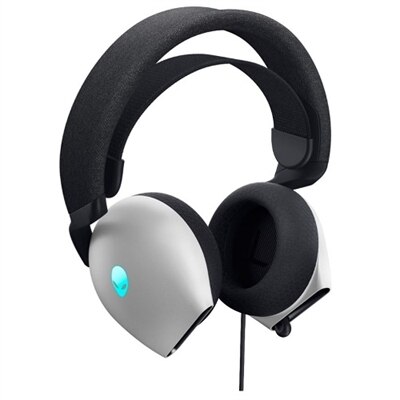
A professional wireless gaming headset with 50mm graphene-coated drivers, dual AI and active noise cancellation.
An intelligent wireless headset with dual-directional AI noise cancellation and Adaptive ANC for focused listening anywhere.
Black gaming headsets combine listening and voice communication in a dark finish that fits naturally into a wide range of gaming setups, from a compact laptop station to a desktop surrounded by monitors and accessories. Their defining features are headphones for game audio and a microphone for conversation, with connection types, acoustic designs, and controls that vary by model. The black color affects appearance rather than sound quality, making it a styling choice for players who prefer understated equipment or want a consistent look across their desk. Matte surfaces tend to reflect less light, while glossy accents can add contrast but may show fingerprints more readily. For everyday play, the most useful differences are often how a headset connects, how comfortably it sits, and how clearly it reproduces both game sounds and speech. Wired gaming headsets may use a 3.5 mm connector or USB connection, offering straightforward listening without a wireless battery to recharge, though compatibility still depends on the device and connector. Wireless gaming headsets offer more freedom to shift position or reach across a desk without pulling a cable. Models with a dedicated wireless receiver commonly use a low-latency connection suited to gaming, while Bluetooth support can be useful for compatible phones and other everyday devices. Those connection methods are not interchangeable, and support for switching between devices or hearing two sources at once varies. A headset that connects to a computer may not deliver the same microphone functions or audio features on every console. For someone moving between a gaming desktop and a laptop, supported connections and accessible controls can matter more than a long list of features. A physical volume wheel, an easy-to-find mute button, and a microphone that moves out of the way can make the headset feel more natural during an evening of multiplayer matches, a quiet solo session, or a conversation with friends.
Sound character and microphone performance shape how a black gaming headset feels in use. A bass-heavy presentation can give engines and explosions extra weight, but balanced tuning can help dialogue and quieter environmental details remain distinct when a scene gets busy. In a competitive match, footsteps, reloads, and the direction of nearby movement can provide useful context; in a story-driven game, voices, music, and ambient sound help establish the atmosphere. Driver diameter alone does not determine clarity or positional accuracy, so larger drivers are not automatically better. Some headsets support virtual surround sound or other spatial audio processing, with results that depend on the game, platform, software, and listener. Conventional stereo can also provide useful directional cues when the game’s audio is designed for it. Closed-back earcups generally limit sound leakage and offer some passive isolation, which can suit a shared room, though they do not block every household noise. Open-back designs allow more sound to pass in both directions and are better suited to spaces where leakage will not disturb someone nearby. Active noise cancellation, when present, is a separate feature from passive isolation and from microphone noise reduction. The latter is intended to reduce unwanted sound in transmitted speech rather than quiet the room for the wearer. A boom microphone positioned near the corner of the mouth, rather than directly in the path of breath, can help speech come through clearly with fewer distracting bursts of air. Adjustable or detachable microphones add flexibility for players who also use their headset for music, video calls, or streaming. Microphone monitoring, sometimes called sidetone, lets the wearer hear some of their own voice and may help prevent speaking too loudly while wearing isolating earcups. For shared living spaces, clear voice pickup and convenient muting are especially practical when a fan is running, another person is talking nearby, or a teammate needs a quick, understandable response.
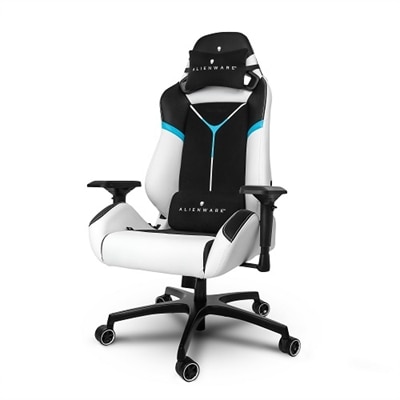
Comfort becomes especially noticeable after several rounds, and the best fit depends on head shape, ear size, glasses, and personal preference. Over-ear cushions should leave enough room around the ears without pressing them against the inner covering, while an adjustable headband helps distribute pressure across the top of the head. A suspension-style band can spread that contact differently from a padded rigid band, but neither design guarantees a comfortable fit for every wearer. Weight matters alongside balance: a headset that sits securely without a tight squeeze can feel less distracting when turning toward a second screen. Memory foam cushions may conform gradually to the head, fabric coverings can feel more breathable, and leatherette surfaces are generally easy to wipe down but may retain more warmth. Glasses wearers may prefer softer cushions that put less pressure on the frames at the temples. Durability depends on more than a sturdy-looking exterior; reinforced adjustment points, well-supported hinges, detachable cables, and replaceable ear cushions can all contribute to longer useful life when included. Plastic construction can keep weight down, while metal reinforcement may strengthen particular stress points without making the entire headset heavy. Routine care also makes a difference. A soft, dry cloth removes everyday dust, and cleaning should follow the manufacturer’s directions for the specific cushion and housing materials. Excess moisture, harsh cleaners, and liquid near microphone openings or charging ports can cause damage. Letting cushions air out after a warm session, keeping cables loosely gathered rather than sharply bent, and placing the headset on a stable stand can reduce avoidable wear. Wireless models also need a charging routine that suits the wearer’s habits, with listening time affected by volume, lighting, and enabled features. At the desk, a coordinated setup can pair a dark headset with Black Gaming Chairs, while fit and seating comfort remain separate considerations. As a gift for a student, a regular multiplayer teammate, or someone setting up a first gaming space, a headset is most useful when its connection, fit, and microphone suit the recipient’s routine. Those practical details help it serve beyond gaming, whether the next activity is a remote study session, a movie, or a late-night conversation.
Add the products you would like to compare, and quickly determine which is best for your needs.