card-img

Logitech Webcams for Remote Work

Logitech webcams for remote work offer a reliable way to stay connected and professional during virtual meetings and collaborations. Designed to support clear communication, these webcams are an excellent choice for home offices and remote setups. Explore a range of options that help make every video call smooth and productive, ensuring you present your best self from any location.

Filters

$139.99

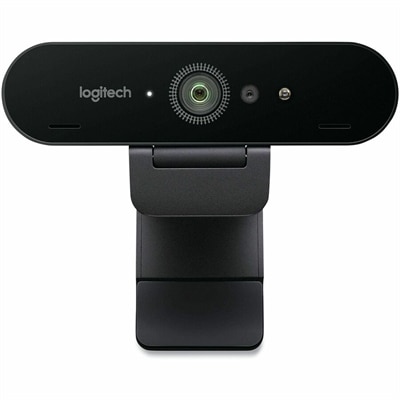
A graphite webcam delivering smooth 1080p HD video at 60fps with AI facial tracking and USB-C connectivity.

$139.99
$2799.00

A studio-quality videoconferencing kit with white mic pods, ideal for medium to large meeting rooms.

$2799
$3499.00

A graphite video conferencing camera offering AI-driven insights, seamless connectivity, and advanced audio engineering.

$3499
$449.99

A wireless streaming camera offering 1080p HD video, real-time editing, and six-hour battery life.

$449.99
$999.00

A USB 3.1 Type C video conferencing camera with AI features for small meeting rooms.

$999
$249.00

A black video conferencing camera offering HD 1080p video and superior speakerphone audio for small groups.

$249
$1399.00

A versatile video conferencing system with HD video, clear audio, and expansion mics for large rooms.

$1399
$829.00

A 4K video conferencing camera with 120-degree FOV and optimized audio for small rooms.

$829
$3199.00

An all-in-one video bar and touch controller with PoE, perfect for small rooms up to 6 people.

$3199
$2799.00

A sleek videoconferencing kit with 4K optics, graphite mic pods, and modular audio components for natural meetings.

$2799
$2299.00

A sleek videoconferencing kit with 4K optics, modular audio, and automation for natural meetings.

$2299
$1399.00

A matte black slate gray camera with 4K sensor, 15X HD zoom, and automated framing technology.

$1399
$599.00

A high-definition video camera with 10x zoom, 260-degree pan, and USB connectivity for seamless conferencing.

$599
$2199.00

A white AI-powered camera with 4K resolution and 7 mics for enhanced hybrid meetings.

$2199
$2199.00

A graphite AI-powered camera with 4K resolution and 7 mics for enhanced hybrid meeting experiences.

$2199
$2299.00

An all-in-one video conferencing bar with AI intelligence and versatile mounting for seamless hybrid meetings.

$2299
$3499.00

A white all-in-one video bar with AI-driven performance, ideal for small meeting rooms.

$3499
$3499.00

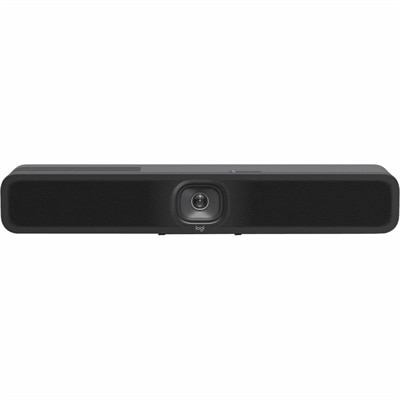
A compact graphite video bar with studio-quality audio, AI-driven performance, and versatile mounting options.

$3499
$4299.00

A sleek white all-in-one video bar offering cinema-quality video and audio for midsize meeting rooms.

$4299
$4299.00

A graphite all-in-one video bar with automated PTZ and high-performance audio for midsize meeting rooms.

$4299
$169.99

A white streaming camera with dual microphones, AI autofocus, USB-C connectivity, and full HD 1080p at 60fps.

$169.99
$2199.00

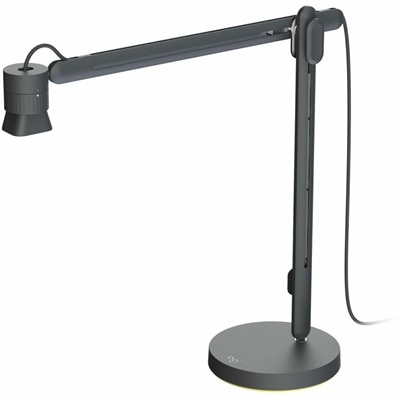
A comprehensive black USB PTZ video kit with wireless preset buttons, ceiling or wall mount, and easy management.

$2199
$4398.00

A graphite video conferencing kit with 4K camera, 15x zoom, and 10.1" touch controller.

$4398
$5298.00

A versatile video conferencing kit with a 4K camera, touch controller, and AI auto-framing features.

$5298

Logitech Webcams for Remote Work

In today’s dynamic landscape of remote work, the importance of clear, reliable video communication cannot be overstated. Whether you’re dialing into daily stand-ups, leading virtual presentations, or collaborating with clients across time zones, a dependable webcam is essential for projecting professionalism and staying connected. The selection of Logitech webcams for remote work reflects the evolving needs of professionals who require crisp video quality, intuitive features, and seamless compatibility with a range of devices. When considering which webcam best fits your workspace, think about the environment in which you’ll be working most frequently. For those joining meetings from bustling home offices or shared spaces, automatic background correction and noise reduction features can make all the difference in maintaining focus and clarity. If your setup often shifts between locations—perhaps from a kitchen table to a dedicated desk—look for models that offer flexible mounting options and compact designs for easy portability.

Selecting from Logitech webcams for remote work also means considering the unique demands of your daily routine. If you spend hours in back-to-back video calls, comfort and ease-of-use become paramount; plug-and-play connectivity ensures you’re up and running without technical headaches, while adjustable angles help capture your best side regardless of lighting conditions. Professionals who frequently present or teach remotely may appreciate advanced autofocus and high-definition lenses that keep visuals sharp even as you move around or share physical materials on camera. For creative roles—think designers sharing intricate concepts or content creators filming tutorials—the ability to capture true-to-life colors and subtle details helps convey ideas more effectively. Gifting a well-chosen webcam can also be a thoughtful gesture for students embarking on virtual learning journeys, freelancers building their home office toolkit, or family members looking to bridge distances through regular video chats.

The versatility found within Logitech webcams for remote work makes them suitable for a wide array of users and scenarios. Picture a consultant leading workshops from different corners of their home each week, relying on smart light correction to look polished in every session. Imagine an entrepreneur connecting with international partners at odd hours, trusting their webcam to deliver consistent audio-visual quality no matter the time of day. Even casual users benefit from features like built-in microphones that reduce clutter and simplify setup. As remote work continues to blend personal and professional spheres, investing in the right technology empowers individuals to communicate confidently and efficiently. Whether enhancing productivity during critical meetings or fostering genuine connections across digital divides, the right webcam becomes an indispensable part of any modern workspace—a tool that adapts alongside your evolving needs while delivering reliability you can count on every day.

What features should I look for in a Logitech webcam for remote work?

When choosing a Logitech webcam for remote work, consider features such as high-definition video resolution, autofocus, built-in microphones with noise reduction, wide field of view, and compatibility with popular video conferencing platforms.

Are Logitech webcams compatible with both Windows and Mac computers?

Yes, most Logitech webcams are designed to be compatible with both Windows and Mac operating systems. Always check the specific model's compatibility details to ensure it meets your needs.

Do Logitech webcams require additional software for setup?

Many Logitech webcams offer plug-and-play functionality, but installing Logitech's dedicated software can unlock advanced features such as background replacement, camera controls, and firmware updates.

Can I use a Logitech webcam with popular video conferencing apps like Zoom or Microsoft Teams?

Logitech webcams are widely supported by major video conferencing applications including Zoom, Microsoft Teams, Skype, Google Meet, and others. They are recognized automatically once connected to your computer.

What are the benefits of using an external Logitech webcam over a built-in laptop camera for remote work?

External Logitech webcams typically offer superior image quality, better low-light performance, enhanced audio capture, and more flexible positioning compared to most built-in laptop cameras. This can lead to a more professional appearance during remote meetings.

Add the products you would like to compare, and quickly determine which is best for your needs.

Add the products you would like to compare, and quickly determine which is best for your needs.