Budget-Friendly Laptops for Everyday Computing

Budget-Friendly Laptops for Everyday Computing are designed to help you stay productive, connected, and entertained without stretching your budget. Whether you’re working from home, attending online classes, or browsing your favorite websites, these affordable laptops deliver the essential performance you need for day-to-day tasks. Explore a range of reliable options that make it easy to find the perfect fit for schoolwork, personal projects, or casual use—all at a price point that suits your wallet.

Filters

$649.99

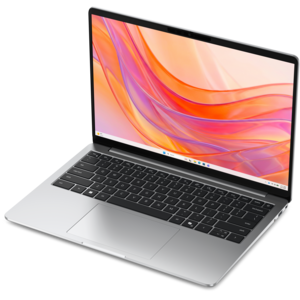
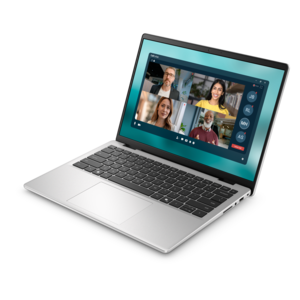
A lightweight laptop with a sleek design, fresh colors, dependable everyday performance, and long-lasting battery life.
$649.99
$699.99

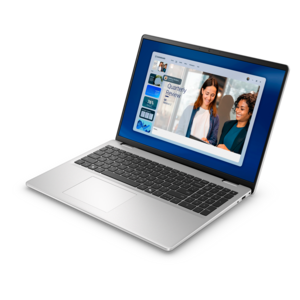
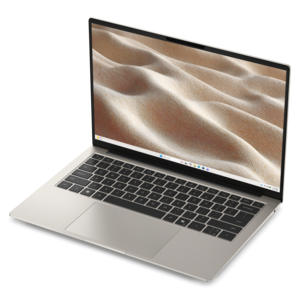
A laptop featuring Intel® 13th Gen processors, a built-in FHD camera, and an enlarged ergonomic keyboard.

$699.99
$1109.99

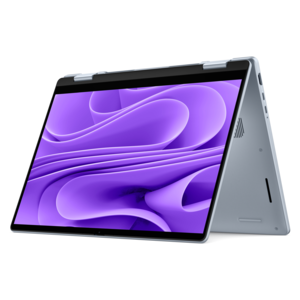
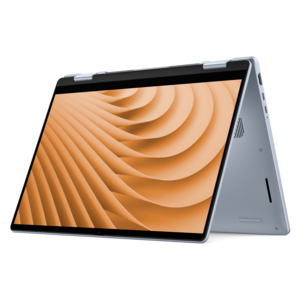
A versatile 2-in-1 laptop designed for AI experiences and seamless multitasking on the go.

$1109.99
$799.99

A thin, lightweight laptop crafted with eco-friendly materials and powered by AMD Ryzen 200 Series processors.

$799.99
$949.99

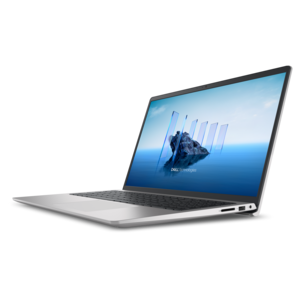
A modern laptop with AMD Ryzen™ processors delivers effortless productivity and captivating entertainment.

$949.99
$1899.99

A remarkably thin and lightweight laptop designed for ultimate mobility and everyday productivity.

$1899.99
$1339.99

A versatile 2-in-1 laptop with AI experiences, all-day battery life, and seamless multitasking.

$1339.99
$1449.99

A sleek laptop with a stylish modern design, built for multitasking and powerful everyday performance.

$1449.99
$954.00

A sleek essential laptop with an expansive display, larger touchpad, and time-saving keyboard shortcuts.

$954
$4041.00

A cost-effective workstation laptop delivering professional performance in a modern-looking design.

$4041
$550.00

A durable, serviceable Chromebook designed specifically for education environments.

$550
$4211.00

A modern workstation-class laptop delivering cost-effective performance for professional productivity.

$4211
$570.00

A durable, serviceable Chromebook designed for K–12 learning environments.

$570
$570.00

A durable, serviceable Chromebook designed specifically for education environments.

$570
$699.99

A thin, lightweight laptop crafted from eco-friendly materials with Series 3 Intel Core processors for productivity.

$699.99
$660.00

A durable, serviceable laptop or 2-in-1 designed specifically for K-12 learning environments.

$660
$879.99

A versatile 2-in-1 laptop with Intel Core processors, DDR5 memory, and multiple modes for creative work.

$879.99
$849.99

A thin, lightweight laptop made with eco-friendly materials and Series 3 Intel Core processors for productivity.

$849.99
$895.00

A business-ready laptop designed for seamless collaboration and everyday productivity.

$895
$1062.00

A portable laptop with a sleek design, 16:10 display, and AI PC options for productivity anywhere.

$1062
$1043.00

A sleek laptop with a spacious display, enlarged touchpad, and time-saving keyboard shortcuts.

$1043
$1099.99

A slim, lightweight laptop with Intel® Core™ processors and graphics for productive work anywhere.

$1099.99
$1102.00

A business-ready laptop designed for seamless collaboration and productive work wherever your day leads.

$1102
$1122.00

A sleek, portable laptop with an expansive 16:10 display for reliable productivity anywhere.

$1122

Budget-Friendly Laptops for Everyday Computing

Budget-friendly laptops for everyday computing are designed around familiar tasks: browsing the web, writing documents, managing email, joining video calls, and streaming entertainment. The most useful balance is enough processing power for those activities, sufficient memory to keep frequently used applications responsive, and a screen and keyboard that feel comfortable throughout the day. A laptop used for checking recipes at the kitchen counter has different demands from one used for several hours of coursework or remote office work, even when both fall within everyday computing. For lighter workloads, 8GB of memory provides a practical starting point; 16GB offers more room for switching among documents, browser tabs, spreadsheets, and video meetings. Actual responsiveness also depends on the processor, software, and number of applications running at once. A solid-state drive helps with startup and opening applications, while its capacity determines how much can be kept locally. A 256GB drive can accommodate everyday documents and applications, although photo libraries, downloaded movies, and large project files can fill that space over time. Online file services can reduce the need to keep everything on the laptop, but access may depend on an internet connection and the settings of the service. Everyday processors are generally suited to reading, research, basic spreadsheets, and casual entertainment rather than demanding 3D rendering or advanced video production. Someone drafting a résumé with a few reference tabs open needs a different level of performance from someone editing lengthy, high-resolution footage. The operating system matters as well, particularly when school or workplace software has specific compatibility requirements. For a household computer, personal work companion, or first laptop for a college student, a balanced configuration supports the activities that happen most often without centering the experience on specialized capabilities that may rarely be used. That balance becomes noticeable during ordinary moments, such as moving from a morning email check to an afternoon application form without having to close every other task.

Physical comfort shapes how an everyday laptop feels long after the first startup. A screen around 14 inches can fit more easily into a backpack or a smaller workspace, while a 15.6-inch display provides a larger viewing area for side-by-side documents, spreadsheet columns, and evening entertainment. Screen size alone does not determine clarity: resolution, brightness, viewing angles, and surface finish also affect the experience. Full HD resolution can keep text and images clear for common tasks, and an antiglare surface can help reduce distracting reflections near a window or under overhead lighting. A larger screen does not automatically make text easier to read, since display scaling and application settings also influence its size. Keyboard spacing, key travel, and a responsive touchpad become especially noticeable during longer writing sessions. A numeric keypad can be useful for entering expenses or working with figures, though its inclusion changes the keyboard layout and may affect the laptop’s overall width. Construction materials vary, with plastic housings and metal components each contributing differently to weight, feel, and rigidity. Material alone is not a complete measure of durability; hinge construction, chassis design, and careful handling matter too. A laptop carried between rooms has a different daily routine from one traveling in a crowded bag, where a padded sleeve or dedicated compartment helps protect it from bumps and scratches. For a shared household computer, a stable surface and enough room around the vents support comfortable, unobstructed use. Keeping food and drinks away from the keyboard reduces the chance of spills and debris, while a soft microfiber cloth helps remove fingerprints from the screen. Cleaning methods should follow the manufacturer’s directions, with liquid kept away from openings. Carrying a laptop by its base rather than the display and avoiding pressure on the lid are simple habits that help preserve its condition. These practical details make an everyday computer more pleasant to live with, whether it spends most of its time on a desk or moves from the dining table to a quiet corner for an online class.

Portability also involves battery behavior, connection options, and the small features that make a laptop useful away from its usual spot. Battery runtime varies with screen brightness, wireless activity, video calls, background applications, and the age of the battery, so a published estimate does not represent every routine. A lightweight laptop can feel convenient during a commute, but the charger’s size and weight contribute to what actually goes into the bag. For a student moving between lectures, accessible charging and a manageable carrying weight may matter more than a larger display. A built-in webcam, microphone, and speakers support class discussions, family calls, and remote appointments, while their quality affects how clearly people can see and hear one another. A physical camera shutter, where included, provides a straightforward privacy measure when the camera is not in use. Connection options deserve similar attention: USB-A can accommodate many familiar peripherals, HDMI can connect a compatible external display, and a headset jack can be useful in shared spaces. USB-C capabilities vary, so the presence of the connector alone does not establish support for charging or video output. Reliable Wi-Fi supports browsing and online learning, although the experience also depends on the router, signal strength, and internet service. For coursework, writing assignments, and campus routines, Affordable Laptops For Students provides a related collection centered on student needs. Everyday laptops can also make thoughtful gifts for someone starting college, returning to classes, or setting up a dedicated computer for personal projects. The best fit reflects the recipient’s habits, including preferred screen size, required applications, and comfort with the operating system. Adjustable text, keyboard shortcuts, and other accessibility features can further personalize daily use. Together, appropriate performance, comfortable construction, and practical connections make a laptop a useful companion for the ordinary tasks that fill a week.

FAQs:

Add the products you would like to compare, and quickly determine which is best for your needs.

Add the products you would like to compare, and quickly determine which is best for your needs.