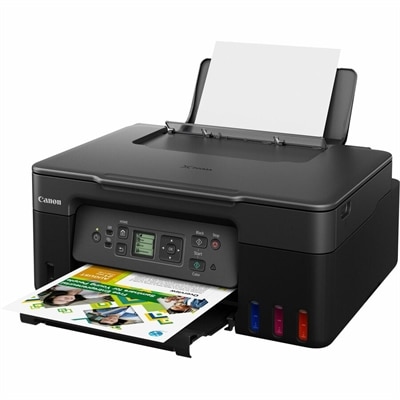
$429.99
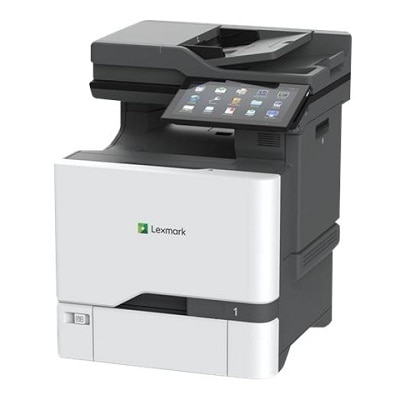
A color laser multifunction printer with wireless connectivity, 26-ppm printing, and an intuitive touchscreen.
Color laser printers are the ideal solution for businesses and home offices looking to produce vibrant, high-quality prints with efficiency and speed. These versatile devices offer a seamless blend of performance and reliability, making them perfect for handling everything from professional documents to eye-catching marketing materials. With advanced technology that ensures crisp, clear images and text, color laser printers provide an excellent balance between cost-effectiveness and superb output. Explore a range of options designed to meet diverse printing needs while maintaining exceptional quality and productivity.
A color laser multifunction printer with wireless connectivity, 26-ppm printing, and an intuitive touchscreen.
Color laser printers are a practical choice for homes, home offices, classrooms, and small businesses that need crisp text and consistent color without relying on liquid ink. Instead of ink cartridges, they use toner powder, which does not dry out when a printer sits unused for several days or weeks. That can be especially useful in a household where printing happens in bursts: permission forms and recipes one day, school projects or travel documents the next, followed by a quiet stretch. Color laser printing is also well suited to documents that need a polished appearance, including presentations, invoices, menus, flyers, charts, shipping labels, and reports with charts or highlighted sections. When comparing models, consider the balance between print speed, image quality, paper capacity, connectivity, and the amount of space available near a desk. Print speed is commonly listed in pages per minute, or ppm, with faster models better suited to shared work areas or recurring batches of documents. A compact printer may be the right fit for a small desk or apartment, while a larger unit with a roomier input tray can reduce the need to reload paper during a busy afternoon. Shoppers looking to save valuable workspace can also explore Compact Laser Printers for designs that fit neatly beside a laptop, monitor, or home office organizer.
Connectivity can make as much difference as print quality. Wi-Fi support allows a printer to serve multiple computers, tablets, and phones without requiring a cable to run across the room, while USB connectivity can provide a direct option for a dedicated workstation. Mobile printing support is helpful when a document arrives on a phone and needs to be printed without first transferring it to a computer. Look for compatibility with common mobile operating systems and printer apps, along with straightforward setup instructions and an easy-to-read control panel. Automatic two-sided printing, often called duplex printing, can reduce paper use and give longer reports a clean, booklike feel. This feature is valuable for home offices managing contracts and forms, as well as for students printing research, study notes, and presentation handouts. Some color laser printers focus on printing alone, while multifunction models add scanning and copying for a more complete workspace. A built-in scanner can digitize signed paperwork, preserve children’s artwork, or make quick copies of identification documents and receipts. If several pages need to be scanned or copied in sequence, an automatic document feeder, or ADF, can save considerable time by handling a stack with less hands-on attention. For a shared office, also review the recommended monthly duty cycle, the number of users the printer can comfortably support, and the size of its paper trays. A model designed for occasional personal printing may feel strained in a busy workgroup, whereas a printer built for recurring volume can help keep projects moving smoothly.
Total ownership cost deserves attention beyond the initial purchase. Toner cartridges often cost more at replacement than basic ink cartridges, but toner is typically economical for frequent printing because it can produce a substantial number of pages and remains ready between print jobs. Check the stated page yield for standard and high-capacity cartridges, and remember that color pages use separate toner supplies for the different color channels. Real-world yield varies with how much of each page is covered, so a photo-heavy brochure will generally use more toner than a mostly white page with a small logo. It is also useful to consider whether the printer offers separate replaceable toner cartridges, a combined cartridge system, or a waste-toner component that may eventually need attention. For households and small offices, an easy-to-understand supply indicator can prevent an empty cartridge from interrupting an important task. Print resolution, color consistency, and media handling matter as well. If the printer will produce presentation materials, look for support for heavier paper and the sizes used most often, while envelopes and specialty sheets may require a dedicated feed path. Color laser output usually has a sharp, professional look for text, diagrams, and graphics, although anyone seeking highly detailed photographic prints should review sample output and supported media carefully. A well-chosen model can become one of those quietly essential desk tools: dependable for a last-minute form, capable of producing a polished packet for a client, and ready to bring order to the stack of papers that gathers during the cooler months and throughout the rest of the year.
Add the products you would like to compare, and quickly determine which is best for your needs.