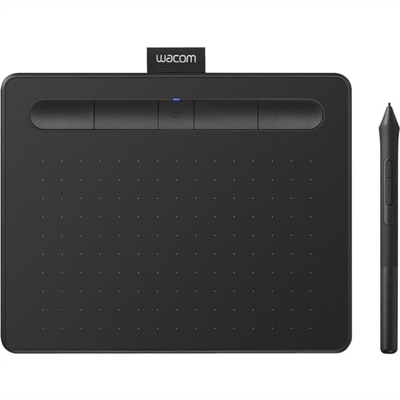
$79.95
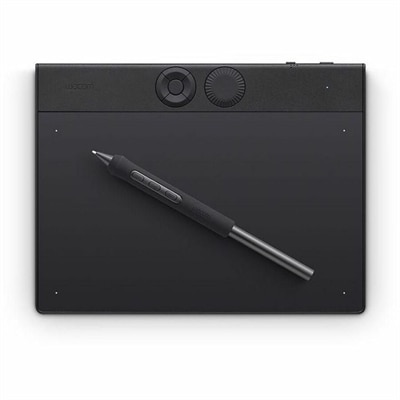
A wireless black graphics tablet with pressure-sensitive pen, Bluetooth, USB connectivity, and creative software for artistry.
Unlock your creativity with cutting-edge computer drawing tools, including drawing tablets, pen styluses, drawing pads, and powerful software designed for digital artistry. Whether you're a professional designer, an illustrator, or a hobbyist, these tools provide the precision and versatility needed to bring your ideas to life. Drawing tablets with pressure-sensitive pen styluses offer unmatched control, while advanced software enhances your workflow with intuitive features for sketching, painting, and designing. Explore our range of computer drawing tools to find the perfect combination of hardware and software to transform your digital canvas into stunning masterpieces.
A wireless black graphics tablet with pressure-sensitive pen, Bluetooth, USB connectivity, and creative software for artistry.
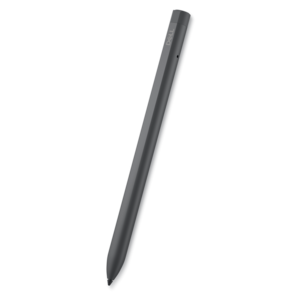
A rechargeable active pen with precision writing, Tile location tracking, and compatibility with select 2-in-1s.
A professional drawing tablet with customizable pressure-sensitive pen, ExpressKeys, dial, magnesium construction, and Bluetooth connectivity.
Computer drawing tools bring the feel of sketching, painting, lettering, and technical illustration to a digital workspace. This category generally includes pressure-sensitive pen tablets, pen displays with built-in screens, digital styluses, and compatible accessories that help turn a laptop or desktop into a more responsive creative studio. A standard graphics tablet has a flat drawing surface that connects to a computer, while the artwork appears on the computer monitor; this arrangement can feel unfamiliar for a few practice sessions, but it offers a generous work area and keeps the drawing surface separate from the display. A pen display combines both functions, allowing the user to draw directly on the image with a hand-to-eye connection that resembles pencil on paper. When comparing options, consider the active drawing area, screen size, display resolution, pen pressure levels, tilt recognition, shortcut controls, connection type, and compatibility with the intended computer and creative software. A larger active area may be comfortable for sweeping illustration strokes, while a compact design can fit neatly beside a keyboard in a shared workspace or travel bag. Pressure sensitivity matters for anyone who wants light sketch lines and darker, more expressive marks from the same tool, and tilt support can add natural variation to shading and brush effects. Screen texture is another practical detail: some surfaces feel smooth and fast, while others provide a subtle drag that resembles paper. A comfortable stylus shape, replaceable nibs, and a stand or adjustable angle can make long drawing sessions easier on the hand and wrist.
The right computer drawing setup depends on the type of work, the available space, and the way a person prefers to create. Digital painters and concept artists often value a pen display with accurate color, a responsive pen, and enough room for broad gestures. Illustrators who switch between a laptop screen and a separate monitor may prefer a pen tablet that keeps the desk uncluttered and leaves the display open for reference images, palettes, or multiple canvases. Students can benefit from a straightforward tablet that supports note-taking, diagramming, classroom projects, and creative assignments without demanding a large studio footprint. Graphic designers, photographers, and content creators may use a stylus for masking, retouching, layout work, logo construction, and precise selections that are less comfortable with a mouse. Animators can appreciate pressure control for rough frames and clean line work, while architects, engineers, and hobbyists may use drawing tools to mark up plans, trace shapes, or explain an idea with a quick visual note. For family members or friends who enjoy sketchbooks, crafts, or digital art, a drawing tablet or stylus can be a thoughtful gift that opens a new creative outlet without requiring a complete studio makeover. Before choosing, check whether the device works with Windows, macOS, ChromeOS, iPadOS, or Android as needed, and confirm that the required cable, adapter, driver, or software is supported. Users who work in a small room may want to measure the desk before selecting a display, since a comfortable drawing angle and room for the keyboard can matter as much as the screen itself. Those who frequently move between rooms or work away from home should also consider weight, cable management, protective covers, and whether the stylus operates without a battery.
Software plays an equally important role in the computer drawing experience. Drawing and painting applications typically provide customizable brushes, layers, blending modes, color palettes, selection tools, and canvas controls, while vector design software is built around scalable lines, curves, shapes, and typography. Some programs are designed for quick sketches and annotations, making them useful for class notes, brainstorming, or marking up an image; others support detailed painting, animation, comics, photo editing, or professional page layouts. Free and open-source applications can be a practical starting point for beginners, and browser-based tools may be convenient when working across compatible computers. More advanced software may offer extensive brush libraries, color management, symmetry tools, perspective guides, time-lapse recording, and file export options for print or online publishing. Explore Software for Graphic Design to compare creative applications that can complement computer drawing tools. A reliable setup also benefits from a monitor with clear color and comfortable brightness, a laptop or desktop with enough memory for large layered files, and accessories such as an ergonomic stand, replacement pen tips, a compact keyboard, or a monitor arm. New users often make faster progress by starting with simple exercises: tracing broad shapes, practicing lines at different pressures, and recreating familiar objects such as a coffee mug, a houseplant, or the view from a window. Over time, digital drawing becomes less about imitating paper and more about using layers, undo controls, adjustable brushes, and flexible file formats to develop a personal workflow. Whether the goal is a first sketch, a polished illustration, a classroom presentation, or a growing portfolio, the best computer drawing tools are the ones that feel dependable, fit the workspace, and support the creator’s natural way of working.
Add the products you would like to compare, and quickly determine which is best for your needs.