$2429.99
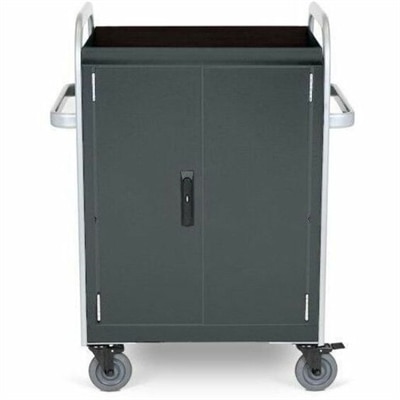
A durable welded cart charges and updates 32 devices with Ethernet connectivity and dual cooling fans.
Elevate your business's performance and efficiency with strategic data center upgrades. As the backbone of modern enterprise operations, a well-optimized data center can significantly enhance productivity and streamline processes. Whether you're expanding capacity, improving energy efficiency, or integrating cutting-edge technologies, upgrading your data center is essential for staying competitive in today's fast-paced digital landscape. Discover solutions that cater to your unique needs, ensuring scalability, reliability, and robust security for your organization's critical infrastructure.
A durable welded cart charges and updates 32 devices with Ethernet connectivity and dual cooling fans.
A dense, powerful rack-ready desktop engineered to optimize demanding computing environments.
Upgrading a technology environment is often less about replacing everything at once and more about creating a dependable foundation for the work people do every day. Organizations may be refreshing aging laptops, adding desktops for specialized tasks, improving displays for teams that spend long hours reviewing information, or standardizing accessories so employees can move between workspaces with less friction. A thoughtful upgrade begins with a clear look at current needs: the applications users rely on, the number of people sharing a workspace, the size and resolution required for visual tasks, and the amount of room available on each desk. It also helps to consider how equipment will be used during demanding periods, such as financial reporting, seasonal business activity, software development, creative production, or large-scale analysis. A compact laptop may suit a mobile employee who works from meeting rooms, home offices, and client locations, while a desktop can provide a more settled setup for users who need consistent performance throughout the day. Monitors can make a meaningful difference when work involves spreadsheets, design files, dashboards, documents, or multiple applications at once. Accessories such as keyboards, mice, docks, headsets, webcams, and adapters can round out an upgrade by making a workstation easier to use and more comfortable over extended sessions. When several people are receiving new equipment, consistency matters as much as individual specifications. Shared standards can simplify setup, training, maintenance, and replacement while giving employees a familiar experience wherever they work. For broader planning and equipment categories, visit Data Center Equipment.
Performance is only one part of a successful technology refresh. Reliability, manageability, physical design, and compatibility can have just as much influence on the experience after installation. Buyers should compare processor capability, memory capacity, graphics performance, display quality, battery expectations, available ports, and operating system requirements against the tasks each user performs rather than choosing specifications in isolation. A person working primarily with documents and browser-based applications may value a lightweight design, comfortable keyboard, and long battery life, while someone handling visual content or complex models may benefit from stronger graphics and a larger, higher-resolution display. For fixed workstations, it is worth measuring the desk, checking viewing distance, and considering whether one wide monitor or multiple screens will make information easier to follow. A display with adjustable height and tilt can help support a more natural posture, especially in offices where employees remain at their desks through long stretches of focused work. Accessories should be selected with the same care. A dock can reduce cable clutter, an external webcam can improve the quality of virtual meetings, and a comfortable pointing device can make repetitive tasks feel less tiring. Businesses should also review warranty coverage, support options, security features, device enrollment, and the process for updating software across a group of computers. These details may seem small while products are being selected, but they become highly visible when a device needs assistance or when a team is preparing for a major deadline. During the cooler months and the transition into a busier year-end rhythm, dependable equipment can help employees stay productive in offices, classrooms, studios, service counters, and home workspaces without forcing them to work around sluggish performance or mismatched connections.
A practical upgrade plan should leave room for growth rather than matching only the workload in front of you. Consider how many users may be added, whether employees will shift between remote and in-person work, and which tasks could become more demanding as new software and collaboration tools are introduced. It can be useful to group users by role and create a few clear configurations instead of assembling every purchase individually. A mobile configuration might pair a portable computer with a dock, full-size display, keyboard, mouse, and headset for a flexible work area. A desk-based configuration may emphasize a larger screen, responsive input devices, and convenient access to essential ports. A creative or technical configuration could prioritize color accuracy, graphics capability, memory, and a display that makes fine details easy to inspect. Education teams, small businesses, healthcare offices, design firms, and growing professional practices may all approach upgrades differently, but the underlying goal is similar: provide equipment that feels ready for the work, fits the environment, and can be supported over time. Before finalizing an order, review electrical capacity at each workstation, available space, cable paths, user accessibility needs, and the policies that govern company or institutional equipment. It is also wise to plan for setup, data transfer, recycling, asset labeling, and employee orientation so the transition does not end when the boxes arrive. The best upgrade is one that quietly improves the day: applications open without hesitation, information is easier to see, calls sound clear, desks stay organized, and users can concentrate on their responsibilities instead of troubleshooting their tools.
Add the products you would like to compare, and quickly determine which is best for your needs.