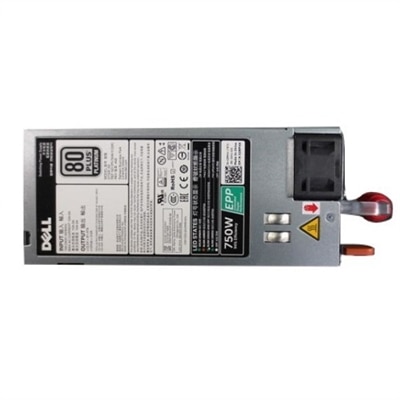
Efficient Computer Power Supplies
Efficient computer power supplies are essential for maintaining optimal performance and reliability in any PC setup. Designed to support a wide range of computing needs, these power supplies help ensure smooth operation while meeting the demands of modern technology. Whether upgrading your system or building a new one, choosing the right efficient computer power supply can make a significant difference in overall energy usage and system stability. Explore options that deliver dependable power for your desktop or workstation, helping you get the most out of your computing experience.
This product is not available
Check out the following recommendations.




Efficient Computer Power Supplies
Efficient computer power supplies convert alternating current from a wall outlet into the regulated direct current that a desktop computer uses, losing less energy as heat during that conversion. Efficiency is the percentage of incoming electrical power delivered to the computer’s components: a power supply operating at 90 percent efficiency delivers 450 watts of DC power while drawing approximately 500 watts from the outlet, with the remaining 50 watts dissipated primarily as heat. This distinction separates efficiency from wattage capacity. A 750-watt power supply can support up to its rated output under specified operating conditions; it does not continuously consume 750 watts simply because the computer is switched on. Actual consumption depends on the demands of the processor, graphics card, and other connected components, along with conversion losses. For a desktop used throughout the day, those demands can shift from a modest draw during email and document work to a much heavier load during video rendering or an evening gaming session. Efficient conversion is useful across these everyday changes, especially when a computer spends many hours running. Independent efficiency certifications provide a reference for comparing performance under defined test conditions. Common certification tiers include Bronze, Silver, Gold, Platinum, and Titanium, with higher tiers generally requiring better conversion efficiency at specified loads. The exact requirements depend on the certification program, input voltage, and power supply category, so a rating is most meaningful alongside its test conditions. Many power supplies reach their highest efficiency around the middle of their output range, although the curve varies by design, and performance at light loads matters for computers that spend substantial time idle. Reduced conversion losses can mean less heat for the power supply’s cooling system to remove, potentially supporting quieter operation. Efficiency alone, however, does not establish overall build quality, electrical stability, or noise levels. Those characteristics also depend on circuit design, component quality, fan behavior, and the conditions inside the computer case.
The right fit for an efficient desktop power supply involves physical dimensions, electrical connections, and the computer’s expected workload. Full-size towers often accommodate an ATX power supply, while compact desktops may require a smaller form factor or a model-specific design. Even within a familiar form factor, enclosure depth can vary, affecting clearance around internal brackets and cable-routing spaces. Some prebuilt computers use proprietary mounting arrangements or motherboard connections, making the original system specifications particularly important when considering a replacement. Output capacity should comfortably support the installed components and their short-duration power demands, rather than merely match an average reading during light use. A desktop used for spreadsheets and online meetings has different requirements from a system that handles detailed animation, high-resolution editing, or graphics-intensive games. Sensible capacity headroom can accommodate demanding tasks and planned upgrades, but a substantially oversized unit does not automatically improve efficiency during routine work. The available motherboard, processor, and graphics power connectors are equally important, including their quantities and supported power levels. For graphics cards with newer high-power connections, compatibility with the required connector and applicable power supply standard helps ensure the system is properly supported. Cable layout also shapes the experience inside the case. Fully modular power supplies allow unused detachable cables to remain outside the build, while semi-modular designs combine fixed essential connections with detachable cables for other components. Non-modular designs keep their cables permanently attached. Each arrangement can function well when the case has enough room for secure connections and unobstructed airflow. Modular cables are not universally interchangeable, even when their plugs appear identical; only cables explicitly approved for the exact power supply should be used. For another related category, Standard Power Supplies provides additional context for desktop power needs. Across either category, compatibility takes priority over a higher wattage number or a more advanced efficiency tier.
Materials, construction, and cooling details help determine how a computer power supply performs over years of ordinary use. A protective metal enclosure surrounds the internal circuitry, while insulated wiring, securely fitted connectors, capacitors, and heat sinks each contribute to dependable operation. Component temperature ratings and the manufacturer’s stated operating conditions offer useful context, especially for a desktop that works through long creative sessions or sits in a room that becomes warm in the afternoon. Fan size, bearing design, and control settings influence the sound profile as electrical demand changes. Some designs stop the fan below a specified load or temperature threshold, creating a quieter environment during lighter tasks, while others maintain continuous airflow. Neither approach guarantees silence once the computer is working hard, and a fan-stop feature is not a substitute for adequate ventilation. A clear intake path, properly positioned case filters, and enough space around exhaust vents help the cooling system work as intended. Routine care generally centers on removing dust from accessible exterior vents and case filters according to the manufacturer’s instructions, with the computer shut down and disconnected from power. The power supply enclosure should never be opened for cleaning or repair because internal components can retain hazardous electrical charge after unplugging. Long-term reliability also involves electrical protection features, such as safeguards against excessive current, abnormal voltage, overheating, and short circuits. These protections serve a different purpose from an efficiency certification and deserve separate attention in the specifications. For someone working from a home office, an efficient power supply can support a desktop that runs steadily through calls, research, and document preparation without adding unnecessary conversion heat. For a gamer or creative professional, appropriate capacity and well-managed cooling support heavier workloads without treating every task as a maximum-output event. As a gift for an experienced computer builder, a power supply is most useful when the recipient’s exact case, components, and connection requirements are known. Ultimately, efficient computer power supplies belong in systems where their size, output, connections, and operating characteristics suit the way the computer is actually used.
FAQs:
An efficient computer power supply reduces energy waste and heat output, which helps keep your system cooler and quieter. It also lowers your electricity consumption, making it a more environmentally friendly and cost-effective choice over time.
Upgrading to a high-efficiency PC power supply is beneficial for gamers, creative professionals, students, and anyone who uses their computer for extended periods. It’s also a great option for those looking to build a new system or refresh an older desktop for more reliable performance.
80 Plus certifications indicate the efficiency level of a power supply. Ratings like Gold, Platinum, or Titanium show that the unit delivers more power to your components while wasting less as heat, ensuring stable performance and longer-lasting hardware.
Modular computer power supplies offer the flexibility to use only the cables you need, resulting in better cable management and improved airflow inside your case. This can make installation easier and help maintain a tidier, more efficient system.
Yes, installing a quality power supply can enhance your computer’s reliability by providing consistent and clean power to all components. This reduces the risk of unexpected shutdowns and helps protect your hardware from power fluctuations.