Enterprise Laptops for IT-Managed Environments

Enterprise Laptops for IT-Managed Environments offer organizations reliable computing solutions designed to meet the demands of modern workplaces. These laptops are built with IT management in mind, ensuring seamless integration, streamlined deployment, and simplified maintenance for businesses of all sizes. Whether upgrading your fleet or expanding your workforce, explore a selection of enterprise laptops that help support productivity and security in professional settings. Discover options tailored for IT-managed environments to keep your business running smoothly and efficiently.

Filters

$2387.00

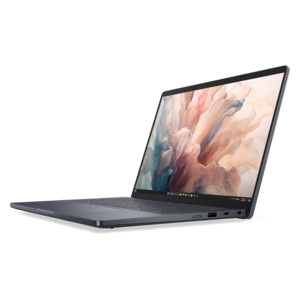
A premium laptop featuring QHD+ resolution, ComfortView Plus, built-in AI, and an Intel vPro platform.
$2387
$1906.00

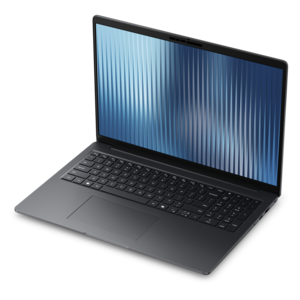
A thin, lightweight business laptop offering durable construction, commercial-grade security, and reliable everyday productivity.

$1906

Enterprise Laptops for IT-Managed Environments

Enterprise laptops for IT-managed environments are business computers designed to function within an organization’s security policies, device management processes, and everyday workflows. Their value extends beyond individual performance: a dependable fleet also needs consistent configuration, predictable updates, and hardware that fits how employees actually work. An employee moving between conference rooms may benefit from a lightweight chassis and compact screen, while an analyst reviewing several spreadsheets may need more screen space, additional memory, and connections for external displays. Engineers and creative professionals working with complex models or large visual projects can require greater processing and graphics capability than employees primarily using browser-based applications. Matching those requirements helps prevent a thin, travel-friendly laptop from being assigned work that routinely pushes its cooling system and battery to their limits. Physical construction matters just as much during repeated daily handling. Aluminum, magnesium alloy, reinforced polymers, and composite materials offer different balances of weight, rigidity, and surface finish; no single material guarantees durability. Hinge stability, keyboard construction, chassis reinforcement, and protection around frequently used ports all contribute to how a laptop handles a busy workweek. Testing against selected MIL-STD-810H methods can provide useful context for resistance to specific environmental stresses, but it does not make a computer waterproof or immune to drops. The particular tests and conditions matter more than a broad durability claim. Fit also includes the small details employees encounter hundreds of times a day: readable text at a comfortable viewing distance, a keyboard with a familiar layout, a responsive touchpad, and a screen that remains usable under overhead office lighting. For organizations assigning equipment across multiple departments, a consistent core platform with workload-appropriate configurations can simplify deployment without forcing every employee into the same physical format. These characteristics distinguish enterprise laptops from computers chosen primarily for occasional personal use or entertainment.

Security and manageability are central considerations because an enterprise laptop remains part of the workplace even when it leaves the building. A hardware security component such as TPM 2.0 can protect cryptographic keys and help establish device trust, while properly configured drive encryption helps protect local files if a laptop is lost. Secure boot protections, firmware integrity checks, and supported recovery capabilities can add safeguards at different stages of the startup process. These features serve distinct purposes and work best alongside operating system updates, endpoint protection, strong authentication, and clearly enforced access policies. Fingerprint readers and infrared cameras can make supported biometric sign-in more convenient, but their suitability depends on the organization’s authentication requirements and software configuration. A physical camera shutter offers visible control over the camera; it does not independently disable the microphone or replace application permissions. For administrators, compatibility with existing device management tools is often as important as any individual security feature. Remote enrollment, policy application, application deployment, update scheduling, and device health reporting help keep distributed employees working within a consistent environment. On appropriately equipped and configured systems, hardware-level remote management may support certain diagnostic or recovery tasks when the operating system is unresponsive. Those capabilities depend on the platform, management tools, connection, and power state rather than being universal features of business laptops. Standardized firmware settings, documented driver packages, and repeatable setup processes can make a replacement computer easier to prepare when an employee starts a new role or needs a working device quickly. An employee opening a laptop at home should be able to reach approved applications through the organization’s established access methods without relying on improvised workarounds. Longer-term fleet planning also benefits from clear information about firmware maintenance, supported operating systems, repair procedures, and service terms. Together, these details help IT teams evaluate how a laptop will be administered throughout its working life, not simply how it performs during an initial setup.

Daily usability connects those administrative requirements to the employee experience. Battery endurance varies with screen brightness, video calls, application load, wireless activity, and power settings, so a stated runtime should not be treated as a promise of identical results throughout every workday. For employees who move between a home desk and an office workstation, compatible docking, sufficient display support, and convenient charging can reduce repeated cable changes. A connector’s shape alone does not confirm its capabilities: charging, external display output, and data transfer depend on the laptop, port specification, cable, and connected accessory. Clear microphones, effective speakers, and a well-positioned camera matter during back-to-back meetings, especially when the employee is working in a shared space. Travel adds another set of practical needs, including manageable weight, a secure carrying sleeve, and connectivity that works with approved remote-access policies. The related page What Are the Best Business Laptops for Travel for IT Managers Who Need Secure Connectivity? offers additional context for mobile work requirements. Physical privacy features and screen positioning can help reduce casual viewing in an airport lounge or shared workspace, while secure connectivity still depends on appropriate configuration and employee practices. Care and serviceability also influence how reliably a laptop remains in use. Keeping vents unobstructed, carrying the computer in a padded compartment, and following manufacturer-recommended cleaning methods help protect surfaces, keyboards, and cooling components. Liquid should never be sprayed directly onto the device. Documented access to replaceable batteries, memory, keyboards, or other components can simplify authorized repairs, although component accessibility varies by design. Before reassignment or retirement, an organization’s approved data-removal and device-release procedures help protect information and prepare the computer for its next destination. Enterprise laptops that balance these practical details with suitable performance and manageable security features are better aligned with the realities of a supported workplace: employees need dependable tools, and administrators need devices that fit established processes.

FAQs:

Add the products you would like to compare, and quickly determine which is best for your needs.

Add the products you would like to compare, and quickly determine which is best for your needs.