$39.99
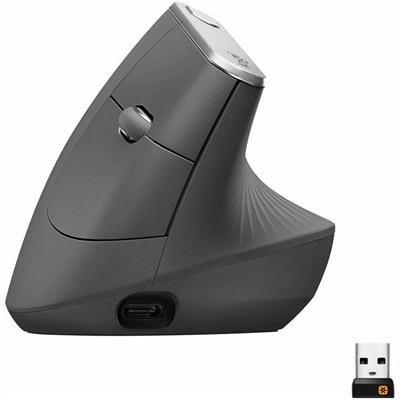
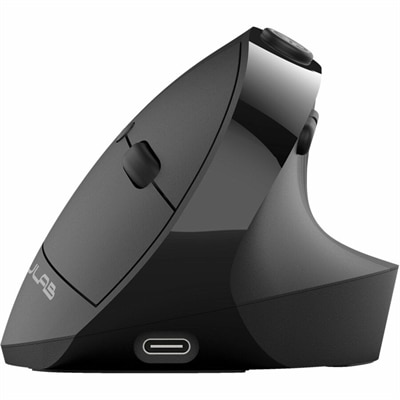
An ergonomic vertical mouse with seven silent buttons, Bluetooth/USB connectivity, and rechargeable four-month battery life.
Ergonomic mice are essential tools for anyone seeking to enhance their comfort and productivity during long hours at the computer. Designed with user-friendly shapes and features, these devices aim to reduce strain on your hand, wrist, and arm, promoting a more natural posture. Whether you're working on detailed graphic design projects, intense gaming sessions, or everyday tasks, ergonomic mice offer a blend of style and functionality that supports your well-being. Explore our selection to find the perfect ergonomic mouse that fits your needs and elevates your computing experience.
An ergonomic vertical mouse with seven silent buttons, Bluetooth/USB connectivity, and rechargeable four-month battery life.
A right-hand-focused wireless gaming mouse with 26,000 DPI, reliable connectivity, and robust battery life.
An ergonomic graphite wireless mouse with a 57-degree vertical design, rechargeable battery, and textured rubber grip.
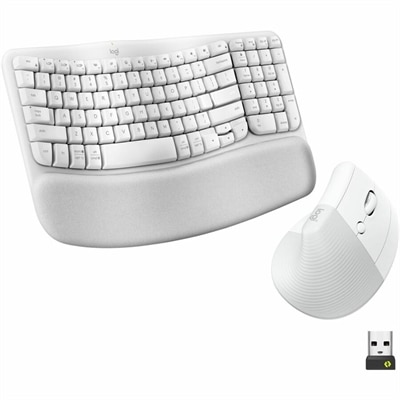
An off-white ergonomic wireless keyboard and vertical mouse combo with cushioned palm rest, Bluetooth, multi-OS support.
Ergonomic mice are designed to make everyday cursor control feel more natural by supporting the hand, wrist and forearm in a comfortable position. Unlike a standard flat mouse, an ergonomic design may have a sculpted body that follows the curve of the palm, a taller profile that reduces the need to flatten the hand, or a vertical shape that places the hand in a handshake-like position. These details can help limit the inward rotation of the forearm and reduce the gripping or reaching that may develop during long periods at a computer. An ergonomic mouse can be a practical choice for anyone who spends hours moving between documents, spreadsheets, creative applications, web pages and communication tools, including remote workers, students, office professionals, designers and home users. It may also be useful for people who notice tiredness or tension after a full day of clicking and scrolling, although individual comfort needs vary and a mouse cannot replace professional medical advice. For broader workstation support, explore Ergonomic Accessories For Wrist Pain. When browsing ergonomic mice, pay attention to the shape, size and controls rather than focusing on appearance alone. A mouse should allow the palm to rest without excessive pressure, keep the fingers relaxed over the buttons and let the thumb sit naturally along the side. If the body is too small, the hand may feel cramped; if it is too large, the user may stretch to reach the buttons or scroll wheel. Hand size is therefore an important starting point, but grip style matters too. Users who keep the whole palm on the mouse may prefer a fuller, higher contour, while fingertip or claw-grip users may want a lower profile with room for precise movement. Left-handed users should look for an ambidextrous or left-hand-specific design, since many sculpted mice are shaped primarily for the right hand.
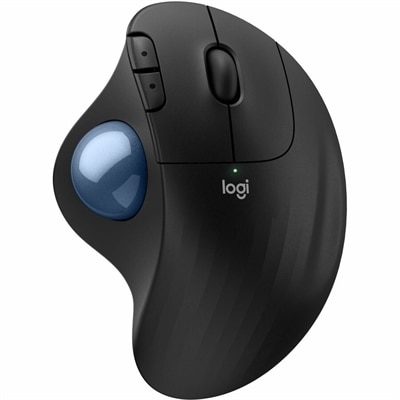
The main ergonomic mouse styles offer different approaches to comfort and control. Vertical mice position the buttons on the side of a raised body, allowing the hand to rest at an angle that more closely resembles a handshake. This can be appealing for users who want to reduce forearm twisting while navigating long documents, entering data or switching among applications. The angle can vary from a gentle tilt to a more upright position, so a person new to this style may appreciate a moderate design that feels familiar while still changing the hand’s posture. Trackball mice remain stationary on the desk while a thumb or finger moves a built-in ball to guide the pointer. Because the mouse itself does not need to travel across the surface, trackballs can help conserve desk space and reduce repeated arm movement. They can be especially useful on compact work areas, shared desks or surfaces where movement is limited. A short adjustment period is normal as the user learns to control the pointer with the ball, but many people value the stable base and the ability to keep the arm relatively still. Contoured traditional ergonomic mice retain a familiar horizontal layout while adding a wider body, raised palm support and carefully placed thumb rests. They are often an easy transition for someone who wants more support without changing the basic way a mouse feels. Some models include additional thumb or top buttons for shortcuts, which can reduce trips to the keyboard when working in productivity software or browsing complex interfaces. Wired and wireless options each have practical advantages. A wired connection avoids battery changes and can provide consistent responsiveness, while a wireless mouse keeps the desktop clear and makes it easier to move between a laptop and a home office setup. For wireless models, consider battery life, charging method, connection range and whether the receiver or Bluetooth pairing fits the computer being used. A responsive sensor, smooth scroll wheel and quiet buttons can also make a noticeable difference in shared offices, libraries and late-evening workspaces.
Choosing the right ergonomic mouse also means considering the surface, software and daily routine around it. Optical or precision sensors should track reliably on the desk mat or other surface available, and adjustable sensitivity can help users move the pointer across a large monitor without sweeping the arm repeatedly. A well-placed scroll wheel is valuable for navigating long pages, while programmable buttons may simplify frequent commands such as back, forward, copy, paste or application switching. Keep the number of controls appropriate to the user’s habits; extra buttons are helpful only when they are easy to reach without shifting the hand. A clean, uncluttered desk encourages the forearm to rest comfortably, and the mouse should sit close enough that the elbow remains near the body rather than reaching outward. Adjusting chair height, desk height and monitor placement can complement an ergonomic mouse, as can taking brief pauses to relax the fingers and change position during extended sessions. People who work from home may appreciate an ergonomic mouse as a thoughtful gift for a new workspace, a family member who spends time on a laptop, or a colleague who handles detailed computer tasks every day. It can also be a useful addition to a student’s study area or a creative workstation where precision and repeated pointer movement are part of the routine. During the warmer months and into cooler-weather workdays, a comfortable setup can make a home office feel more inviting, whether the user is settling in for a focused morning, managing household tasks or enjoying a quiet evening project. As with any input device, the best choice is the one that fits the user’s hand, preferred grip, desk space and computing habits. Comparing vertical, trackball and contoured designs makes it easier to find a balance of posture support, accurate control and familiar operation for work, study and everyday computing.
Add the products you would like to compare, and quickly determine which is best for your needs.