Flat Panel Stands
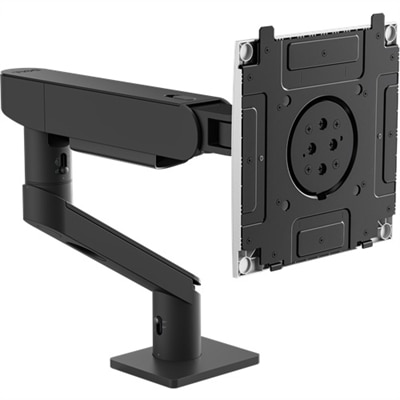
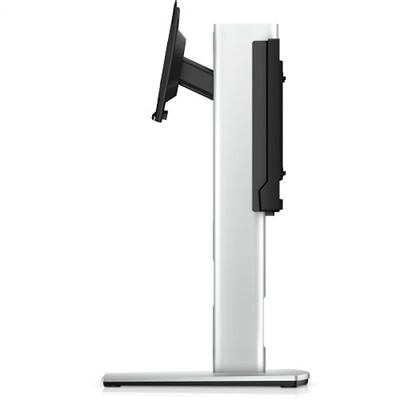
Flat panel stands offer a sleek and practical solution for displaying your screens in any environment, from home offices to entertainment spaces. Designed to complement modern décor while maximizing space, flat panel stands provide the stability and versatility needed for an organized setup. Explore a wide selection to find the ideal fit for your display needs and elevate your viewing experience with ease.
This product is not available
Check out the following recommendations.




Flat Panel Stands
Flat panel stands offer a practical way to place a television or monitor when wall mounting is not possible, not preferred, or simply does not suit the room. Designed for slim displays, these stands can sit on a desk, tabletop, dresser, media console, or floor, while rolling models make it easier to move a screen between rooms or work areas. A stand can also be useful when a display needs to be positioned in front of windows, rented walls, brick, tile, or other surfaces that make drilling inconvenient. In a home office, a tabletop stand may free up valuable desk space by lifting the screen to a more comfortable viewing height and creating room beneath it for a keyboard, notebook, or small accessories. In a living room, a floor stand can provide a clean, open appearance without adding a large piece of furniture. Mobile options are especially helpful in classrooms, meeting rooms, training spaces, reception areas, and shared workspaces where the screen may need to serve different audiences throughout the day. Before choosing a stand, begin with the display’s exact size and weight, then check the mounting pattern on the back. Many flat-panel displays use a VESA mounting pattern, expressed as the horizontal and vertical distance between the mounting holes in millimeters, such as 75 x 75 or 200 x 200. The stand must support both the correct pattern and the full weight of the screen. Screen size alone is not enough because two displays with the same diagonal measurement can have different weights, mounting locations, and center-of-gravity requirements. Keep the display’s documentation nearby, or measure carefully from hole center to hole center if the specifications are not readily available. A compatible stand should attach securely without forcing the mounting hardware, covering ports, or placing stress on the rear panel.
The right stand depends just as much on the setting as on the display. Tabletop stands are a natural fit for desks, counters, dressers, and compact entertainment areas. Look for a broad, stable base that suits the depth of the furniture, along with a height that keeps the top of the screen near eye level when seated. Adjustable height can make a noticeable difference in a long workday, especially when a display previously sat too low and encouraged a downward tilt of the head. Some designs allow tilt, swivel, or screen rotation, which can help reduce glare from a nearby window and make it easier to share content with someone seated to the side. Floor stands are useful when furniture is limited or when the display needs to sit in a more open part of the room. A substantial base helps prevent rocking, while a slim vertical profile can preserve walking space and keep the screen visually uncluttered. For homes with children or pets, stability deserves particular attention: place the stand on a level surface, keep the base clear of loose rugs when possible, and use any included safety hardware according to the instructions. Rolling stands add flexibility for offices, presentations, community rooms, and multipurpose spaces. Locking casters can keep the stand firmly in place during use, while smooth-rolling wheels make repositioning easier when the room layout changes. Check the overall height and width, including the base and wheels, before purchase so the assembled stand can pass through doorways and fit comfortably where it will be used. Cable management is another feature that can transform the finished setup. Channels, clips, or openings in the column can guide power and signal cables downward, reducing tangles and keeping cords away from feet, chair legs, and cleaning equipment. Leave enough slack for height adjustment or rotation, and confirm that every cable can reach the intended outlet or accessory without being stretched.
A flat panel stand can be a thoughtful choice for someone refreshing a home office, setting up a guest room, or creating a more adaptable entertainment space. It is also useful for a family member who shares a desk, a student working in a compact room, or a professional who moves between work areas during the day. For a gift, compatibility is the detail that matters most; knowing the recipient’s display size, weight, VESA pattern, and preferred location is more valuable than choosing by appearance alone. If those details are not available, a general-purpose option with clearly stated support ranges and adjustable mounting hardware may provide greater flexibility, though the specifications should still be checked before installation. Style and finish can help the stand blend naturally with the room, but structure should remain the priority. Examine the base construction, mounting plate, adjustment points, included hardware, and instructions. A well-designed stand should feel solid when touched, keep the display balanced, and allow access to the ports needed for power, video, audio, and peripherals. For monitor setups, a stand with height adjustment or screen rotation can support a more comfortable arrangement for writing, coding, design work, or reading long documents. A display placed vertically may be particularly useful for webpages and documents, while a horizontal position may suit video, spreadsheets, and collaborative work. Those comparing options for a computer workspace can also explore Modern Monitor Stands for additional ways to organize a screen without sacrificing desk comfort. Once installed, tighten each connection evenly, confirm that the display is level, test the full range of movement slowly, and route cables so they remain clear of hinges and wheels. With the correct fit and a stable foundation, a flat panel stand can make a screen feel purposefully placed rather than simply set down, improving comfort, mobility, and the overall order of the space.
FAQs:
Flat panel stands come in a variety of styles to suit different needs, including mobile rolling carts for easy transport, tripod stands for portable setups, tabletop stands for desks or media consoles, and fixed or heavy-duty floor stands for permanent installations in commercial or public spaces.
In business environments, flat panel stands are commonly used by professionals in conference rooms for presentations, in lobbies for digital signage, and at trade shows for dynamic displays. They are also popular among IT teams who need flexible solutions for collaborative workspaces.
Yes, many flat panel stands offer features such as height adjustment, tilt, and swivel, allowing users to position their monitors at optimal viewing angles. This can help reduce neck and eye strain, contributing to a more comfortable and productive workspace.
Flat panel stands can make a thoughtful and practical gift for students, remote workers, gamers, or anyone setting up a new office or entertainment area. Their versatility and utility make them suitable for a wide range of recipients.
Common features include VESA compatibility for mounting, integrated cable management systems, adjustable height and tilt, wheels for mobility, and sturdy construction. Some stands also offer shelves for accessories or locking mechanisms for added security in public spaces.