$199.99
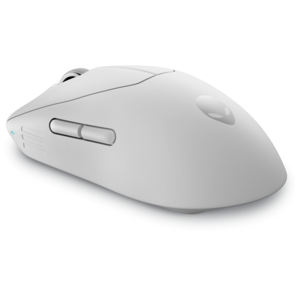
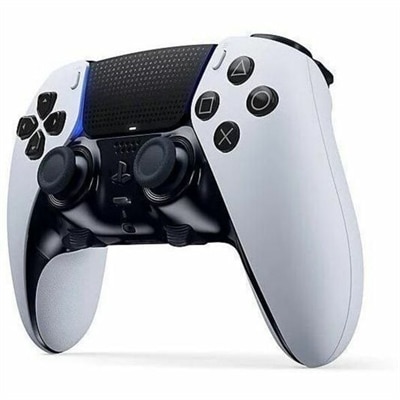
A white wireless gaming controller offering customizable controls for personalized, high-performance gameplay.
Gaming controls are essential for enhancing your interactive experience, providing precision and responsiveness during every session. Whether you’re exploring new worlds or competing with friends, the right gaming controls can make all the difference in comfort and performance. Discover a wide selection designed to suit various play styles and platforms, helping you stay connected to your favorite games with ease.
A white wireless gaming controller offering customizable controls for personalized, high-performance gameplay.
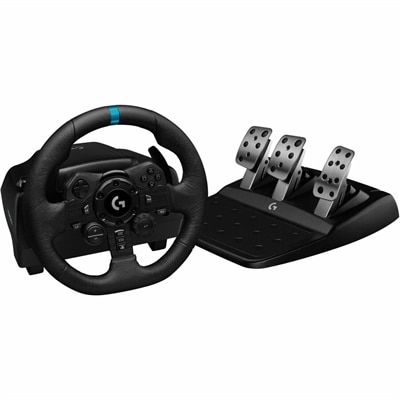
A professional racing wheel with brushed metal, leather stitching, progressive pedals, customizable controls, and RPM LEDs.
An ultra-lightweight gaming mouse with 4KHz wireless or 8KHz wired polling for responsive control.
A tri-mode wireless gaming keyboard with magnetic snap-on charging and customizable controls for enhanced performance.
Gaming controls are the devices and input methods used to move characters, aim, navigate menus, and interact with a video game. Physical gaming controls include keyboards, mice, gamepads, and specialized peripherals such as racing wheels, pedals, and flight sticks. Each translates a physical action into an on-screen response, but the feel and precision of that interaction vary. A keyboard typically provides digital inputs: a movement key is either pressed or released. An analog thumbstick can register both direction and how far it is pushed, allowing a supported game to distinguish between a slow walk and a full run. Analog triggers can provide similarly graduated input for braking or acceleration, while buttons handle actions such as jumping, reloading, or selecting a menu option. Keyboard and mouse controls are common for PC shooters and strategy games, where mouse movement supports precise aiming and a keyboard puts numerous commands within reach. Gamepads bring movement, camera control, and action buttons into a handheld layout that suits many racing, sports, platforming, and third-person games. Touchscreen controls serve a similar purpose on compatible mobile devices through taps, swipes, and virtual buttons, although their feel differs from physical switches and sticks. The right type of gaming input depends on the games being played, the supported platform, and the player's preferred position. At a desk, a mouse and keyboard can provide room for broad aiming movements and quick access to shortcuts. From a chair farther from the screen, a gamepad keeps the main inputs together without requiring a flat surface. A racing wheel and pedal set can make steering and throttle adjustments feel more connected to the driving experience, provided the game supports them. Players who move between several genres may use different controls for different sessions rather than expecting one layout to suit everything. Familiar button placement, predictable response, and comfortable reach often matter more in everyday use than a long list of extra functions.
Fit becomes especially important during extended play, when small differences in shape, weight, and resistance become noticeable. A handheld controller should allow the thumbs to reach the sticks and face buttons without an awkward stretch, with index fingers resting comfortably near the shoulder buttons and triggers. Wider grips may suit larger hands, while a more compact shape can make the same controls easier to reach for someone with smaller hands. Weight is a personal preference: some players like a substantial feel, while others prefer less weight to hold through a long adventure. Gaming mice also vary in width, height, and contour, affecting how the palm and fingers rest on the shell. A low-profile shape may feel natural with a fingertip grip, whereas a fuller body can provide more palm contact. Keyboard size changes the workspace as well. A compact layout leaves more room for mouse movement, while a full-size keyboard keeps a number pad handy for tasks beyond gaming. Materials and surface finishes contribute to comfort and durability. Molded plastic housings are common, textured surfaces can improve purchase, and rubberized areas may add grip, though their finish can wear with repeated handling. Keycap materials, button mechanisms, cable strain relief, and the construction of moving parts all affect how controls stand up to frequent use. Mechanical keyboard switches differ in sound and resistance; a pronounced click may feel satisfying in a private room but distracting in a shared space. Adjustable sensitivity, remappable buttons, and interchangeable components can help tailor supported devices to particular games or preferences. Rear buttons may put a frequently used command within reach without lifting a thumb from a stick, although their usefulness depends on placement and software support. For a closer look at handheld layouts and distinctive styling, Cool Gaming Controllers offers a related category to explore. Appearance can complement a gaming setup, but a comfortable grip and accessible controls have a more direct effect on how the device feels in play.
Compatibility is another defining consideration for gaming controls, particularly in households where accessories move between a desktop, laptop, and console. A matching connector does not by itself guarantee full functionality. Platform support, operating system requirements, game compatibility, and any required software determine whether buttons, vibration, audio connections, and customization features work as expected. Even button prompts can differ between layouts, so a familiar arrangement can make learning a new game less distracting. Wired controls avoid the need to recharge a wireless battery during use, but cable length and routing matter when the computer sits beneath a desk or the screen is across the room. Wireless controls reduce cable clutter and allow more freedom of movement, although connection type, battery life, charging method, and receiver requirements vary. Bluetooth and dedicated wireless receivers are different connection options, and neither should be assumed to work with every platform. For racing wheels and flight controls, the physical setup deserves equal attention: a stable mounting surface, suitable clearance, and secure pedal placement help keep equipment from shifting during a tight corner or a careful landing. Everyday care supports consistent operation across these categories. Clean hands and a dry, uncluttered surface help limit residue around buttons, keys, and grips. Routine cleaning should follow the manufacturer's directions, generally with power disconnected and without spraying liquid directly into openings. Cables last better when loosely coiled rather than sharply bent at the connector, and handheld devices benefit from storage that keeps pressure off their sticks and triggers. Gaming controls can be thoughtful gifts for a frequent player, someone building a first PC setup, or a friend who enjoys local multiplayer sessions. Knowing the recipient's platform, favorite genres, and preferred grip makes the choice more personal and practical. For players with limited reach or dexterity, supported remapping and accessible input options may help create a more usable layout. Whether the setting is a compact desk or a shared living room, well-matched controls make the physical side of play feel comfortable, consistent, and familiar.
Add the products you would like to compare, and quickly determine which is best for your needs.