$234.99
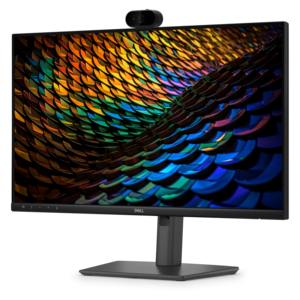
A Full HD conferencing monitor with built-in webcam, speakers, and microphone for seamless everyday collaboration.
Upgrade your video conferencing experience with Google Meet hardware solutions designed to support seamless collaboration in any workspace. Whether you are outfitting a home office, conference room, or classroom, these integrated tools help ensure clear communication and efficient meetings. Explore a range of options tailored for Google Meet to find the right fit for your needs, all backed by quality and reliability you can trust.
A Full HD conferencing monitor with built-in webcam, speakers, and microphone for seamless everyday collaboration.
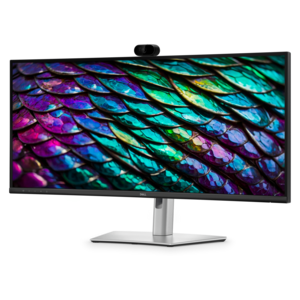
A curved WQHD IPS conferencing monitor with built-in webcam, speakers, microphone, and USB-C hub.
Google Meet Hardware Solutions are designed to make video meetings feel natural, organized and easy to start, whether the conversation takes place in a compact huddle space, a shared office or a larger conference room. A typical room setup brings together several purpose-built components: a dedicated compute system running ChromeOS, a camera that captures participants clearly, a touch controller for joining and managing calls, and a speaker-and-microphone unit that helps voices carry throughout the room. Working as a coordinated system, these devices can reduce the clutter of separate accessories and make it easier for employees, clients, teachers and guests to participate without spending the first few minutes adjusting settings. Camera features such as automatic framing can help keep people visible as they move or as someone joins the table, while echo cancellation and noise reduction support more comfortable conversations in rooms with hard surfaces, air circulation or occasional background activity. A compatible display monitor or screen is also an important part of the experience, because room kits generally do not include the external display used to show participants, shared presentations and meeting details. When selecting a display, consider viewing distance, available wall or table space, brightness, resolution and whether the room receives direct daylight. A smaller screen may suit a two- or four-person huddle area, while a larger meeting space may benefit from a display that remains easy to read from the far end of the table. For personal workspaces, a well-positioned webcam can complement a laptop or desktop and create a more consistent view during one-to-one calls. Browse Logitech Business Webcams for Hybrid Work for additional camera options that can support employees working from home, in private offices or from shared spaces.
Room size is one of the most useful starting points when comparing Google Meet hardware. Small-room solutions are suited to intimate conversations where participants sit close to the camera and microphone, making them a practical choice for quick check-ins, interviews, tutoring sessions and small project discussions. Medium-room solutions are intended for groups spread around a table, with wider camera coverage and audio pickup that can help include people seated farther from the central position. Large-room solutions are built for conference spaces where participants may sit at different distances or where the room layout changes from one meeting to another. Counting seats alone is not enough; also consider the shape of the table, the location of the display, the amount of open space between participants and the level of ambient sound. A long table may require broader coverage than a compact room with the same number of chairs. A room with glass walls, tile floors or a nearby hallway may place greater demands on microphone performance and echo control. Teams that frequently host presentations should look for an arrangement that keeps both the presenter and the shared content easy to follow, while groups that hold discussion-heavy meetings may place greater value on balanced voice pickup and natural framing. These solutions can be useful in offices, classrooms, training rooms, reception areas and flexible workspaces. A growing company might use them to connect distributed teams, while a small organization may use a single room to meet with customers without asking everyone to gather around one laptop. Schools and community groups can use them for remote instruction or guest presentations, and families may appreciate a straightforward setup for staying connected with relatives during the cooler months. They are generally purchased for shared use rather than as conventional gifts, although a webcam, monitor or related accessory can be a thoughtful choice for someone establishing a home office or improving a dedicated study area.
Before choosing a Google Meet room setup, confirm the account and administrative requirements that support it. An active Google Workspace subscription is required for Google Meet hardware, and each hardware unit needs a dedicated Google Meet hardware license for management and updates. Checking these requirements in advance helps prevent a room from being installed but unavailable for scheduled meetings. It is also worth confirming whether the organization will manage several rooms, because consistent naming, scheduling and device administration can make a noticeable difference as the number of spaces grows. Review the room’s available power connections, mounting locations and cable paths before delivery, and measure the distance between the planned camera position and the seats farthest from it. A monitor should be placed at a comfortable height, with the camera close enough to the display that remote participants appear to make eye contact rather than looking sharply to one side. Touch controllers should be easy to reach without forcing people to cross the room, and speaker-and-microphone components should have a clear path to the people speaking most often. For hybrid work, small details matter: a bright window behind the participants can make faces harder to see, an uncovered table can create distracting reflections, and a chair positioned outside the camera’s main view may leave someone feeling overlooked. Choosing compatible components as a coordinated solution can simplify installation and support a more reliable experience over time. Whether the goal is to equip one quiet huddle room or several meeting areas with different layouts, the right combination of camera coverage, audio pickup, display size, touch control and account support can help every participant feel present, heard and ready to contribute.
Add the products you would like to compare, and quickly determine which is best for your needs.