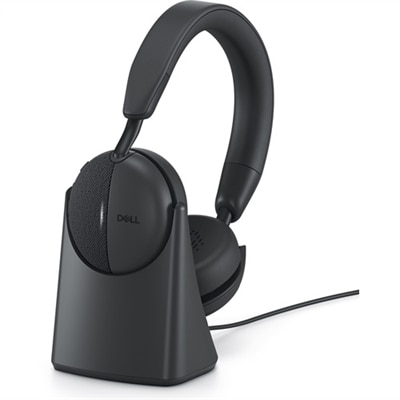
Headsets For Office Use
Headsets for office use are essential tools for creating a productive and comfortable work environment. Whether you’re participating in virtual meetings, collaborating with colleagues, or focusing on important tasks, the right headset can help minimize distractions and enhance communication. Explore a wide range of headsets designed to support your daily workflow and keep you connected throughout the workday. Find the perfect fit for your office setup and enjoy seamless audio performance during every call and conference.
This product is not available
Check out the following recommendations.
Headsets For Office Use
Headsets for office use combine headphones and a microphone to support clear conversations, focused listening, and hands-free work at a desk or around a workspace. They serve a different purpose from headphones designed mainly for entertainment: speech clarity, microphone positioning, dependable connections, and comfort through repeated calls often matter more than powerful bass. For someone answering customer questions, coordinating appointments, or joining back-to-back video meetings, a well-matched office headset keeps conversations close without requiring a phone to be held against the ear. A single-ear design leaves one ear open for nearby colleagues, while a two-ear design brings meeting audio to both ears and can help reduce distractions. Neither format suits every setting. A quiet home office, a shared reception desk, and a busy open-plan floor place different demands on fit and sound isolation. Microphone noise reduction and active noise cancellation also perform different jobs. A noise-reducing microphone is designed to limit the background sound transmitted to other callers, while active noise cancellation works on what the wearer hears. Cushioned earcups provide passive isolation by forming a physical barrier, with the amount of isolation depending on their design and fit. These features can make conversation easier to follow, but they do not guarantee that nearby voices, keyboard taps, or sudden sounds will disappear. A boom microphone keeps the pickup point near the mouth; positioning it slightly to the side, according to the manufacturer's directions, can help limit breath noise. Voice-focused audio tuning can also make spoken details easier to distinguish, whether those details are a client's name, an appointment time, or a colleague's comments during a presentation. For shared spaces, a visible mute indicator or supported busy light can provide a useful cue, although how those features behave may depend on the connected device and meeting software. The practical value comes from matching these capabilities to the actual workday rather than assuming that every office needs the same setup.
Connection type shapes how an office headset fits into everyday routines. Wired office headsets draw their appeal from a direct connection and, in many designs, operation without a battery that needs regular charging. USB connections are common for computer-based calls, but the connector still needs to match the laptop, desktop, or compatible adapter. A USB-A plug and a USB-C plug are physically different, and a connector alone does not establish support for every headset control. Analog connections require similar attention: a compatible combined headphone-and-microphone jack may support both functions, while separate audio ports can require an appropriate adapter. Wireless designs give the wearer more freedom to stand, stretch, or reach a nearby cabinet during a conversation, within the limits of the connection. For workspaces where that movement matters, Wireless Office Headsets offer a related category built around cord-free use. Bluetooth models can pair with compatible devices, while some wireless designs use a dedicated USB receiver or base. Range varies with the technology, room layout, walls, interference, and device placement, so a stated maximum is not a promise of uninterrupted coverage throughout an office. Battery specifications deserve the same context: talk time, listening time, and standby time describe different activities, and features such as active noise cancellation can affect runtime. A charging stand or accessible charging cable can make it easier to keep a headset ready between meetings. Multipoint connectivity, where supported, allows connections to more than one device, but switching behavior and simultaneous audio capabilities vary. That distinction matters when a computer meeting is followed by a call on a mobile phone. Compatibility with conferencing applications is another practical consideration, particularly for answer, end-call, volume, and mute controls. A headset may carry audio successfully without supporting every software shortcut. For employees moving between home and a company workspace, a compact receiver, manageable cable, and protective carrying case can simplify the transition without adding unnecessary clutter to a laptop bag.
Comfort becomes especially noticeable during a long morning of calls, when a small pressure point can turn into a persistent distraction. Headset weight, headband adjustment, earcup movement, and cushion shape all influence how the headset rests against the head. On-ear cushions sit directly on the ears and can feel compact and unobtrusive, while over-ear cushions surround the ears and usually occupy more space. The better fit depends on individual preference, ear shape, hairstyle, glasses, and how long the headset stays on at a stretch. Eyeglass frames can affect both cushion pressure and the seal around the ears, making fit more important than the appearance of generous padding. Breathable fabric coverings may feel different against the skin than smooth synthetic coverings, which can be easier to wipe down when the care instructions permit it. Foam cushioning provides softness, but its resilience and condition influence support over time. Adjustable headbands and reinforced joints can contribute to everyday durability, while hinges, microphone booms, and cable entry points benefit from careful handling. A cord pulled tight across the edge of a desk is more exposed to strain than one routed with a little slack. For shared workstations, replaceable ear cushions and microphone covers, where supported, can make routine upkeep more practical. Cleaning should follow the manufacturer's instructions, using only approved methods and keeping moisture away from openings, connectors, and charging contacts. Letting cleaned surfaces dry before use and storing the headset away from spills helps protect materials and electronics. Moderate listening levels and occasional breaks support more comfortable use; turning up the volume is not a substitute for addressing distracting surroundings or a poor fit. Office headsets can suit remote employees, administrative teams, consultants, and anyone whose day includes frequent online conversations. They can also be a thoughtful gift for someone setting up a home workspace, provided the connection, fit, and work requirements are understood. Across those settings, the most useful qualities are straightforward: intelligible speech, accessible controls, dependable operation, and a fit that remains comfortable as the day moves from a quick check-in to a longer discussion.
FAQs:
When selecting a headset for office use, consider features such as noise-canceling microphones, comfortable ear cushions for long wear, wireless connectivity options, compatibility with unified communications platforms, and intuitive on-ear controls. These features enhance productivity and comfort during calls and meetings.
Headsets are beneficial for a wide range of professionals, including remote workers, customer service representatives, administrative staff, and teams who frequently participate in virtual meetings. Anyone who values clear communication and hands-free convenience can enhance their work experience with a quality office headset.
Yes, wireless headsets are well-suited for office environments as they provide freedom of movement, reduce desk clutter, and allow users to multitask during calls. Many wireless models offer reliable connectivity and long battery life, making them ideal for busy workdays.
To ensure comfort during long work sessions, look for headsets with adjustable headbands, lightweight designs, and memory foam or plush ear cushions. Trying different styles, such as over-ear or on-ear, can help you find the best fit for your preferences and needs.
Dell workplace solutions headsets are designed for reliable performance, seamless device integration, and consistent audio quality. They offer a range of options to suit individual or enterprise needs, making them a dependable choice for enhancing productivity and communication in the workplace.