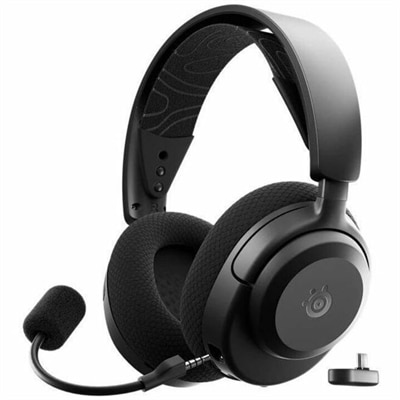
Headsets With Mic
Elevate your audio experience with our selection of headsets with mic, designed to meet the demands of both work and play. Whether you're diving into an intense gaming session, joining a critical conference call, or simply enjoying your favorite tunes, these headsets deliver crystal-clear sound and reliable microphone performance. Explore our diverse range that combines comfort, style, and functionality to suit any need. Find the perfect headset with mic to enhance your communication and entertainment experiences today.
This product is not available
Check out the following recommendations.
Headsets With Mic
Headsets with mic combine personal audio and voice pickup in a single device, making them useful for video meetings, online classes, multiplayer games, and everyday conversations. A good match delivers clear incoming sound, intelligible speech, and a comfortable fit for the time spent wearing it. For someone moving between project calls and focused work, that can mean a lightweight design with accessible mute controls. For a player coordinating with teammates, it may mean stereo sound, a steady microphone position, and ear cushions that remain comfortable through a long session. Over-ear headsets surround the ears and can help soften nearby distractions, while on-ear styles rest against the ears and often have a smaller profile. Single-ear designs leave one ear uncovered, which can suit conversations at a desk where hearing the surrounding room still matters. Microphone placement also shapes the experience. An adjustable boom brings the microphone closer to the mouth for more consistent voice pickup, while an integrated microphone keeps the headset’s silhouette simpler. A boom positioned slightly beside the mouth rather than directly in front of it can help reduce breath sounds, although the recommended placement varies by design. Microphone noise reduction and active noise cancellation serve different purposes: the former aims to reduce unwanted sounds transmitted to other people, while the latter reduces some of the noise heard by the wearer. Neither guarantees complete silence in a busy room. In a shared apartment, for example, a microphone designed to emphasize nearby speech may help keep a conversation clearer when another person is talking across the table. Ear cushions that form a comfortable seal can also provide passive sound isolation without electronic processing. Clear calls depend on the whole setup, including the headset, application settings, connection quality, and room acoustics, so microphone performance is best understood as part of that everyday environment rather than a single feature on a specification sheet.
Connection type helps determine how naturally a headset fits into an existing routine. Wired headsets with mic offer a direct connection and avoid battery charging for basic audio use, which can be convenient at a permanent desk or during back-to-back appointments. A 3.5 mm headset typically needs a compatible combined headphone-and-microphone jack; computers with separate audio ports may require a suitable splitter. USB headsets use a digital connection, but the connector shape alone does not establish compatibility with every computer, console, or mobile device. USB-A and USB-C connections, operating system support, and application requirements all matter. Wireless headsets make it easier to stand up during a conversation or move around a workspace without a cable trailing across the keyboard. Depending on the design, they may connect through Bluetooth or a dedicated USB receiver. A dedicated wireless connection can provide lower latency for interactive use, while Bluetooth can be convenient for compatible laptops and phones. Actual performance depends on the headset, device, wireless conditions, and audio mode. Some Bluetooth connections also change playback quality when the microphone is active, a distinction that can matter when listening to game audio and speaking at the same time. Battery runtime, charging time, and whether a headset supports use while charging affect how it fits a full day. Multipoint connectivity, when supported, can help with switching between compatible devices, though it does not necessarily mean hearing both at once. Physical controls add another layer of convenience: a reachable volume dial, clearly marked mute button, or supported flip-to-mute boom can make quick adjustments less disruptive. For play that depends on spoken coordination and responsive sound, Gaming Headphones With Mic bring those priorities into focus. Stereo positioning can help distinguish sounds coming from different directions, while surround effects depend on compatible hardware, software, and content. Console compatibility deserves particular attention because a connection that works on a laptop may not provide the same audio, microphone, or control functions on a gaming system.
Comfort becomes especially noticeable after the first hour, when small differences in weight, pressure, and cushion texture start to matter. An adjustable headband helps distribute the load across the top of the head, and swiveling earcups can accommodate different head shapes without forcing the cushions into an awkward angle. People who wear glasses may prefer a fit that does not press the frame arms firmly against the temples. Over-ear cushions also need enough interior space to avoid rubbing the edges of the ears. Memory foam can conform to the wearer over time, while fabric coverings often feel more breathable during extended use. Leatherette surfaces are typically easier to wipe down, although they can retain warmth and may peel as they age. No single material suits everyone: a cool home office, a warm gaming corner, and a frequently packed travel bag place different demands on the same accessory. Lightweight plastic can reduce fatigue, while metal reinforcement may add support at high-stress points; construction quality, hinge design, and handling matter more than material alone. Replaceable cushions, detachable cables, and replaceable microphone windscreens can help extend useful life when those parts are supported. Day-to-day care is usually simple but worthwhile. Disconnecting the headset before cleaning, wiping suitable surfaces with a soft cloth, and following the manufacturer’s care directions help protect finishes and electronics. Moisture should stay away from microphone openings, charging ports, and speaker mesh, and cushions should dry fully before use. Loosely coiling cables rather than wrapping them tightly around the headband reduces unnecessary strain, while a stand or protective case can keep earcups from being crushed beneath books or other equipment. Headsets can be thoughtful gifts for college students attending remote lectures, relatives who enjoy regular video chats, or friends building a comfortable gaming space, provided the connection and fit suit their setup. For shared households, an adjustable design and easy-to-clean contact surfaces can be particularly practical. Across these uses, balanced sound, dependable speech pickup, sensible controls, and lasting comfort contribute more to daily satisfaction than an oversized feature list, especially when the headset becomes something worn as routinely as a favorite pair of glasses.
FAQs:
Using a headset with a microphone allows for clear, hands-free communication during video calls and online classes. It helps reduce background noise, improves audio quality, and provides comfort for extended use, making it easier to stay focused and productive in any environment.
Yes, many dell headsets with mic are designed to be compatible with a wide range of devices, including laptops, desktops, and smartphones. They often come with standard 3.5mm audio jacks or USB connections, and some wireless models can connect via Bluetooth for added versatility.
For gaming or conferencing, look for features such as noise-canceling microphones, comfortable ear cushions, adjustable headbands, and in-line controls for quick muting and volume adjustments. High-quality audio drivers and compatibility with your preferred devices are also important considerations.
Yes, there are wireless dell headphones with microphone options that offer the convenience of movement without being tethered to your device. These models often use Bluetooth connectivity and have rechargeable batteries for hours of uninterrupted use.
To keep your dell headset in top condition, store it in a cool, dry place when not in use, and regularly clean the ear cushions and microphone with a soft, dry cloth. Avoid exposing the headset to extreme temperatures or moisture, and gently handle cords and connectors to prevent wear and tear.