$2591.99
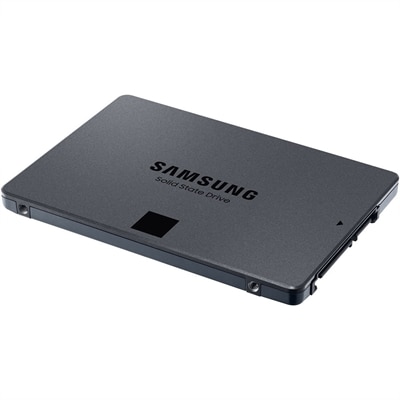
An SATA SSD offering 560MB/s read and 530MB/s write speeds with Intelligent TurboWrite and QLC storage.
Discover the ultimate solution for your storage needs with high capacity SSDs. These state-of-the-art solid-state drives are designed to provide ample space for all your digital content, from large multimedia files to extensive software applications. High capacity SSDs offer a seamless blend of performance and reliability, ensuring faster data access and improved system responsiveness. Whether you're a professional requiring vast storage for complex projects or a gamer in need of expansive space for your game library, these SSDs are engineered to meet your demands efficiently. Explore our selection and elevate your computing experience with the power of high capacity SSDs.
An SATA SSD offering 560MB/s read and 530MB/s write speeds with Intelligent TurboWrite and QLC storage.
High capacity SSDs give laptops, desktops and compatible gaming systems room for large applications, high-resolution media and extensive personal files without the moving parts found in traditional hard disk drives. Solid-state storage uses flash memory, which helps deliver quiet operation, quick access to files and faster load times when compared with older mechanical alternatives. Consumer internal and portable SSDs commonly range from 1TB to 8TB, though the right capacity depends on the computer, operating system and type of content you plan to keep on the drive. A 1TB model can suit everyday computing, a growing photo library or a carefully managed game collection, while 2TB, 4TB and larger options are helpful for creative professionals, PC enthusiasts and anyone who works with sizable projects. Video editors handling 4K or 8K footage, photographers preserving RAW images, musicians with large sample libraries and gamers with demanding installations can benefit from having more available space. A high capacity drive can also reduce the need to shuffle folders between devices, making it easier to move from a home office to a classroom, studio or living-room setup during the cooler months. For an overview of options designed to combine generous capacity with responsive performance, explore High Capacity SSD Storage for Faster Load Times.
Before choosing a high capacity SSD, start by checking the connection and physical format supported by your computer. Internal M.2 drives are compact, slide directly into a compatible slot and may use PCIe through the NVMe protocol for very responsive transfers. The slot must support the drive’s length, key type and interface, and some systems may require a firmware update or a heat spreader for sustained heavy workloads. A 2.5-inch SATA SSD can be a practical choice for desktops or older laptops that do not accept M.2 drives, although its interface generally has a lower performance ceiling. Portable SSDs connect externally through USB and can be convenient when files need to travel between several computers; check the USB generation, connector type and included cable to understand the speeds your setup can actually reach. A high-speed drive connected to a slower port will still work in many cases, but transfers may be limited by that port. Compatibility matters for game consoles as well. Some consoles support internal expansion only when a drive meets specific performance and thermal requirements, while others work with external drives for selected game libraries and media files. Review the computer or console manufacturer’s requirements before purchase, and remember that advertised capacity is measured differently from the usable space shown after formatting and system files are accounted for.
Performance specifications provide useful context, but they should be considered alongside capacity, endurance and cooling. Sequential read and write ratings describe large, continuous transfers, such as moving video footage, while random performance is more relevant to launching applications, loading game assets and opening many smaller files. PCIe 4.0 and PCIe 5.0 models can offer very high throughput on systems built to support those standards, but a newer drive may not reach its rated speed in an older computer. TLC and QLC flash designs can both be effective for everyday use; differences in sustained write behavior, endurance ratings and price make one a better fit than another depending on the workload. Look for an endurance specification such as total bytes written when the drive will handle frequent video exports, large backups or repeated project transfers. A model with a strong warranty and dependable thermal management can be reassuring for a work machine that runs for long stretches. Keep at least some free space available, because a nearly full SSD may have less room to organize incoming data and maintain consistent performance. High capacity is also valuable for local copies of important files, but it should not be treated as a complete backup plan. Preserve irreplaceable photos, schoolwork, creative projects and personal records on more than one device or in a separate backup location. For a gift, a portable high capacity SSD can be a thoughtful choice for a photographer, student, gamer or remote worker, especially when its compact design makes it easy to carry alongside a laptop. As routines shift between indoor work, travel and creative time at home, choosing the right interface, capacity and durability helps ensure the drive remains useful well beyond the initial setup.
Add the products you would like to compare, and quickly determine which is best for your needs.