$54.99
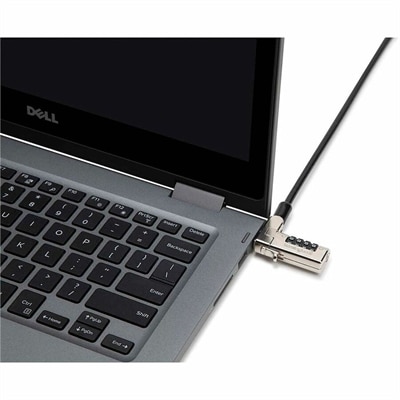
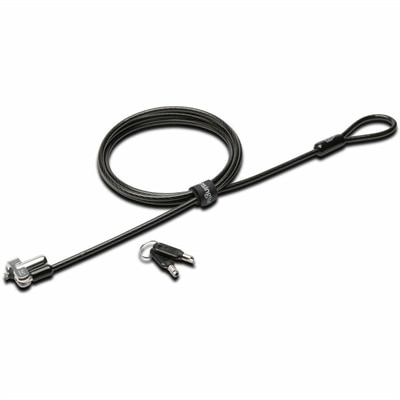
A master-keyed security lock with wedge-slot compatibility, carbon-steel cable, anti-pick technology, pivoting design, and TAA compliance.
In today's fast-paced digital world, ensuring the security of your valuable tech investments is more important than ever. Keyed laptop locks offer a robust solution for safeguarding your devices, providing peace of mind whether you're at the office, in a classroom, or on the go. Designed to deter theft and unauthorized access, these locks are an essential accessory for anyone who values their data and equipment. Explore our selection of keyed laptop locks to find the perfect match for your security needs and keep your laptop protected wherever you are.
A master-keyed security lock with wedge-slot compatibility, carbon-steel cable, anti-pick technology, pivoting design, and TAA compliance.
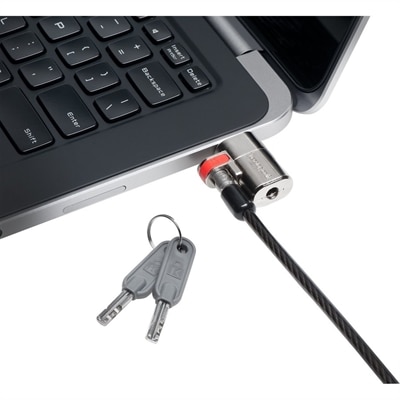
Keyed laptop locks provide a straightforward way to add a physical layer of security wherever a notebook is used outside a private home or secured office. A typical lock combines a steel cable with a key-operated locking head that attaches to a compatible security slot built into the laptop chassis. The cable can be looped around a fixed object, such as a desk leg, conference table support, or other substantial anchor, helping deter an opportunistic grab when a computer is left briefly unattended. This can be especially useful in open-plan offices, classrooms, libraries, coworking spaces, reception areas, training rooms, and shared workspaces where people move in and out throughout the day. A lock does not replace sensible device habits, encryption, account protection, or physical supervision, but it can make a laptop much less convenient to take. For additional practical advice on securing a notebook and protecting the information stored on it, visit Laptop Theft Prevention. Keyed designs are appealing to many users because they do not rely on batteries, software, wireless pairing, or a remembered combination. The key-operated mechanism is ready whenever the laptop is secured, even in a busy room where there is no time to adjust settings or troubleshoot an electronic accessory. Many locks include two keys, allowing one to stay with the everyday user while the other is stored in a safe place. Keeping the spare separate from the laptop is a small but important habit; a lock is most helpful when its key is available and easy to identify.
Compatibility is the most important consideration when choosing a keyed laptop lock. Security slots are not all shaped or positioned the same way, so the lock head must match the opening on the notebook. Standard T-Bar or K-Slot designs use a traditional rectangular slot commonly found on many older or standard-thickness laptops. Wedge-style slots use a smaller trapezoidal opening designed for certain thin chassis, while Nano-style slots are built for some modern slim notebooks and lightweight systems. Universal 3-in-1 locks use an adjustable or interchangeable tip intended to work with multiple slot styles, which can be useful when several people use different laptops or when equipment may be replaced over time. Before purchasing, check the laptop manufacturer’s specifications, inspect the side of the computer for a security-slot symbol, and compare the slot shape with the lock’s stated compatibility. The lock should insert smoothly and turn without forcing; a poor fit can make installation difficult or prevent the locking mechanism from engaging fully. Cable length and flexibility also deserve attention. A longer cable can reach a desk support or other anchor more easily, while a slimmer, more flexible cable may be easier to route around crowded furniture. Look for a cable that feels substantial enough for everyday deterrence without becoming cumbersome in a laptop bag. The locking head should sit securely against the chassis, and the cable should not block ventilation, ports, hinges, or the movement of the display. When a laptop is carried between rooms or packed for travel, consider the lock’s weight and how neatly it stores alongside a charger, mouse, and other accessories.
Keyed laptop locks can serve individuals, families, schools, small businesses, and larger organizations with shared equipment. A remote worker may use one at a kitchen table or temporary workspace, particularly when the laptop is visible from a hallway or near a frequently used entrance. A student might secure a computer at a library table while stepping away to print a document or refill a drink. In an office, a lock can give employees added confidence when they leave a workstation for a meeting, lunch, or a trip to the printer. It can also help establish a consistent routine: close the laptop, connect the cable to a suitable fixed anchor, turn the key, and keep the key in a designated place. For organizations managing multiple notebooks, keyed-alike locks allow several locks to open with the same key, reducing the clutter of separate keys for each device. Master-keyed arrangements provide another option, with individual keys assigned to specific locks and a master key available to an authorized administrator. These formats can simplify equipment checkouts, classroom management, and office inventory while preserving individual accountability. A single keyed lock may also be a thoughtful practical gift for someone beginning college, moving into a shared workspace, commuting with a laptop, or setting up a home office in a busy household. It is compact, reusable, and useful across many work and study settings. As routines shift between indoor work areas and travel during the warmer and cooler parts of the year, a dependable keyed lock can help make laptop security feel like an ordinary part of packing up rather than an afterthought. Pairing it with a protective sleeve, privacy-conscious habits, and a clearly labeled spare key creates a simple security routine that fits naturally into everyday computing.
Add the products you would like to compare, and quickly determine which is best for your needs.