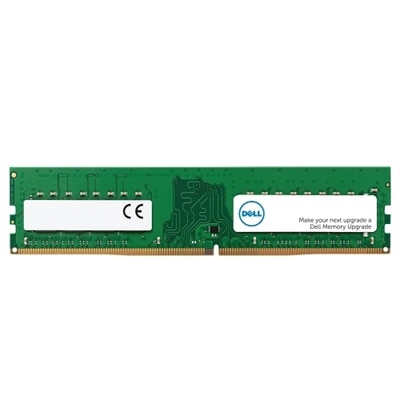
Memory Configurations
Explore a wide range of memory configurations designed to support your computing needs, whether you're multitasking, creating content, or managing everyday tasks. With various options available, you can find the ideal setup to enhance performance and productivity across laptops, desktops, and accessories. Discover how the right memory configurations can help optimize your workflow and elevate your overall experience.
This product is not available
Check out the following recommendations.




Memory Configurations
Memory configurations describe how a computer’s random access memory, or RAM, is arranged, including its total capacity, module count, memory generation, operating speed, and use of supported memory channels. In laptops and desktops, these details help determine how comfortably a system handles active applications and the information they need at any given moment. A browser filled with research tabs, a video meeting, and a large spreadsheet all draw on that working memory, even when only one window is visible. Capacity, typically measured in gigabytes, is therefore an important consideration, but it is not the whole picture. Two computers with the same amount of RAM can have different memory arrangements and different opportunities for future expansion. A configuration with one removable module differs from one with two matched modules, while a laptop with soldered memory may not support a later capacity upgrade. For everyday browsing, email, and document work, modest memory requirements can make a straightforward configuration suitable. Moving between several applications, working with detailed presentations, or keeping a busy digital workspace open can make additional capacity useful. A 16GB configuration is a common starting point for general multitasking, while 32GB or more may suit heavier creative work, demanding games, or larger projects, depending on software requirements. Extra RAM does not automatically make every task faster; its biggest benefit comes when a workload would otherwise exceed the memory the computer can comfortably provide. Students comparing lecture notes beside a recorded class, professionals sharing a screen while reviewing reports, and hobbyists editing a weekend’s photographs may all need different amounts of working room. The most relevant memory configuration reflects those actual routines rather than the largest capacity alone. Processor capability, graphics hardware, and application design also influence responsiveness, so RAM is best understood as one part of a balanced computer. For a laptop or desktop intended as a gift, the recipient’s usual applications and expected years of use provide more meaningful context than a capacity figure viewed in isolation.
The physical fit and electrical compatibility of memory matter just as much as the number printed beside its capacity. Desktop computers commonly use full-size DIMMs, while many laptops with replaceable memory use smaller SO-DIMMs; other compact designs use soldered memory or alternative module formats. These formats are not interchangeable simply because their capacities match. Memory generations such as DDR4 and DDR5 also have different requirements, and a computer must support the generation specified for its motherboard and processor. A module’s circuit board, memory chips, and connector layout are engineered for a particular interface, making the supported form factor and system documentation more important than outward similarity. Some desktop modules include metal heat spreaders, which can affect clearance beneath a processor cooler or inside a compact enclosure. Other modules use a low-profile design with less surrounding material. Neither appearance nor a larger heat spreader guarantees better performance in a particular computer. Speed is another specification that needs context: memory transfer rates are commonly expressed in megatransfers per second, or MT/s, and the operating rate depends on what the processor, motherboard, firmware, and installed modules support together. A higher-rated module may run at a lower supported rate, and an advertised maximum may require a compatible performance profile rather than standard settings. Latency also contributes to memory behavior, but isolated timing numbers do not provide a complete comparison across different generations and speeds. For many everyday users, sufficient capacity and verified compatibility matter more than small differences in memory timings. Expansion potential depends on the number of memory slots, the maximum supported capacity, and whether any memory is permanently attached to the board. A thin laptop designed around soldered RAM can be well suited to portable use, but its initial memory capacity deserves particular attention. A desktop with accessible slots may offer more flexibility, although an upgrade still depends on the system’s supported module capacities and configuration rules. Those distinctions help separate a configuration that fits today’s workload from one that can also accommodate changing needs.
Channel layout adds another dimension to memory configurations. On compatible systems, a balanced arrangement across two memory channels can increase theoretical memory bandwidth compared with a single-channel arrangement, allowing the processor to move more data between itself and RAM. That does not mean every application runs twice as fast: the practical difference varies with the workload, processor, and graphics design. Integrated graphics can be particularly sensitive to memory bandwidth because they commonly share system RAM. A desktop with four memory slots often assigns two slots to each channel, and many motherboards recommend the second and fourth slots from the processor for an initial pair of modules. However, slot labels and preferred positions vary, so the correct arrangement comes from the documentation for the exact system, not a universal placement rule. Correct placement supports the intended channel operation and electrical layout; it is not primarily an airflow choice. Matched modules with compatible capacities, speeds, and timings generally make a balanced configuration more straightforward. Mixed capacities can sometimes operate partly in dual-channel mode, but behavior depends on the platform, and mixing modules may limit operating speed or introduce compatibility issues. Filling every slot is not automatically the fastest arrangement either, since some systems support lower memory rates with more modules installed. These technical details have practical consequences for someone previewing a complex video timeline, playing a game while using voice chat, or running several development tools together. They also distinguish RAM choices from separate hardware topics such as Switch Configurations: each configuration depends on the equipment and task involved. For long-term reliability, memory benefits from appropriate operating temperatures, unobstructed computer ventilation, and protection from electrostatic discharge during handling. Removable modules require careful handling by their edges, without touching the contacts, and maintenance should follow the computer manufacturer’s procedures. RAM has no moving parts and generally needs no routine direct cleaning. A well-matched configuration combines enough capacity for active work, a supported physical format, and the correct channel arrangement, creating a dependable foundation for everyday computing without treating a single specification as a promise of overall performance.
FAQs:
A memory configuration refers to the arrangement and type of memory modules installed in a computer system, including factors like the number of modules, their capacity, speed, and how they are distributed across available memory slots.
Dual-channel memory configuration allows two memory modules to work simultaneously, effectively doubling the data transfer rate between the RAM and the processor. This can lead to improved overall system performance, especially in tasks that require high memory bandwidth.
While it is technically possible to mix different brands or speeds of RAM, it is generally recommended to use matching modules for optimal compatibility and performance. Mixing different speeds may cause all modules to run at the speed of the slowest one.
Single-rank and dual-rank refer to how memory chips are organized on a module. Dual-rank modules can offer better performance in some systems due to improved data access patterns, but compatibility depends on your motherboard's specifications.
Motherboards have specific requirements regarding supported memory types, maximum capacity, speed, and configuration (such as single or dual channel). Ensuring compatibility helps prevent installation issues and ensures your system runs efficiently.