$39.99
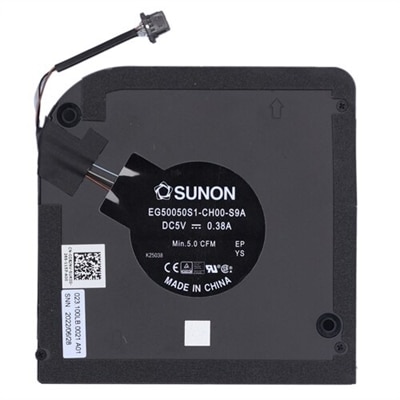
A genuine OEM heatsink assembly with fan, designed for reliable cooling in XPS 13 (7390) systems.
PC heat sinks are essential components designed to maintain optimal performance and longevity of your computer's hardware. By efficiently dissipating heat generated by the CPU and other critical parts, these devices ensure that your system runs smoothly even under demanding conditions. Whether you're a gamer pushing your rig to its limits or a professional requiring reliable computing power, investing in high-quality PC heat sinks can make a significant difference in your overall experience. Explore our range of options to find the perfect solution for keeping your PC cool and efficient.
A genuine OEM heatsink assembly with fan, designed for reliable cooling in XPS 13 (7390) systems.
PC heat sinks help manage the warmth produced by the components that work hardest inside a desktop computer. A heat sink is a metal cooling assembly with a flat contact surface, fins, and, in some designs, heat pipes that move thermal energy away from a processor or another compatible component. The base sits against the chip, usually with a thin layer of thermal compound filling microscopic gaps between the two surfaces. Heat then travels through the metal and spreads across the fins, where airflow carries it away. A heat sink itself may operate without a motor, but it typically works alongside one or more case or CPU fans to move warm air out of the system and bring cooler air across the fins. This combination can help a computer maintain steadier performance during gaming, photo and video work, software development, streaming, multitasking, and other demanding workloads. It can also reduce the chance that a processor will lower its speed to protect itself from excessive heat. When browsing PC heat sinks, begin with compatibility rather than appearance. Check the processor socket, supported CPU families, rated thermal design power, mounting hardware, and the dimensions listed for the cooler. A heat sink that fits one socket may not attach correctly to another, and a design intended for a compact desktop may not provide enough surface area for a high-wattage processor. Case clearance matters as well: measure the maximum CPU cooler height, the space around the processor socket, and the distance from the cooler to nearby memory modules or graphics hardware. Tall memory modules, large motherboard heat spreaders, and tightly arranged components can affect installation even when the cooler technically supports the correct socket. Aluminum is commonly used for its light weight and efficient heat transfer, while copper offers excellent thermal conductivity and may appear in the base or heat pipes. Larger fin stacks and multiple heat pipes can provide more surface area for dispersing heat, although they may also require a larger case and stronger airflow. For a quieter computer, look at fan diameter, speed range, bearing design, and published noise levels, while remembering that noise can also come from the graphics card, power supply, and case fans. A carefully matched heat sink with balanced airflow often keeps a system comfortable without forcing every fan to run at maximum speed.
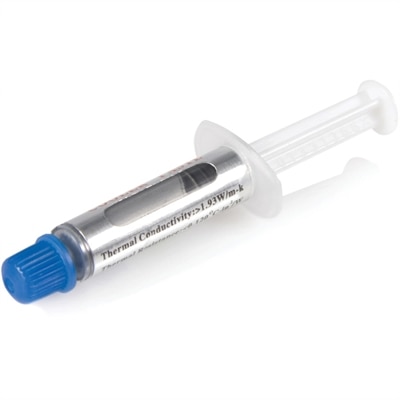
Choosing among PC heat sinks is easier when you consider how the computer is used and how much room is available for future upgrades. A basic desktop for everyday browsing, office applications, schoolwork, and light creative tasks may need a straightforward cooler that fits securely and provides dependable airflow. A gaming computer or workstation used for extended rendering, compiling, simulation, or high-resolution media work may benefit from a larger tower-style heat sink, a broader fin array, or a design with several heat pipes. Compact desktops call for special attention to cooler height, orientation, and ventilation, while open-air cases and systems with carefully arranged intake and exhaust fans may accommodate more substantial cooling hardware. Some heat sinks are made for processors, while others are sized for graphics memory, voltage regulation components, M.2 solid-state drives, or other compatible parts; always confirm the intended component and mounting method before purchasing. Thermal compound may be included, but it is worth checking the package contents and keeping a suitable replacement available for a future installation. During installation, shut down and unplug the computer, work on a clean noncarpeted surface, and follow the mounting instructions in the correct order. Remove old compound carefully, avoid touching contact surfaces with bare fingers, and use only the recommended amount of new compound. Too little can leave air gaps, while too much can spread beyond the intended area. Confirm that the cooler is evenly secured, the fan is connected to the correct motherboard header, and cables are clear of the blades before replacing the side panel. Good case ventilation remains important, particularly when a computer is working hard during the cooler months indoors or when the surrounding room becomes warmer. For systems that need additional airflow, browse High Performance Computer Fans to complement a compatible heat sink. PC heat sinks can also be a thoughtful gift for someone assembling a first desktop, refreshing an older computer, or learning how to maintain and upgrade their own system. The most useful choice is one that matches the recipient’s processor, case, mounting requirements, workload, and comfort with installation. Reviewing those details before adding a cooler to a build helps create a quieter, more consistent computer and leaves room for dependable performance as applications and workloads become more demanding.
Add the products you would like to compare, and quickly determine which is best for your needs.