Quad Core Processors

Quad core processors are at the heart of modern computing, providing the power and efficiency needed to tackle a wide range of tasks with ease. Whether you're delving into complex data analysis, engaging in immersive gaming experiences, or simply multitasking throughout your day, these processors offer the robust performance required to keep up with your demands. Explore our selection of quad core processors designed to enhance your computing experience by delivering seamless performance and responsiveness across various applications. Discover how upgrading to a quad core processor can transform your digital world into a more dynamic and efficient environment.

Filters

$2829.00

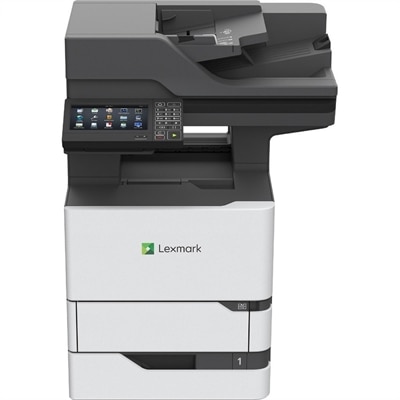
A monochrome multifunction printer delivering 65 ppm with automatic duplexing, color scanning, faxing and Gigabit Ethernet.

$2829
$34.99

A 4K streaming stick with quad-core 1.7GHz processing, Wi-Fi 6, Dolby Vision, HDR10+, and Dolby Atmos.

$34.99

Quad Core Processors

A quad-core processor is a central processing unit, or CPU, with four physical processing cores that execute instructions and share the work of running a computer. Those four cores can handle different tasks at the same time, such as keeping a document open, processing a video call, and supporting background applications. Software designed for parallel processing can also divide a single workload among multiple cores. The operating system schedules that work, so four cores do not limit a computer to four open applications. Some quad-core processors support simultaneous multithreading, allowing each physical core to handle more than one software thread; others support one thread per core. Core count and thread count therefore describe different capabilities. For everyday laptops and desktops, a quad-core CPU can provide a practical foundation for web browsing, office applications, media playback, and lighter creative work. Compared with a single-core or dual-core processor of similar design, four cores offer more capacity for concurrent tasks, although actual responsiveness depends on the entire system. Processor generation, architecture, clock speed, cache, memory, and cooling all influence the experience. Clock speed measures operating cycles per second, but a higher number alone does not establish which CPU will complete a task faster. Newer designs may accomplish more work per cycle or use power more efficiently. Cache provides fast access to frequently needed data, while system memory holds information used by active applications. These components work together when switching between a spreadsheet, a browser, and a presentation. Quad-core processors also differ in how much power they consume and how long they can maintain higher operating speeds. A processor designed for a thin laptop may emphasize efficiency, while one designed for a desktop may operate within a higher power limit. The same four-core description can therefore apply to computers with noticeably different strengths, making the complete configuration more informative than core count alone.

Computers with quad-core processors suit many familiar routines: a student researching an assignment with reference tabs open, a home office user updating documents during a conference call, or a household sharing a desktop for calendars, homework, and streaming video. In these settings, enough memory helps keep active applications accessible, and a responsive solid-state drive can shorten application launches and file access. A CPU cannot fully compensate for a system that runs short of memory or struggles to move data quickly. Video conferencing adds another consideration because camera effects, screen sharing, and other open programs can compete for processing resources. Four cores can support this combination well when the processor, memory, and software requirements are appropriately matched. For photography, a quad-core computer can be suitable for organizing images, making basic adjustments, and preparing pictures to share. Occasional short video projects may also be manageable, although high-resolution footage, complex effects, and large exports can take considerably longer than they would on a stronger configuration. Casual gaming and some older games can run comfortably on suitable quad-core systems, but graphics hardware, game requirements, and display resolution remain important. Integrated graphics can handle many everyday visual tasks, while more demanding games and creative applications may benefit from a dedicated graphics processor. Not every quad-core CPU includes integrated graphics, so display capability belongs among the specifications considered for a desktop build. More demanding work, including frequent video rendering or running several intensive applications together, may benefit from additional cores when the software can use them effectively. Configurations featuring 10 Core Processors provide a related point of comparison for workloads that can take advantage of greater parallel processing capacity. More cores do not automatically make every application faster, however. Tasks that rely heavily on one processing thread may respond more to per-core performance than to the total number of cores. For everyday use, the strongest match is a balanced system that meets the demands of the applications running throughout a typical day.

Physical compatibility matters just as much as performance when considering a quad-core processor for an existing computer or a new desktop build. A replaceable desktop CPU must match the motherboard’s processor socket, supported chipset, firmware requirements, and power capabilities. A matching socket by itself does not guarantee support, and the motherboard’s supported-processor documentation is the most useful reference for confirming compatibility. Memory requirements also depend on the platform rather than simply on the number of cores. Laptop processors are often soldered to the motherboard and are not intended for a straightforward processor replacement, making the original computer configuration especially important. Cooling is another part of fit: the cooler needs compatible mounting hardware, adequate heat-dissipation capacity, and enough clearance inside the case. Metal heat spreaders, heatsinks commonly made with aluminum or copper, and thermal interface material help transfer heat away from the processor. During sustained work, insufficient cooling can cause a CPU to reduce its operating speed to manage temperature. Clear ventilation openings and routine dust removal, performed according to the computer manufacturer’s care instructions, help preserve airflow. A laptop used on a firm surface generally has a better opportunity to draw in cooling air than one resting on bedding or a thick cushion. The processor itself has no moving parts, but fans and the surrounding cooling assembly still need appropriate care. Installation and servicing also require protection against static discharge and careful handling of delicate contacts or socket pins. Beyond the CPU, the finished computer’s construction affects daily comfort and durability. A portable system may spend each day moving between a desk and a bag, while a desktop may stay connected to a larger monitor, keyboard, and other accessories. Battery capacity, screen quality, chassis design, and upgrade options shape those experiences alongside processing performance. Current operating system support and application requirements deserve attention as well, since four cores alone do not establish software compatibility. Together, these details distinguish a quad-core configuration suited to light, everyday computing from one better equipped for sustained multitasking and more demanding projects.

FAQs:

Add the products you would like to compare, and quickly determine which is best for your needs.

Add the products you would like to compare, and quickly determine which is best for your needs.