Replacement PC Fans
Looking to keep your computer running smoothly and efficiently? Replacement PC fans are essential components for maintaining optimal system performance and preventing overheating. Whether you're upgrading your current setup or replacing a malfunctioning unit, our selection of high-quality replacement PC fans offers reliable solutions to ensure your machine stays cool under pressure. Explore a variety of sizes and designs tailored to fit different configurations and enhance your computing experience with quiet, effective cooling.
This product is not available
Check out the following recommendations.


Replacement PC Fans
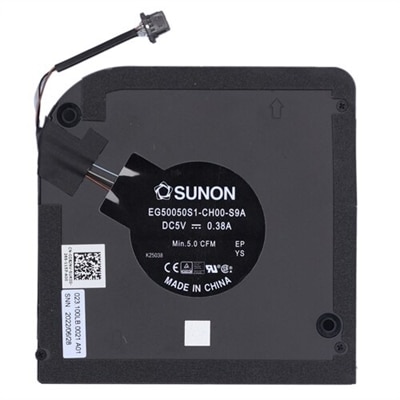
Replacement PC fans help maintain airflow through a computer, carrying heat away from components so the system can operate within its intended temperature range. They can replace a worn fan that rattles during everyday tasks, restore cooling when a fan stops spinning, or support a quieter desktop setup when the original cooling arrangement allows a compatible alternative. The right replacement depends on the fan’s location, dimensions, mounting pattern, electrical connector, and the computer’s cooling requirements—not simply whether it looks similar. A case fan moves air through the enclosure, while a processor cooler fan pushes or pulls air across a heat sink. Graphics card fans and compact internal blowers often have more specialized shapes and connections. These roles matter because fans with similar outside dimensions may not be interchangeable. For desktop case fans, measurements such as 80 mm, 92 mm, 120 mm, and 140 mm generally describe the frame size, but thickness and screw-hole spacing also affect fit. A thicker frame may interfere with a nearby cable, side panel, or cooler, particularly inside a small desktop. Laptop cooling assemblies are usually much more closely matched to a particular computer design, with shaped housings, short cables, and precisely positioned mounting points. For portable computers, Laptop Cooling Fans belong to a distinct category where matching the original assembly and system documentation is especially important. Replacement fans serve a broad range of users, from someone keeping a home-office desktop comfortable to work beside to a hobbyist maintaining a gaming computer used for long evening sessions. They are practical maintenance components rather than universal upgrades: replacing a failing fan can restore expected cooling, but adding a faster fan does not automatically improve performance. A scraping sound, persistent vibration, or fan-related system warning can justify closer inspection, although noise alone does not confirm that the fan needs replacement. Dust buildup, an obstructing cable, or a loose mounting point can produce similar symptoms.
Airflow, pressure, and sound characteristics help distinguish replacement PC fans intended for different spaces inside a computer. Airflow ratings, often expressed in cubic feet per minute, describe how much air a fan moves under stated test conditions. Static pressure describes its ability to move air against resistance, which becomes relevant around dense heat-sink fins, radiator surfaces, or restrictive filters. Neither number tells the whole story by itself. A fan with a high maximum airflow rating may be louder than necessary at full speed, while a well-matched fan can provide sufficient cooling at a lower, less noticeable speed. Published noise ratings are useful context, but their test conditions may differ, and the enclosure can change how a fan sounds in practice. In a quiet study, a low hum may be less distracting than a higher-pitched tone even when the listed sound levels appear similar. Connector type and speed control deserve equal attention. Standard desktop three-pin fans generally use voltage-based speed adjustment when supported by the motherboard, while four-pin PWM fans use a separate control signal to regulate speed. Proprietary connectors and wiring arrangements also exist, so pin count alone is not proof of compatibility. Voltage, current requirements, cable length, and the supported fan-control method all need to match the intended connection. A replacement that cannot report its speed correctly may trigger a warning even if its blades turn. Lighting adds another compatibility layer: fan motor power and lighting power can use separate connections, and different lighting standards are not interchangeable. For a straightforward repair, matching the original electrical and mechanical specifications is often more important than decorative features. Airflow direction also affects suitability. Many fan frames include arrows indicating rotation and airflow, making it easier to preserve the enclosure’s intended intake and exhaust arrangement. A balanced cooling layout gives incoming air a clear path across warm components and a route out, rather than placing fans where they work against one another or draw repeatedly from the same pocket of warm air.
Materials and construction influence how a replacement computer fan handles vibration, everyday dust, and repeated hours of operation. Frames and blades commonly use lightweight molded plastics, with blade shape and frame stiffness contributing to airflow behavior and acoustic character. Some designs include rubber contact pads or other vibration-damping features that reduce the transfer of motor vibration into a metal enclosure. These features can make a difference on a desk where a side panel amplifies a faint buzz, though they cannot compensate for damaged bearings or incorrect mounting. Bearing design is another durability consideration. Sleeve, ball, and fluid-based bearing systems have different operating characteristics, and their service life depends on construction quality, temperature, mounting orientation, and operating speed. A stated lifespan is an estimate under specified conditions rather than a promise for every computer. For a desktop used throughout the workday, consistent operation and effective speed control may matter more than a very high maximum speed. For a system used for demanding games or creative work, maintaining airflow during sustained processor and graphics activity becomes especially relevant. Care also affects long-term performance. Dust on blades, filters, and heat-sink surfaces can restrict airflow and make the cooling system work harder, so replacement fans function best in an enclosure that receives periodic cleaning according to its service instructions. Cleaning and replacement require a powered-down, unplugged computer, with additional battery precautions for portable systems as directed by the manufacturer. Fan blades need protection from forced overspinning during cleaning, and liquid cleaners should not reach the motor or electrical connections. Access varies considerably between computers; a removable desktop side panel is a different situation from a tightly packed portable chassis. System documentation helps establish whether replacement is appropriate for the owner or better handled by a qualified technician. Once fitted, a suitable replacement should sit securely, leave its blades clear of cables, and work with the computer’s temperature controls. The result is not necessarily a silent machine, but dependable cooling with sound levels appropriate to the workload—a steadier background presence during video calls, coursework, entertainment, and everyday computing.
FAQs:
Common signs that your PC fan may need replacement include unusual noises such as grinding or rattling, inconsistent fan speeds, overheating or thermal warnings from your system, and sudden shutdowns during intensive tasks. If you notice your device becoming hotter than usual or if the fan stops spinning altogether, it's a good indication that a replacement is necessary.
Many Dell laptops are designed with user-friendly access panels that make fan replacement straightforward, especially if you have some experience with basic computer hardware. Always consult your device’s service manual for step-by-step instructions, and ensure you have the correct replacement part, such as a dell xps fan replacement or dell g15 fan replacement, to guarantee compatibility.
It’s a good practice to clean your PC fan every few months to prevent dust buildup, which can hinder performance. As for replacement, most fans last several years, but heavy use or exposure to dust and pet hair may shorten their lifespan. If cleaning no longer restores proper function or noise levels, it may be time for a new fan.
Genuine Dell parts are engineered specifically for your device, ensuring a precise fit and optimal performance. Using authentic components helps maintain your system’s warranty, supports long-term reliability, and ensures that your cooling solution meets the manufacturer’s quality standards.
Yes, gaming laptops such as the Dell G16 7630 require high-performance cooling solutions due to their powerful hardware. Dedicated replacements, like the dell g16 7630 fan replacement, are designed to handle the increased heat output and sustain consistent performance during extended gaming sessions or demanding workloads.