RGB Lighting Effects

Explore RGB lighting effects to add color to your PC setup. Browse products with RGB lighting, and check individual specifications for available lighting modes, customization controls, and compatibility with your existing equipment.

Filters

$79.99

A wired gaming headset with Hi-Res certified drivers, Dolby Atmos spatial audio, and comfortable adjustable design.
$79.99
$159.99

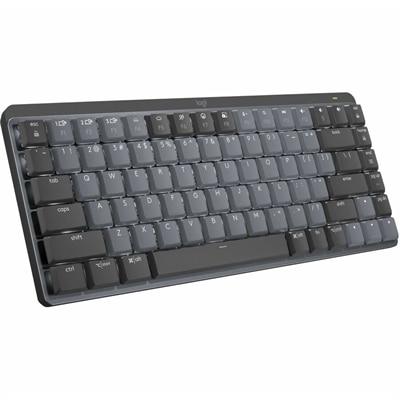
A wireless mechanical keyboard with tactile quiet switches, adaptive backlighting, aluminum construction, Bluetooth, and USB-C charging.

$159.99
$699.99

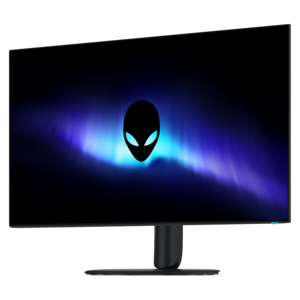
A 4K OLED gaming monitor delivering vibrant colors, sharp text, immersive HDR, and deep black levels.

$699.99
$49.99

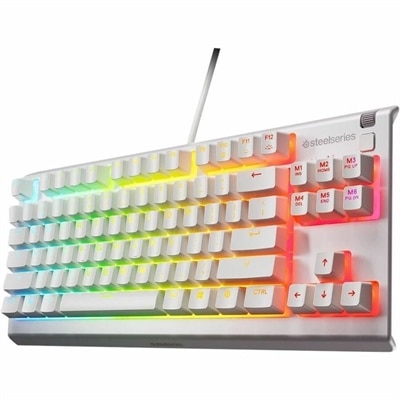
A white tenkeyless gaming keyboard with whisper-quiet switches, anti-ghosting keys, water resistance, and customizable RGB lighting.

$49.99

RGB Lighting Effects

RGB lighting effects use red, green, and blue light-emitting diodes, or LEDs, to create different colors by varying the intensity of each channel. Systems with 8-bit control per channel can produce more than 16 million color combinations, although the range and appearance depend on the hardware, controller, and software. Across gaming desktops, laptops, keyboards, mice, and other computer accessories, these lights add anything from a quiet accent to an animated display. A static effect holds one color, breathing gradually brightens and dims, and color cycling moves through a sequence of hues. Wave effects send bands of color across a lighting surface, while reactive effects may respond to keystrokes, sound, or supported on-screen activity. Those responses require compatible hardware and software; they are not built into every illuminated accessory. Standard RGB lighting commonly applies the same color to a connected group of LEDs, while addressable RGB allows compatible controllers to assign different colors to individual LEDs or segments. That distinction makes a visible difference when several colors appear along one strip or move independently across a keyboard. Separate lighting zones can also offer customization without giving individual control over every LED. The result depends as much on the placement and diffusion of the light as on the number of colors supported. A softly illuminated edge can outline a desktop without drawing attention away from the screen, while exposed points of light create a sharper, more technical look. For coordinated setups, compatible lighting controls can help several accessories share a palette or animation, but matching connectors alone does not guarantee synchronized effects. Software support, operating system requirements, and the features of each device all matter. Lighting on a monitor’s housing or stand is also separate from the image on its panel, so decorative effects should be considered independently from screen resolution, refresh rate, and color performance.

The physical design of illuminated computer accessories shapes how RGB lighting looks and how comfortably the equipment fits into everyday use. Translucent plastic diffusers soften visible LED hotspots, while opaque housings direct light toward key legends, edges, logos, or the surrounding surface. Metal panels can provide a firm, substantial feel, but material alone does not determine durability; construction, switches, cable connections, and the finish around frequently touched areas all contribute. On a keyboard, light-through legends can make individual characters easier to distinguish in a dim room, whereas lighting confined to the outer frame serves a more decorative purpose. Keycap design and LED placement influence how evenly letters appear, especially when viewed from an angle. For mouse users, shape, grip comfort, button placement, and weight remain important even when the lighting is a central part of the look. A compact keyboard leaves more room for broad mouse movements, while a larger layout may better suit someone who frequently enters numbers or uses dedicated controls. For desktop-centered lighting, RGB PC Lights can complement illuminated peripherals, with dimensions, mounting methods, and connection requirements helping determine the right fit. A light strip positioned behind a desk creates a different impression from one visible through a computer enclosure, and nearby white walls tend to reflect color differently from dark surfaces. Adhesive-backed lighting needs a suitable mounting surface, while clips or magnetic mounts offer different placement possibilities where supported. Internal lighting accessories require particular care with electrical compatibility: standard RGB and addressable RGB connections can use different voltages and pin arrangements and are not automatically interchangeable. External accessories may instead draw power through USB or a dedicated adapter. Cable length, access to ports, and room for normal movement help keep an illuminated setup practical rather than crowded. None of these decorative additions should obstruct ventilation, cover controls, or interfere with the comfortable placement of a keyboard, mouse, or display.

Everyday use often calls for more flexibility than a constantly moving rainbow. A gamer might enjoy a quick ripple across the keys during an evening session, then switch to a steady, low-brightness color for reading or messaging. A student sharing a room may prefer lighting that can be dimmed or turned off without disconnecting the accessory. Someone moving between creative work and video meetings may appreciate separate profiles for a colorful personal workspace and a more restrained background on camera. Adjustable brightness and an accessible off setting can be as useful as a large selection of animations. Fast transitions and pulsing patterns can be distracting, particularly in peripheral vision, so a stable effect may feel more comfortable during concentrated work. Light reflected in a glossy display can also compete with the image, making placement important in smaller spaces. Decorative RGB lighting is not a substitute for suitable task lighting, and a color chosen for atmosphere should not be mistaken for an improvement in display accuracy or computer performance. On battery-powered devices, illuminated effects consume energy, with the impact depending on brightness, pattern, and hardware design. Features such as onboard profile memory, where supported, can help retain a preferred appearance when a device moves between compatible computers. For gifts, illuminated accessories can suit gamers, computer enthusiasts, or anyone personalizing a home workspace, especially when the recipient’s layout preferences and connection requirements are already known. Long-term enjoyment also depends on ordinary care. Dust can dull translucent surfaces, and fingerprints are especially noticeable on glossy finishes. Cleaning should follow the manufacturer’s instructions, generally with power disconnected and without spraying liquid directly into openings. Flexible light strips and attached cables need protection from sharp bends, repeated pulling, and pressure from furniture. With comfortable controls, appropriate fit, and effects that match the setting, RGB lighting can bring a distinctive visual character to equipment used for work, study, and play without overwhelming the space around it.

FAQs:

Add the products you would like to compare, and quickly determine which is best for your needs.

Add the products you would like to compare, and quickly determine which is best for your needs.