$275.99
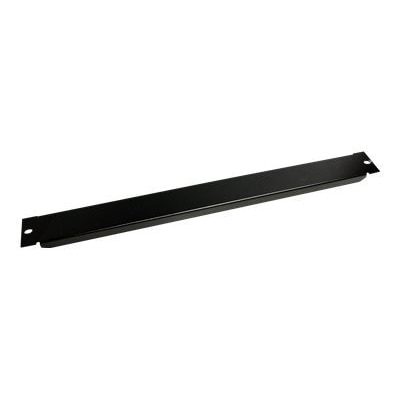
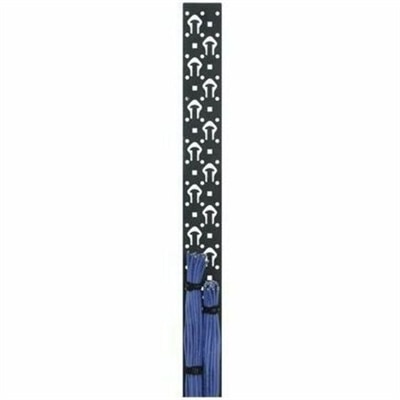
A black powder-coated steel lacer strip providing vertical cable management with tie posts and mounting holes.
Optimize your data center or IT workspace with server rack vertical cable management solutions designed to keep cables organized and accessible. Proper cable management not only enhances the appearance of your server racks but also supports efficient airflow and simplifies maintenance tasks. Whether you're setting up a new system or upgrading an existing setup, explore a variety of options tailored to help streamline your network infrastructure. Discover how server rack vertical cable management can contribute to a cleaner, more efficient, and professional environment for all your technology needs.
A black powder-coated steel lacer strip providing vertical cable management with tie posts and mounting holes.
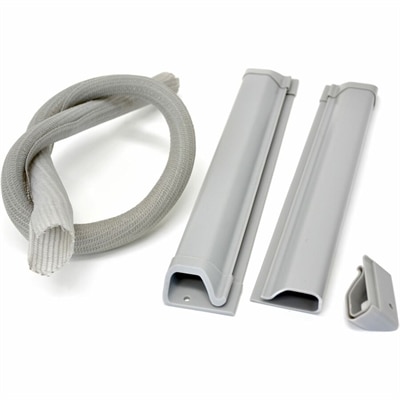
Vertical cable management organizes cords along an upright path, helping keep connections accessible while reducing loose loops around computers, monitors, and other desktop electronics. Instead of allowing every cord to fall behind a work surface, a vertical organizer provides a defined route between devices and their connection points. The practical difference is easy to see in a workspace with a laptop, external display, keyboard, and several charging cables: cords follow the edge of the furniture rather than spreading across the floor or catching behind a chair. Common designs include enclosed channels, slotted channels, open retaining loops, and flexible sleeves, each offering a different balance of coverage and access. Enclosed channels conceal much of the bundle and create a more uniform appearance, while open loops make it easier to trace a cord or change a connection without disturbing neighboring cables. Slotted channels allow individual leads to enter or exit at different heights, which can be useful when devices sit on separate shelves or at different positions along a desk. Flexible sleeves gather several cords into one manageable bundle, although they generally need separate attachment points to establish a supported vertical route. The best fit depends on how the workspace functions throughout the day, not simply on how many cables it contains. A permanent desktop arrangement may benefit from a covered path that stays largely untouched, whereas a shared workstation often needs straightforward access for changing laptops and accessories. Vertical organization also helps make individual connections easier to identify, particularly when several cords have similar colors and connector shapes. For a broader view of organizing approaches, Cable Management Systems provides a related category to explore. Across these approaches, the underlying purpose remains the same: give cables a supported, accessible route without forcing tight turns, placing unnecessary tension on plugs, or blocking the everyday use of the workspace.
Dimensions and mounting details matter as much as the organizer’s overall shape. Height determines how much of the vertical route receives support, while usable internal width and depth determine whether the bundle can rest comfortably inside. Outside measurements alone do not show how much room remains beneath a cover or between retaining fingers. A few thin charging leads occupy far less space than a mixed bundle containing thicker display and power cords, and large connector housings may need additional clearance at entry and exit points. Leaving some open space makes later adjustments easier and helps prevent cables from being compressed when a cover closes. Gentle changes in direction are preferable to sharp corners; the appropriate minimum bend radius depends on the cable and should follow its manufacturer’s specifications. A cable that reaches its port only when pulled taut needs a different route or a suitable length, rather than stronger fastening. Mounting compatibility deserves the same attention. Screw-mounted designs need an appropriate supporting surface, matching hardware, and clearance behind the attachment point. Clamp-mounted designs depend on furniture thickness and edge shape, while adhesive-backed designs require a compatible, properly prepared surface and use within their stated load limits. Painted, textured, or delicate finishes may need particular care because attachment and removal can affect their appearance. Materials influence both handling and long-term performance. Molded plastic can offer a lightweight structure with smooth routing features, though thin fingers and tabs may be vulnerable to repeated bending. Metal designs can provide a rigid support structure, but edges, openings, and protective finishes still need close attention wherever they contact cable jackets. Fabric sleeves offer flexibility and a softer surface, with closure quality and resistance to fraying affecting repeated use. For any material, smooth contact points, secure closures, and accessible mounting hardware are more useful indicators of suitability than appearance alone. Removable covers should open without pulling on the bundle, and retaining loops should hold cords without pinching them.
Everyday use reveals details that are easy to overlook in an empty workspace. At a height-adjustable desk, the cable route must accommodate the full travel between sitting and standing positions without pulling on a monitor connection or leaving a loop where feet can catch it. A display on an adjustable arm needs enough free cable to move through its intended range, with support positioned so that the connector does not carry the hanging weight. In a compact home office, a vertical path along the back of the furniture can help keep the area beneath the desk clearer, but the route should remain separate from moving drawers, chair mechanisms, and sharp edges. Students, remote workers, creative professionals, and households sharing a computer may each value different features: quick access for a frequently disconnected laptop, discrete exit points for multiple displays, or a covered bundle that is less visually distracting in a multipurpose room. In each case, organizing cords should preserve access to plugs and avoid covering device vents or enclosing power adapters in a way that conflicts with their ventilation requirements. Cable organizers support and route cords; they do not repair damaged insulation, increase an electrical connection’s capacity, or replace appropriate electrical protection. Reusable straps can keep a bundle together without the difficulty of cutting away a permanent fastener during every adjustment, provided they are not tightened enough to deform the jackets. Small, readable labels near connection points can also make maintenance less disruptive when similar cords sit side by side. Care is usually straightforward but should follow the organizer’s material and manufacturer recommendations. Accessible surfaces can be dusted with a soft, dry cloth, while any permitted cleaning solution should stay away from electrical connections. Periodic checks are useful after moving furniture or changing devices: confirm that attachments remain secure, covers close freely, and no cable has become trapped or sharply bent. A durable arrangement is one that stays manageable as the workspace changes, keeping frequently used connections within reach and supporting longer cable runs without turning a simple device change into a complete reorganization.
Add the products you would like to compare, and quickly determine which is best for your needs.