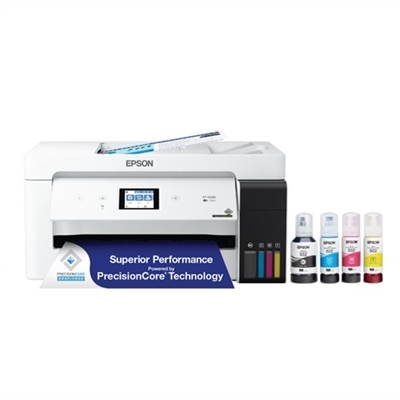
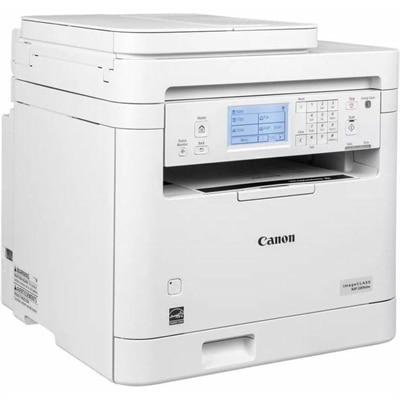
Small Office Multifunction Laser Printers
Small office multifunction laser printers deliver efficient and reliable performance for businesses looking to streamline their workflow. Designed to handle daily tasks with ease, these versatile devices combine printing, scanning, copying, and faxing capabilities in one compact unit. Ideal for maximizing productivity in limited spaces, small office multifunction laser printers offer a practical solution to meet the diverse needs of any growing team. Explore options that help your office stay organized and connected while maintaining professional-quality results.
This product is not available
Check out the following recommendations.




Small Office Multifunction Laser Printers
Small office multifunction laser printers bring printing, scanning, and copying together in one machine, making them a practical fit for workspaces where every surface has a job. Often called all-in-one laser printers, these devices handle everyday paperwork without requiring separate equipment for each task. A three-in-one model typically prints, scans, and copies, while a four-in-one model adds fax capability for offices that still exchange documents that way. For a bookkeeper preparing monthly statements, a consultant marking up proposals, or a small front desk copying forms, the benefit is straightforward: fewer steps between receiving a document and putting it to work. Laser printing uses toner rather than liquid ink and is particularly well suited to crisp text, fine lines, and recurring batches of business documents. Monochrome multifunction laser printers print in black and white, making them a sensible choice when most output consists of invoices, contracts, shipping documents, and internal notes. Many monochrome models can still scan in color, although that capability should be confirmed in the specifications. Color multifunction laser printers add flexibility for charts, presentation handouts, instructional materials, and documents where colored highlights help readers find information quickly. They are useful for general business graphics, though they are not usually the first choice for photographic prints with subtle tonal detail. In a compact office, the right choice depends less on having every available feature and more on the work that crosses the desk each week. Think of the morning stack: a signed agreement to digitize, a few pages to copy, and a revised schedule to print before everyone arrives. A well-matched multifunction printer keeps those ordinary tasks moving without taking over the room. Independent professionals, small administrative teams, educators working from home, and owners managing their own paperwork can all benefit from that combination of functions. For a workspace that also serves household needs, Laser Printers For Home Office Use offers a related selection to consider alongside office-focused multifunction models.
Print speed, paper handling, and scanning features make the biggest difference once a printer becomes part of the daily routine. Speed is generally listed in pages per minute, or ppm, but that number does not tell the whole story. First-page-out time matters when you usually print one invoice or a short letter at a time; sustained speed becomes more important when several people send longer documents throughout the day. Published speed ratings also depend on test conditions, and two-sided printing may run at a different pace from one-sided output. Automatic duplex printing prints on both sides of a sheet without manual reinsertion, helping reduce paper use and keeping multipage documents less bulky. It is separate from duplex scanning, a distinction worth checking carefully. An automatic document feeder, or ADF, moves a stack of originals through the scanner for copying or digitizing, sparing you the repetitive lift-place-close routine of using the flatbed for every page. A single-sided ADF generally captures one side per pass. A duplex ADF can capture both sides automatically, while a single-pass duplex ADF captures both sides in one pass, which is especially convenient for double-sided agreements and intake forms. The flatbed remains useful for bound pages, delicate originals, and materials unsuitable for the feeder. Compare feeder capacity with the size of your usual document batches, and check supported paper sizes for both the scanner glass and the ADF. Legal-size printing, for example, does not necessarily mean the flatbed can scan a legal-size original. Paper tray capacity deserves similar attention: a 250-sheet tray can accommodate a substantial stack of everyday office paper, while additional capacity may be worthwhile for shared use. A multipurpose tray or manual feed slot can make occasional envelopes, labels, or heavier paper easier to manage, provided those materials meet the printer’s requirements. Check the output tray, too; a large input tray is less helpful if finished pages need frequent clearing. These details are easy to overlook until a busy afternoon turns into repeated trips across the room.
Ownership costs, connection options, and physical fit help distinguish a printer that looks suitable on paper from one that works comfortably in your office. Start with estimated monthly printing, then compare it with the manufacturer’s recommended monthly print volume rather than relying only on the maximum duty cycle. The recommended range is a more useful reference for routine workloads; the maximum duty cycle is not a target for continuous use. Look beyond the initial price to toner replacement costs, cartridge yields, and any separately replaceable drums or other maintenance components. Included starter cartridges may contain less toner than replacement cartridges, and published yields reflect standardized testing rather than a promise for every mix of documents. Pages with dense graphics or heavy coverage can use more toner than simple text. High-yield cartridges may lower the cost per page when your volume justifies them, while color printing introduces additional consumables to budget for. For connectivity, USB can suit a printer used by one nearby computer, while supported wired or wireless connections can make sharing easier. Confirm compatibility with your computers, operating systems, and mobile devices, including the wireless bands supported by the printer. Mobile printing, scan-to-email, cloud destinations, and searchable document creation vary by model and may require software, accounts, or additional setup. Offices handling sensitive paperwork may also value authenticated access, secure print release, and available firmware updates. Finally, measure more than the closed machine. Leave room to open the scanner lid, extend trays, load originals, replace toner, and reach areas used for clearing paper jams, following the manufacturer’s clearance guidance. A printer beside your chair also makes operating noise more noticeable than one across the room, so sound ratings and quiet modes can matter in shared or call-heavy spaces. Clear controls, an accessible screen, and straightforward maintenance are worth considering alongside speed. When those practical details match the workload, a small office multifunction laser printer becomes a dependable part of the workspace: ready for a single signed page, a neatly collated packet, or the week’s paperwork waiting to be filed.
FAQs:
Multifunction laser printers combine printing, scanning, copying, and often faxing into one device, saving valuable workspace and streamlining document management. They offer fast print speeds, reliable performance, and lower cost-per-page for text documents, making them ideal for busy small office environments.
A black only printer is typically more cost-effective for offices that primarily print text documents, offering lower running costs and less maintenance. Color laser printers are better suited for offices that need to produce presentations, marketing materials, or any documents requiring color graphics, though the color laser printer cost is generally higher.
Key features to consider include wireless connectivity for easy sharing, automatic duplex printing for double-sided documents, an automatic document feeder for efficient scanning and copying of multipage documents, and robust security settings to protect sensitive information.
A multifunction printer makes a thoughtful gift for entrepreneurs, remote workers, recent graduates setting up a home office, or anyone launching a small business. It’s a practical tool that supports productivity, organization, and seamless document handling.
Yes, many multifunction laser printers are equipped with both scanning and faxing capabilities. These all-in-one devices are especially useful in small offices where handling contracts, forms, and other official documents is a regular part of business operations.