$59.99
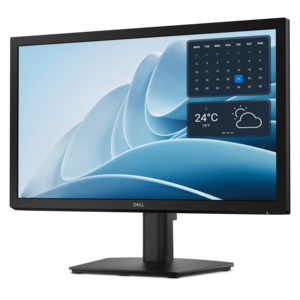
A smooth 100Hz monitor with TÜV Rheinland 3-star eye comfort certification for everyday productivity.
Discover the perfect present for any occasion with tech gifts under $100. Whether you're shopping for a gadget enthusiast or looking to surprise someone with the latest in technology, you'll find an array of innovative options that fit your budget. Explore affordable electronics and accessories designed to bring convenience, entertainment, and style into everyday life—all without breaking the bank. Find thoughtful choices that make gifting both easy and memorable.
A smooth 100Hz monitor with TÜV Rheinland 3-star eye comfort certification for everyday productivity.
A productivity monitor offering 100Hz refresh and eye comfort solutions that reduce blue light emissions.
Tech gifts bring a personal touch to everyday routines, whether the recipient spends the morning working on a laptop, unwinds with a game after dinner, or carries a computer between campus and home. Computer accessories make thoughtful gifts because their usefulness often comes from small improvements: a more comfortable grip, a clearer voice on a call, a tidier workspace, or fewer tangled cords in a bag. The strongest fit depends on how someone already uses technology rather than how many features an accessory includes. A frequent traveler may appreciate compact proportions and components that pack neatly, while someone with a permanent desk may prefer a fuller layout and room to spread out. For a student sharing a room, quiet operation and a small footprint can matter more than decorative lighting. For a friend who works remotely, comfortable audio accessories and dependable connections can help the day flow with fewer interruptions. Gifts for gaming enthusiasts can support both play and ordinary computer tasks, especially when controls feel familiar and adjustments are easy to reach. Compatibility is central to all of these uses. A connector that fits physically does not necessarily support every function, and wireless accessories may depend on a particular operating system, connection method, or software version. USB-C connections, for example, can differ in their support for charging, video, and data transfer. Bluetooth connectivity can reduce cable clutter, but pairing requirements and the number of supported devices vary. Accessories that use a separate wireless receiver also need a suitable port and a secure place to keep that receiver during travel. Clear compatibility information helps distinguish a thoughtful addition from something that requires extra adapters or an unexpected change in routine. The result is a gift that feels at home beside the recipient’s existing laptop, desktop, or monitor, with a purpose that becomes apparent the first time it is used.
Comfort, materials, and construction shape how a tech gift feels long after the wrapping comes off. For accessories handled throughout the day, dimensions and weight deserve as much attention as appearance. A compact shape can slip easily into a commuter bag, yet a larger design may offer better support for someone who spends hours at a desk. Hand size, preferred grip, and left- or right-handed use influence how natural handheld controls feel. With wearable audio accessories, headband adjustment, ear cushion depth, clamping pressure, and overall weight affect comfort during long conversations or study sessions. Soft padding can feel welcoming at first touch, but its covering and stitching also influence how it holds up to repeated use. Smooth plastics are often lightweight and easy to wipe clean, while textured surfaces can provide a more secure grip. Metal components may add rigidity, though they can also increase weight. Fabric finishes bring a softer feel but may collect lint or require more careful cleaning. None of these materials guarantees durability on its own; well-supported connection points, consistent seams, stable bases, and reinforced cable ends are useful construction details to consider. At a desk, a nonslip underside helps an accessory stay put when someone reaches across a notebook or moves between tasks. In a bag, rounded edges and protected connectors help reduce snagging against linings and other belongings. Protective accessories should match the device’s actual dimensions, including thickness, rather than relying only on its screen size. A close fit keeps a laptop from shifting excessively, while enough clearance around a zipper helps prevent awkward pressure at the corners. Water resistance, where specified, should be understood according to the manufacturer’s rating rather than treated as permission to expose electronics to any conditions. Everyday care is usually straightforward: disconnect power before cleaning, use an appropriate soft cloth, keep moisture away from openings, and follow the manufacturer’s directions for cleaning solutions. Gentle cable loops and storage away from excessive heat can also help preserve condition between uses.
The details of a recipient’s day give tech accessories their meaning as gifts. On a kitchen table that becomes a temporary workspace, equipment that sets up quickly and tucks away neatly can make the transition from breakfast to a morning meeting less cumbersome. At a dedicated workstation, adjustable positioning can help bring a screen or input surface into a more comfortable arrangement, provided the accessory supports the device’s size and weight. In a shared apartment, private listening and a microphone positioned close to the speaker’s mouth can make conversations easier to manage without filling the room with sound. Microphone noise reduction and listening noise cancellation serve different purposes, so those descriptions should not be treated as interchangeable. For someone who moves between locations, battery runtime, charging requirements, and the ability to operate while connected can be more useful than an elaborate set of optional settings. Published runtime figures typically depend on usage conditions, and features such as lighting or higher volume can change how often charging is needed. Simple controls, readable indicators, and easy-to-find support information also contribute to a smoother experience, particularly for recipients who prefer technology that requires little adjustment. If companion software is involved, its system requirements and any account requirements are worth understanding before the gift becomes part of a daily routine. Birthdays, graduations, housewarmings, and thank-you occasions all lend themselves to practical technology gifts, especially when the choice reflects a familiar habit: the relative who joins every family video call, the graduate arranging a first workspace, or the friend who always carries a laptop to the library. For a broader selection of related gift ideas, Tech Gifts Under $200 offers another collection to explore. Across these occasions, lasting usefulness comes from the same foundations: compatible connections, comfortable proportions, appropriate materials, and a clear role in the recipient’s day. An accessory does not have to change an entire setup to feel personal; sometimes the most appreciated improvement is the one that quietly removes a familiar inconvenience.
Add the products you would like to compare, and quickly determine which is best for your needs.