$34.99
A wired productivity keyboard with built-in collaboration keys, designed for comfortable, efficient typing.
Technology for homeschooling empowers students and educators to create a dynamic and engaging learning environment at home. With the right tools, families can support virtual lessons, interactive projects, and seamless communication. Explore a wide range of devices and accessories designed to enhance productivity, encourage creativity, and make every homeschooling day more efficient. Find everything you need to build a flexible and inspiring setup with technology for homeschooling.
A wired productivity keyboard with built-in collaboration keys, designed for comfortable, efficient typing.
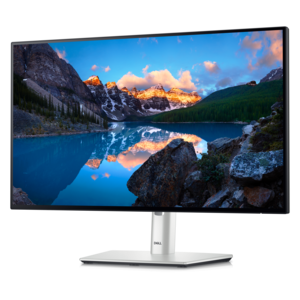
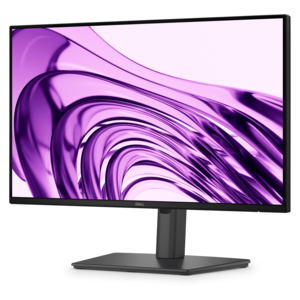
A smooth 100Hz monitor with TÜV Rheinland 3-star eye comfort certification for everyday productivity.
An AI-powered premium conferencing soundbar delivering clear audio with enhanced noise cancellation.
An intelligent 4K webcam delivering vibrant, full-spectrum clarity for secure, next-level collaboration.
A Full HD conferencing monitor with built-in webcam, speakers, and microphone for seamless everyday collaboration.
A 1080p conference camera with full-duplex speakerphone audio, autofocus, remote pan-tilt-zoom, and echo cancellation.
A TÜV-certified USB-C hub monitor offering 4-star eye comfort, enhanced productivity and extensive connectivity.
A durable, serviceable Chromebook designed specifically for education environments.
A durable, serviceable Chromebook designed for K–12 learning environments.
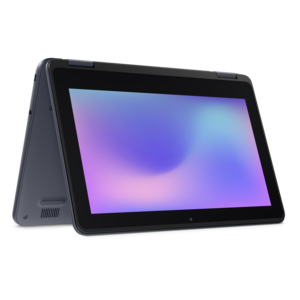
A durable, serviceable laptop or 2-in-1 designed specifically for K-12 learning environments.
A durable, serviceable Chromebook designed specifically for education environments.
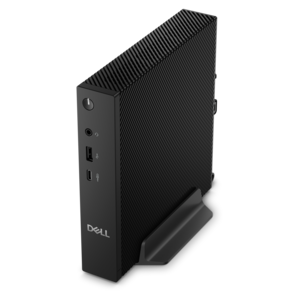
A compact thin client supporting cloud software, ThinOS, Windows 11 IoT Enterprise, or no operating system.
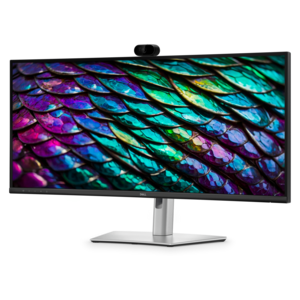
A curved WQHD IPS conferencing monitor with built-in webcam, speakers, microphone, and USB-C hub.
A remarkably thin, lightweight laptop designed for ultimate mobility and effortless everyday productivity.
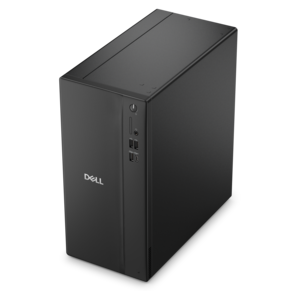
A business-ready tower desktop delivering reliable everyday performance with essential security features for productive workflows.
A powerful desktop designed to boost everyday productivity in a streamlined setup.
A durable, serviceable laptop or 2-in-1 designed specifically for demanding education environments.
A compact desktop delivering reliable performance and security for everyday productivity.
A durable, serviceable laptop designed specifically for demanding education environments.
A portable laptop with a sleek design, 16:10 display, and AI PC options for productivity anywhere.
A business-ready tower desktop delivering dependable performance and security for everyday productivity workloads.
A space-saving business desktop delivering reliable everyday performance with essential security features for productive work.
A sleek, portable laptop with an expansive 16:10 display for reliable productivity anywhere.
A modern laptop with AMD Ryzen™ processors, delivering effortless productivity and captivating entertainment in a design.
Technology for homeschooling connects everyday lessons with the tools students need to read, research, write, create, and share their work. A practical home learning setup often centers on a laptop or desktop, with a monitor, keyboard, mouse, and headset supporting the way each student learns. The right combination depends on the curriculum, the learner’s independence, and the space where schoolwork happens. A younger child practicing letter sounds may benefit from a responsive touchscreen and simple navigation, while an older student drafting essays or comparing historical sources needs a comfortable keyboard and enough screen space to keep reference material beside a document. Laptops suit households where lessons move from a kitchen table to a quiet bedroom or a weekly learning group. Desktops make sense for a dedicated study area, especially when several family members use the same workstation at different times. For families whose assignments revolve around browser-based lessons and online documents, Chromebooks For Homeschooling offers a focused starting point for exploring that type of computer. Compatibility with required coursework remains important: some subjects use downloadable applications, specialized testing tools, or creative software that may require a particular operating system. Memory and processing capability also affect the daily experience, particularly when a student joins a video lesson while viewing a textbook and taking notes. A typical morning might include a live discussion, a written response, and a short educational video; a computer suited to those overlapping tasks can help keep attention on the assignment rather than on waiting for applications to respond. Battery runtime matters when an outlet is not within reach, although actual runtime varies with settings and activities. For shared computers, separate user profiles can help keep assignments and preferences organized. Homeschooling computers are most useful when they support a familiar routine without making every part of the school day dependent on a screen.
Comfort and physical fit matter because a device that works well for a quick search may feel very different during a full writing session. Screen size, display clarity, keyboard spacing, and mouse shape all contribute to how naturally a student can work. A compact laptop is easier to carry between rooms, while a larger display gives maps, diagrams, and side-by-side documents more room. An external monitor can turn a portable computer into a more spacious workspace for research projects, presentations, and creative assignments. Adjustable stands help position the screen for different users, and a separate keyboard and mouse allow more flexibility in placing the computer. At a shared family desk, those adjustments can make the transition from a child’s spelling practice to an adult’s lesson planning much simpler. Display brightness and placement deserve attention in rooms with changing daylight; reflections from a nearby window can make small text harder to follow. Headsets with adjustable headbands, cushioned earcups, and microphones can support conversation during virtual lessons while helping distinguish a speaker’s voice from household activity. Fit and weight are especially relevant for smaller learners, and listening volume should remain at a comfortable level. A webcam’s positioning matters, too, whether a student is speaking to a tutor or showing a page of handwritten calculations. Connection types are another practical consideration, since monitors, webcams, keyboards, and other accessories need compatible ports or appropriate adapters. Where several accessories stay connected, a compatible docking station can simplify the transition between a mobile laptop and a regular study spot. Physical construction also influences everyday use. Housing materials, hinge design, and reinforced edges are worth considering for computers that are opened, closed, and carried frequently. A padded sleeve or fitted carrying case helps protect a laptop during transport, but it does not make the device drop-proof. Cable routing, a stable work surface, and space away from drinks help keep a busy learning area easier to use and maintain.
Homeschool technology also supports the work surrounding a lesson, from preparing materials to documenting progress. A keyboard and mouse can make it easier for a parent or caregiver to organize assignments, maintain records, and prepare the next day’s activities on the same computer a student uses for coursework. For learners, dependable input devices support skills that build over time: typing a paragraph, editing a report, arranging slides, or writing a first piece of code. Creative projects may call for a touchscreen or compatible digital pen, particularly when sketching a diagram or annotating an image is more useful than typing. Pen support varies by device, so compatibility matters more than appearance alone. Accessibility features such as text enlargement, read-aloud functions, captions, and voice typing can offer different ways to engage with assignments, though support depends on the operating system and applications. Built-in parental controls and individual accounts may help families manage access and device use, but they do not replace supervision or conversations about online safety. Technology fits most naturally into homeschooling when it leaves room for paper, books, experiments, movement, and time outdoors. A student might watch a short demonstration, close the laptop to build a model, and return later to describe the results. That balance gives the computer a clear purpose rather than making it the center of every activity. Everyday care helps preserve the equipment that supports those routines. Screens generally need gentle cleaning with a soft, lint-free cloth according to the manufacturer’s directions, with liquids kept away from openings and ventilation areas left unobstructed. Chargers and cables benefit from careful handling rather than tight bends or pulling at the cord. Operating system updates and regular backups of schoolwork also belong in the household routine. Whether the setup serves one independent learner or several siblings sharing a workspace, well-matched computers and accessories can support focused study, creative exploration, and the practical rhythm of learning at home.
Add the products you would like to compare, and quickly determine which is best for your needs.