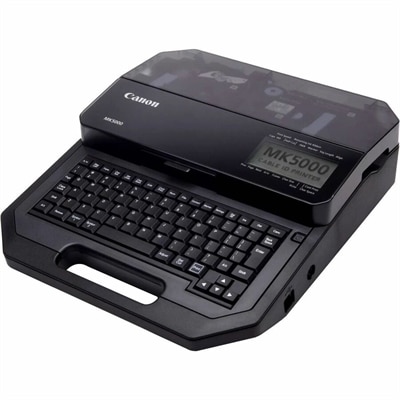
$1329.00
A thermal-transfer marker printer delivering 300-dpi output across tubes, tapes and plastic plates with dual-power flexibility.
Thermal printers are essential devices for businesses and individuals who require efficient, high-quality printing solutions. Utilizing advanced thermal technology, these printers offer reliable performance for a variety of applications, from producing crisp labels and receipts to creating detailed barcodes and shipping documents. With their compact design and user-friendly operation, thermal printers are ideal for environments where space is limited, yet precision and speed are paramount. Whether you're outfitting a retail store, managing inventory in a warehouse, or streamlining operations in an office setting, thermal printers provide the versatility and dependability needed to keep your tasks running smoothly.
A thermal-transfer marker printer delivering 300-dpi output across tubes, tapes and plastic plates with dual-power flexibility.
Thermal printers are compact, efficient devices designed to produce labels, receipts, tags, tickets, barcodes and other practical prints with heat rather than conventional liquid ink. A thermal printhead contains rows of tiny heated elements that activate selected areas as paper or label material passes beneath it. In a direct thermal printer, the heat reacts with a coating on specially treated paper, creating dark text and images without ink cartridges, toner or a separate ribbon. This straightforward design can make direct thermal printing a convenient choice for shipping labels, appointment slips, inventory stickers, price tags, identification bands and everyday organization at home or in a small workplace. Many models are built for fast, repeated output, which is helpful when preparing a stack of parcels, labeling storage bins or printing a run of product tags. Thermal transfer printers use a different process: heat melts ink from a ribbon onto paper, synthetic stock or another label surface. The resulting print is generally more resistant to moisture, abrasion, sunlight and temperature changes, making thermal transfer a practical option for labels that need to remain readable over a longer period or in more demanding environments. When comparing thermal printers, begin with the materials and formats you expect to use most often. A unit intended for narrow address labels may not support wider tags or receipt rolls, while a model built around standard shipping labels may be less suited to small barcodes or compact organizational stickers. Check the supported label width, roll or sheet format, core size and maximum print length, as well as whether the printer can handle continuous media or pre-sized labels. Print resolution also matters: standard resolution is often suitable for clear text and ordinary barcodes, while higher resolution can improve the appearance of small type, detailed symbols and fine graphics. Direct thermal output is typically monochrome, so it is best suited to information where clarity and speed matter more than color. For colorful photographs, craft projects or visual keepsakes, a Photo Printers category may be a better fit.
The right thermal printer depends as much on workflow as on print quality. For a home office, small business or side project, look for a design that connects easily to the computers, laptops, tablets or smartphones you already use. USB connections can provide a dependable link at a dedicated desk, while Wi-Fi or Bluetooth can make it easier to print from different rooms or from a mobile device. Compatibility with the operating systems and label-design applications in your workflow is important, particularly if you rely on templates, address books, inventory software or online shipping services. A simple setup process, clear status indicators and a convenient media-loading mechanism can save considerable time over the life of the printer. Speed specifications are useful when printing in volume, but the fastest stated rate is not the only factor to consider; the actual result may depend on label size, print density, connection type and the time required for software or shipping platforms to prepare each job. Consider the footprint as well. A portable thermal printer can travel in a tote or sit beside a packing area, making it useful for pop-up selling, mobile services, classroom projects and home organization. A larger desktop model may offer a wider media path, a sturdier feed system and easier access to rolls for frequent use. Features such as automatic cutters, peelers, alignment sensors and adjustable guides can be worthwhile when a printer will handle many labels in succession. If a thermal printer is intended as a practical gift, it can be especially useful for someone who sells handmade goods, manages a household mailing routine, organizes a craft room, runs a local service or enjoys creating a more orderly workspace. Pairing the printer with compatible labels or paper can help the recipient begin using it right away, but verify the supported media before purchasing supplies. Thermal paper is not interchangeable across every device, and a roll that appears similar may have the wrong width, core, adhesive, coating or winding direction.
Long-term print durability is another key consideration. Direct thermal labels are convenient because they do not require ink or toner, but the heat-sensitive coating can gradually fade or darken when exposed to strong sunlight, high temperatures, friction or certain chemicals. This makes direct thermal output a sensible choice for short-term shipping information, temporary organization and routine receipts, but less ideal for records, outdoor identification or labels expected to remain legible for years. Store unused direct thermal rolls in a cool, dry, shaded place and keep finished labels away from prolonged heat and direct sun. Thermal transfer printing uses a ribbon, adding a consumable to the process, yet the printed result may stand up better to handling and environmental exposure. When estimating ongoing ownership costs, account for the price and availability of the correct paper, labels or ribbons, along with the amount of media used for test prints and misaligned jobs. Good alignment and calibration can reduce waste, especially when working with small labels or pre-cut formats. Keep the printhead and feed path clean according to the manufacturer’s instructions, and avoid touching the printhead with rough materials that could cause damage. It is also wise to consider the software experience, replacement-part availability, warranty coverage and the expected daily print volume before making a choice. A thermal printer can bring a satisfying rhythm to repetitive tasks: enter an address, hear the quiet feed motor, and receive a crisp label ready for a package; scan an item, print a tag, and move on to the next piece of inventory. Whether used for a growing home business, a busy office, school activities, household storage or occasional shipping, choosing the correct printing method, media size and connection options will help ensure the device fits naturally into the routines it is meant to simplify.
Add the products you would like to compare, and quickly determine which is best for your needs.