Thunderbolt 3 Cables
Thunderbolt 3 cables are essential for connecting devices and ensuring fast, reliable data transfer between laptops, monitors, external drives, and more. Designed to support high-performance workflows, these versatile cables help streamline your setup whether you're at home, in the office, or on the go. Explore a wide selection of Thunderbolt 3 cables to find the perfect option for your connectivity needs.
This product is not available
Check out the following recommendations.




Thunderbolt 3 Cables
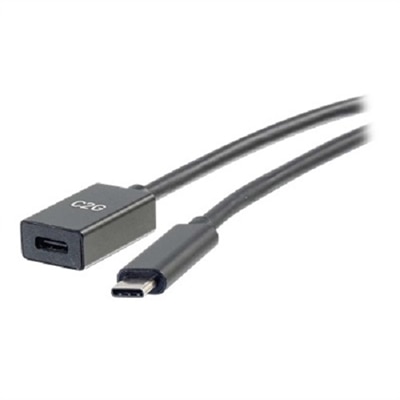
Thunderbolt 3 cables use the compact, reversible USB-C connector to link compatible laptops, desktops, monitors, docks, external drives and other accessories with a single connection. Their standout feature is bandwidth of up to 40 Gbps, which helps move large folders, high-resolution photos and 4K video files quickly between devices. A compatible Thunderbolt 3 connection can also carry power and video, reducing the number of cords needed around a desk. Depending on the computer, display and dock, Thunderbolt 3 may support up to 100W Power Delivery for charging a laptop, a single 5K display or two 4K displays at up to 60Hz. It can also support daisy-chaining several compatible Thunderbolt devices, allowing a streamlined setup in which a laptop connects to a dock or monitor and additional accessories connect downstream. These capabilities make Thunderbolt 3 cables especially useful for people who work with media, design, engineering, photography, music production or large business files, as well as anyone who wants a clean, flexible connection between a laptop and a desktop workspace. They can be helpful in a home office where a single cable connects a portable computer to a monitor, keyboard, mouse, storage accessory and wired network connection through a compatible dock. During the cooler months, when more work and entertainment may move indoors, a dependable cable can make it easier to shift between a mobile setup at the kitchen table and a more comfortable workstation without rearranging every accessory. Thunderbolt 3 cables may also be thoughtful gifts for students, remote professionals, creative hobbyists and frequent travelers who already own compatible devices and appreciate practical upgrades that reduce clutter and waiting time.
When choosing among Thunderbolt 3 cables, start by checking the ports on both devices rather than relying only on the shape of the connector. USB-C describes the connector style, while Thunderbolt 3 describes a set of performance and connection capabilities; not every USB-C port or USB-C cable supports Thunderbolt speeds, displays or full charging power. Look for clear Thunderbolt 3 identification and certification information, particularly when the cable will be used for high-speed storage, a dock or multiple displays. A certified cable is designed to meet the expected performance requirements and can help prevent confusion when a connection works for charging but does not deliver the desired data or video capabilities. Cable length is another important consideration. Shorter passive cables commonly support the full 40 Gbps Thunderbolt 3 rate, while longer passive cables may operate at lower speeds, such as 20 Gbps, depending on their construction and specifications. Active cables can help maintain higher performance over greater distances, although they may have different compatibility or charging characteristics, so checking the details is worthwhile. For a compact laptop-to-dock connection on a nearby desk, a shorter cable can help keep the workspace tidy. For a monitor positioned farther away or a workstation with accessories spread across a large surface, additional length may be more convenient, provided the cable supports the required speed, power and display functions. Also confirm the charging needs of the computer and accessories. Thunderbolt 3 can support up to 100W Power Delivery, but the actual wattage delivered depends on the cable, charger, host device and connected equipment. A cable rated for high-speed data is not automatically the right choice for every charging setup, and a display or dock may have its own power limits. Reviewing the maximum data rate, Power Delivery rating, video support, length and certification together provides a clearer picture of whether a cable fits the intended system. For users comparing compatible USB-C options for a particular Apple laptop, the selection of USB C Cables for MacBook Pro can provide another place to explore connection needs.
Thunderbolt 3 cables are suited to a wide range of everyday and professional routines. A photographer can transfer a full afternoon of high-resolution images to a computer, edit from a fast external drive and connect a large monitor without repeatedly swapping cables. A video editor can move substantial project files between a laptop and external storage while keeping a high-resolution display attached. At home, a compatible dock can turn a portable computer into a more complete workstation for video calls, writing, studying or managing household tasks, with one Thunderbolt connection handling several peripherals. A gamer or entertainment enthusiast may use a compatible cable to connect a computer to a high-refresh display or external graphics solution, subject to the capabilities of the computer and accessory. Students and hybrid workers can benefit from keeping one cable at a desk and another in a travel bag, making it simpler to connect in a classroom, office or shared workspace. Before purchasing, it helps to consider the devices that will be connected most often, the distance between them, the highest display resolution required and whether charging will pass through the cable. It is also wise to allow for future use: a cable selected only for basic charging may become a limitation when a faster drive, dock or display is added later. Look for sturdy construction, reinforced connector housings and a jacket that can withstand regular coiling, especially if the cable will travel between home and work. Neat cable management can be just as valuable as speed; the right length prevents loops across a desk while leaving enough reach for comfortable placement. With the proper compatibility, rating and length, a Thunderbolt 3 cable can serve as the quiet link behind a more capable workstation, a faster file-transfer routine and a less cluttered everyday setup.
FAQs:
Thunderbolt 3 cables offer significantly higher data transfer speeds (up to 40Gbps), support for dual 4K or single 5K video output, and can deliver up to 100W of power—all through a single connection. They also enable daisy-chaining of up to six compatible devices and provide advanced networking capabilities, making them more versatile than standard USB-C cables.
Thunderbolt 3 cables are especially beneficial for creative professionals working with large files, gamers seeking high refresh rates and multi-monitor setups, remote workers who need efficient workstations, and anyone who values fast data transfer and flexible device connectivity. They are also a great choice for students and tech enthusiasts looking to future-proof their setups.
Yes, Thunderbolt 3 cables are backward compatible with standard USB-C devices. However, when used with non-Thunderbolt devices, the cable will operate at the device’s supported speed and feature set, not at full Thunderbolt 3 performance.
A Thunderbolt 3 active cable maintains the full 40Gbps data transfer speed even at longer lengths, making it ideal for setups that require extended reach. Passive cables may look the same but are typically limited to lower speeds (20Gbps or less) at longer lengths, making them better suited for short connections.
Absolutely. Thunderbolt 3 cables can deliver up to 100W of power, making them ideal for charging laptops, tablets, and other peripherals while simultaneously supporting high-speed data transfer and video output.