$500.00
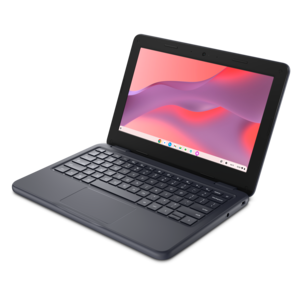
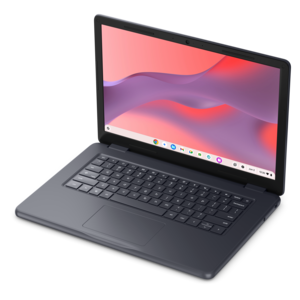
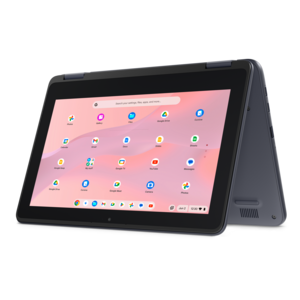
A durable, serviceable Chromebook or 2-in-1 designed specifically for K–12 learning environments.
Touchscreen Chromebooks offer a seamless blend of portability and intuitive navigation, making them ideal for both work and play. With responsive touch displays, these versatile devices provide an interactive experience that enhances productivity and creativity. Whether you’re browsing the web, streaming content, or managing daily tasks, touchscreen Chromebooks deliver convenience and ease of use in a sleek, modern design. Explore available touchscreen Chromebook options to find the right match for your lifestyle and needs.
A durable, serviceable Chromebook or 2-in-1 designed specifically for K–12 learning environments.
A durable, serviceable Chromebook designed for K–12 learning environments, available as a laptop or 2-in-1.
Touchscreen Chromebooks combine the familiar shape of a laptop with the direct, hands-on interaction of a tablet. Instead of relying only on a touchpad or mouse, you can tap an icon, swipe through a webpage, drag an item into place or pinch two fingers to zoom in on a map, photo or document. Many models also use a 360-degree hinge, allowing the display to fold into laptop, tent, stand or tablet positions. That flexibility can make a noticeable difference in everyday routines. A student may type a report at a desk, fold the device back to review a presentation, then use the touchscreen to mark up class materials. Someone following a recipe can set the Chromebook in tent mode on a kitchen counter, while a traveler can hold it like a tablet for reading during a quiet stretch of a trip. ChromeOS is designed around a straightforward, connected experience, with access to web-based tools, cloud storage, entertainment and Android apps on supported devices. Automatic updates and built-in security features help keep the experience simple, while the streamlined interface makes these computers approachable for first-time users and experienced laptop owners alike. For a broader look at available form factors and configurations, explore Chromebook Computers. As the weather shifts and routines move between home, school, work and travel, a touchscreen model can serve as a practical computer for browsing, communication, streaming, homework, light productivity and creative projects without taking up much room in a bag or on a desk.
Screen size is one of the most personal choices when comparing touchscreen Chromebooks. Compact displays in the 11- to 12-inch range are convenient for commuters, younger students and anyone who values a light, easy-to-carry computer. They fit comfortably on a small table and can feel natural in tablet mode, although the smaller workspace may require more scrolling when several windows are open. Displays around 13 to 14 inches often strike a useful balance between portability and comfort, leaving enough room for documents, video calls and browser tabs while remaining manageable in a backpack. Larger screens can make spreadsheets, split-screen research and creative work easier to see, especially when the Chromebook will spend most of its time at home or in an office. Look beyond size to resolution, brightness and viewing angles, since a sharp, bright display can reduce eye strain and make text easier to read in rooms with changing light. A responsive touchscreen should register taps and swipes smoothly, and an included or compatible stylus can be valuable for handwriting, sketching, signing forms or navigating menus with greater precision. Check whether pen support is included, sold separately or limited to particular applications before choosing a model. Hinge construction matters as well: a sturdy 360-degree design should move smoothly while holding its position, and a comfortable keyboard remains important even if the touchscreen is the feature that first catches your attention. For longer typing sessions, look at key spacing, travel, palm-rest comfort and touchpad size. A touchscreen is most useful when it adds another natural way to work rather than replacing the keyboard for tasks that are faster with physical keys.
Performance and endurance deserve equal attention because the right configuration depends on how the computer will be used. For web browsing, email, online learning, streaming and basic documents, an entry-level processor and modest memory may provide a comfortable experience. People who regularly keep many tabs open, move between video meetings and productivity apps, edit photos or work with more demanding web applications may benefit from a faster processor and additional memory. Storage needs also vary: cloud-based files can reduce the need for a large internal drive, while downloaded movies, photos, music and offline documents require more space. Battery ratings are useful for comparison, but actual runtime depends on screen brightness, connected accessories, applications and wireless activity, so consider how often access to an outlet will be available. A lightweight charger, dependable Wi-Fi, Bluetooth support and a useful selection of ports can make a Chromebook easier to live with during school days, work sessions and trips. USB-C connectivity can support charging and compatible accessories, while additional USB ports, a headphone jack or a microSD card slot may be helpful for peripherals and file transfers. Families may appreciate simple profiles and easy access to shared services, while remote workers can benefit from a webcam, microphone and speakers suited to regular video calls. A touchscreen Chromebook can also be a thoughtful gift for a student, a relative learning new digital skills or a frequent traveler who wants a flexible device for reading, communication and entertainment. During the cooler months, its compact footprint is convenient for working from a kitchen table, sofa or shared room, and the ability to switch from typing to tapping can make casual, everyday computing feel less rigid. Reviewing the display, hinge, keyboard, processor, memory, storage, battery expectations and accessory compatibility together will help match the computer to the person and the places where it will be used.
Add the products you would like to compare, and quickly determine which is best for your needs.