Dell Computers with DW5932e WWAN Card Cannot Connect to the Internet after Inserting a SIM Card
Summary: This article provides information about Latitude and Precision Workstations with the DW5932e WWAN card installed cannot connect to the internet after inserting a SIM card.
This article applies to
This article does not apply to
This article is not tied to any specific product.
Not all product versions are identified in this article.
Symptoms
Affected Platforms:
- Latitude 5350
- Latitude 5450
- Latitude 5550
- Latitude 7030 Rugged Extreme Tablet
- Latitude 7350
- Latitude 7350 Detachable
- Latitude 7450
- Latitude 7650
- Latitude 9450
- Precision 3490
- Precision 3590
- Precision 3591
The computer has no internet connection, when turning on the cellular connection from the Windows Network & Internet Setting,
Affected WWAN Cards:
- DW5932e
Cause
It is suspected that the WWAN driver is not updated completely when the user updates through the Windows update.
Resolution
Download and manually install the WWAN driver from the Dell Support website.
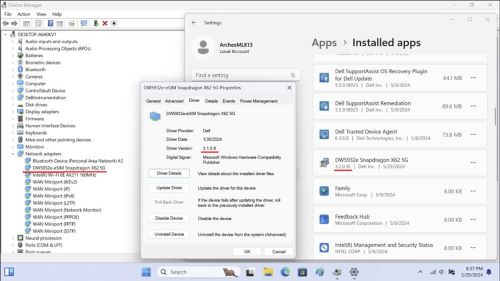
The latest driver DW5932e driver version is 3.2.0.16.
After installing this driver, the Device Manager will show the version as 3.1.0.8.
Note:
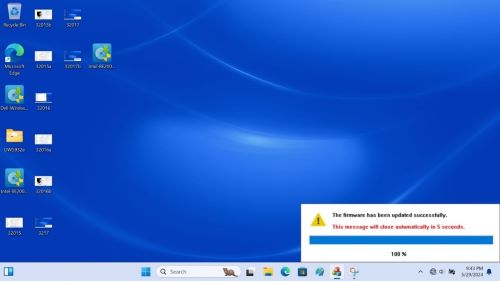
- Do not turn off, put to sleep, or hibernate during the driver installation.
- It takes approximately two to three minutes to complete the installation and there is a progress status on the screen.
- Wait until it reaches 100% or else It may cause the installation to be incomplete.
Affected Products
Latitude 7030 Rugged Extreme Tablet, Latitude 5350, Latitude 7350, Latitude 7350 Detachable, Latitude 5450, Latitude 7450, Latitude 9450 2-in-1, Latitude 5550, Precision 3490, Precision 3590, Mobile Precision 3591Article Properties
Article Number: 000225950
Article Type: Solution
Last Modified: 23 Apr 2025
Version: 5
Find answers to your questions from other Dell users
Support Services
Check if your device is covered by Support Services.