EMC M&R | Watch4net | ViPR SRM: Missing reports and dashboards under the report tree in new installation
Summary: After a new installation, reports and dashboards are missing due to a corrupted "Generic-Reports" module.
This article applies to
This article does not apply to
This article is not tied to any specific product.
Not all product versions are identified in this article.
Symptoms
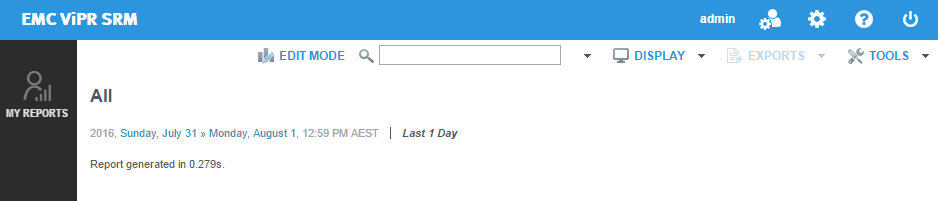
After newly installing Watch4net or ViPR SRM, the report tree only shows the "My Reports" node. All other dashboards and reports are not displayed:
Cause
The Generic-Report module was corrupt during the installation process.
Resolution
To resolve this issue, please update the Generic-Reports module as below:

- SSH or RDP to the Frontend host.
- Run the module-manager command as below:
Linux: /opt/APG/bin/manage-modules.sh update generic-reports Generic-Reports
Windows: "C:\Program Files\APG\bin\manage-modules.cmd" update generic-reports Generic-Reports
Windows: "C:\Program Files\APG\bin\manage-modules.cmd" update generic-reports Generic-Reports
- Accept the default values when prompted to update the files. Example output as below:
srm4fe:~ # /opt/APG/bin/manage-modules.sh update generic-reports Generic-Reports
Required dependencies, in processing order:
   [1]   java '8.0.92' v8.0.92
   [2]   module-manager '1.10u1' v1.10u1
   [3]   generic-event-sender 'Default' v1.3u1
   [4]   webapps-resources 'Default' v1.7u1
   [5]   jdbc-drivers 'Default' v2.7u1
   [6]   whatif-scenario-cli 'Default' v1.4u1
   [7] U generic-reports 'Generic-Reports' v4.0 => v4.0
> 6 not modified, 1 to update
> 5.4 MB space required / 114 GB available
 ? Enter the step to modify, 'yes' to accept them, or 'no' to cancel the operation [yes] > yes

Starting update of generic-reports Generic-Reports from v4.0 to v4.0...
 * Gathering information...
 * Module found in '/opt/APG/Block/generic-reports/Generic-Reports'.
 * It will now be updated using 'generic-reports-4.0.pkg'.
 * Unpacking files...
 * Updating files... 100%
 * 88 files have been updated.
 * Finalizing update...
 ? Do you want to modify the module configuration? (yes/no) [n] > n
Update complete.
srm4fe:~ #
- Upon completion, refresh the Frontend GUI and verify if the new nodes are visible:
Affected Products
SRMProducts
SRMArticle Properties
Article Number: 000061574
Article Type: Solution
Last Modified: 01 Mar 2021
Version: 3
Find answers to your questions from other Dell users
Support Services
Check if your device is covered by Support Services.