PowerStore: Health Checks detects high time skew on Nodes and BMC
Summary: PowerStore: Health Checks detects high time skew on Nodes and BMC.
Symptoms
Various services in PowerStore can detect this issue.
The issue may be detected and reported as follows:
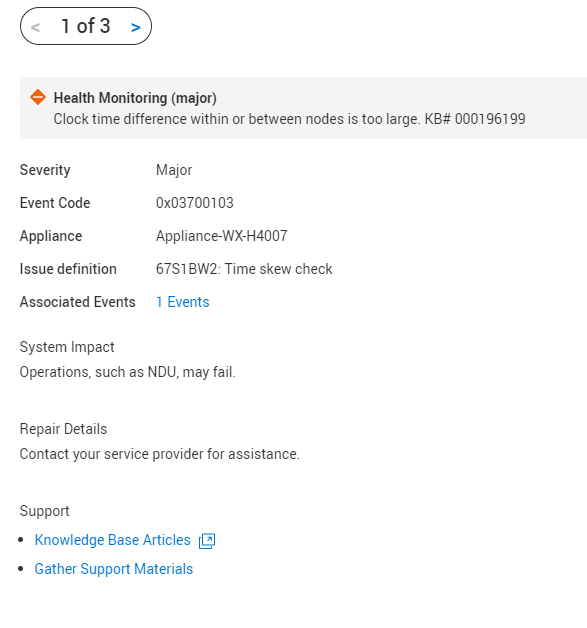 |
Running a System Check using PowerStore Manager (UI) with the Run Upgrade Extensions option:
System Check may display a message Too high time skew on Nodes and BMC.
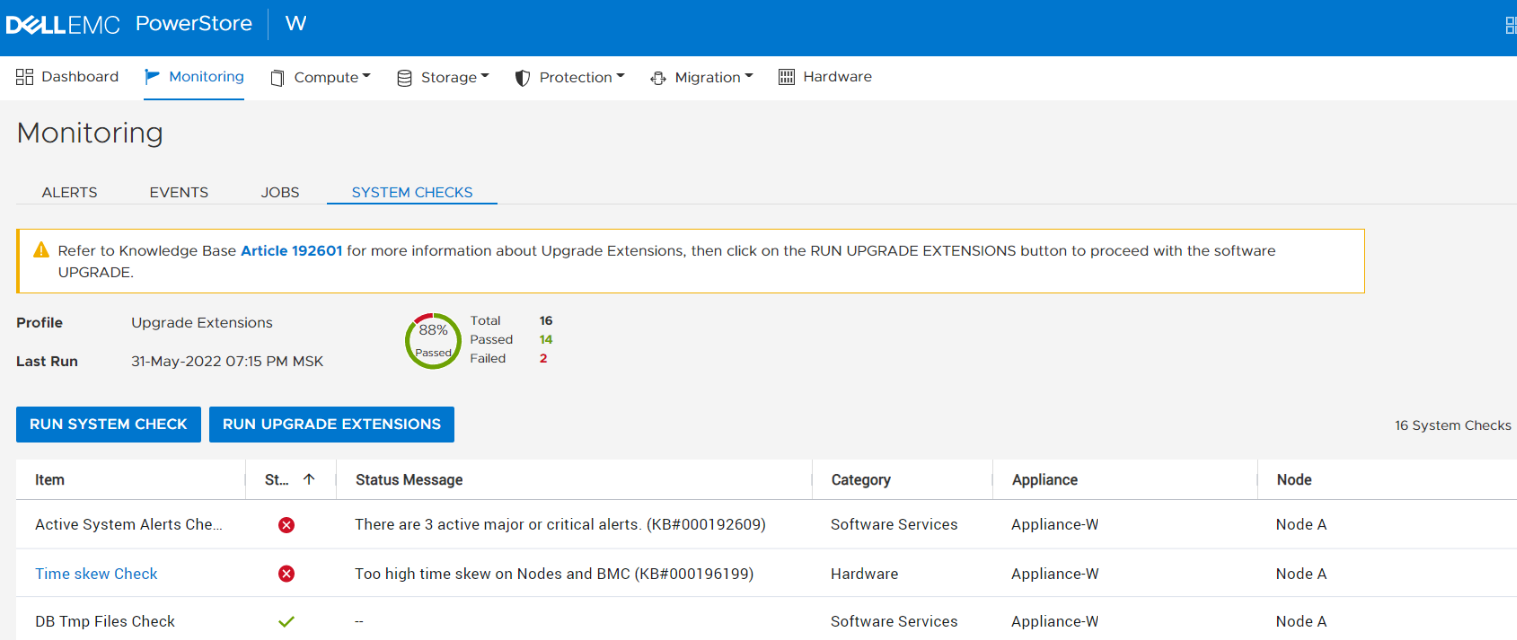
Tip: The Profile field displays Upgrade Extensions when the Run Upgrade Extensions option is used to perform a System Check.
System Check may display a message Too high time skew on Nodes and BMC.
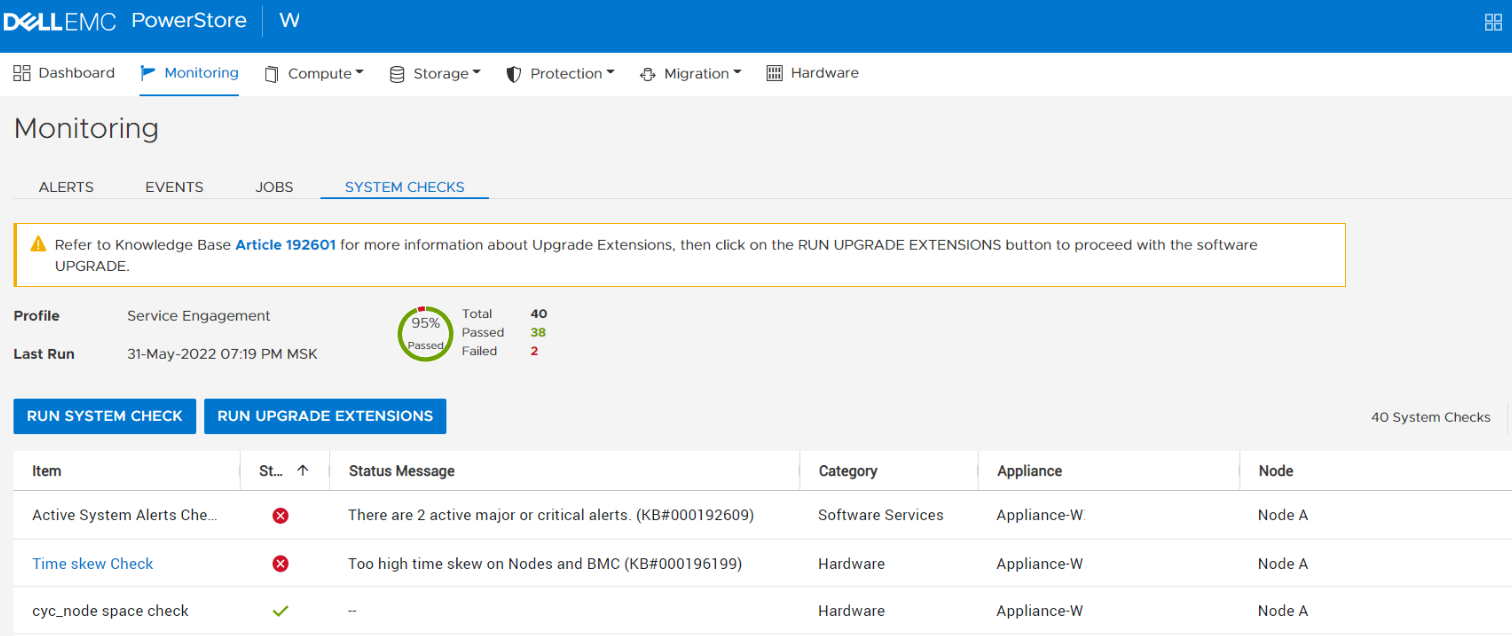
Tip: The Profile field displays Service Engagement when the Run System Check option is used to perform a System Check.
System Health service script may display a message Too high time skew on Nodes and BMC.
$ svc_health_check run -rhc time_skew_check -p Upgrade_ExtensionsName Location Status DescriptionTime skew Check node_a FAILED Too high time skew on Nodes and BMC (KB#000196199) |
Cause
When this issue exists, the correct functioning of the system as a whole may be impaired including software updates.
Resolution
Self-Service Action:
High level:
- SSH to the appliance service shell
- Validate NTP configuration is valid and healthy
- Run the "
svc_ntp_ctl --set" command to force sync the appliance to NTP - If needed repeat on peer node using "svc_ssh_peer"
For more information about accessing and using the service shell, see the PowerStore Service Scripts Guide
Run the svc_ntp_ctl command to display the current NTP configuration and verify that there are NTP servers configured, ntpd state is active and the status of NTP is Normal synchronized state.
[SVC:service@5V70643-B user]$ svc_ntp_ctl INFO: Cluster is configured to use the following NTP servers: AA.BBB.CCC.DDD, AA.BBB.EEE.FFF INFO: Node B current date and time is: 2023-06-28 17:44:40.883230 INFO: Node B relies on the ntpd service for time synchronization. INFO: Node B: service ntpd state: [active] INFO: Node B has status of NTP: Normal synchronized state INFO: Node B: Synchronization detail info: [associd=0 status=0615 leap_none, sync_ntp, 1 event, clock_sync,version="ntpd 4.2.8p13@1.3847-o Tue Jan 18 21:20:40 UTC 2022 (1)",processor="x86_64",system="Linux/5.3.18-24.134.1.dell.1679670291276419912-default", leap=00,stratum=3, precision=-24, rootdelay=51.030, rootdisp=69.004,refid=10.241.253.251,reftime=e846ea51.e96bd587 Wed, Jun 28 2023 17:20:17.911,clock=e846f009.26afe4a4 Wed, Jun 28 2023 17:44:41.151, peer=53167,tc=10, mintc=3, offset=0.474707, frequency=38.049, sys_jitter=8.730238,clk_jitter=1.109, clk_wander=0.139] INFO: Node A current date and time is: 2023-06-28 17:44:43.961124 INFO: Node A relies on the ntpd service for time synchronization. INFO: Node A: service ntpd state: [active] INFO: Node A has status of NTP: Normal synchronized state INFO: Node A: Synchronization detail info: [associd=0 status=0618 leap_none, sync_ntp, 1 event, no_sys_peer,version="ntpd 4.2.8p13@1.3847-o Tue Jan 18 21:20:40 UTC 2022 (1)",processor="x86_64",system="Linux/5.3.18-24.134.1.dell.1679670291276419912-default", leap=00,stratum=3, precision=-24, rootdelay=51.872, rootdisp=74.096,refid=10.241.253.250,reftime=e846ed57.949d8c7d Wed, Jun 28 2023 17:33:11.580,clock=e846f00c.315f7279 Wed, Jun 28 2023 17:44:44.192, peer=48283,tc=10, mintc=3, offset=-0.758737, frequency=37.197, sys_jitter=8.352620,clk_jitter=0.757, clk_wander=0.090] |
Confirm that the NTP IP addresses displayed are the correct/active NTP servers for the PowerStore environment.
Run the svc_ntp_ctl --set command to synchronize the node’s time to the first available active NTP server or run the svc_ntp_ctl --set --server <ip address of NTP server> command to specify the IP address of the NTP server to synchronize with.
[SVC:service@5V70643-B user]$ svc_ntp_ctl --set INFO: Cluster is configured to use the following NTP servers: AA.BBB.CCC.DDD, AA.BBB.EEE.FFF INFO: Node B ntpd service: inactive INFO: Node B: 28 Jun 17:52:34 ntpd[79343]: ntpd: time slew -0.006178 sntpd: time slew -0.006178s INFO: Node B: ntpd service: active INFO: Node A ntpd service: inactive INFO: Node A: 28 Jun 17:52:45 ntpd[40630]: ntpd: time slew -0.000542 sntpd: time slew -0.000542s INFO: Node A: ntpd service: active |
OR
[SVC:service@5V70643-B user]$ svc_ntp_ctl --set --server AA.BBB.EEE.FFF INFO: Node B ntpd service: inactive INFO: Node B: 28 Jun 17:55:28 ntpd[87755]: ntpd: time slew -0.000012 sntpd: time slew -0.000012s INFO: Node B: ntpd service: active INFO: Node A ntpd service: inactive INFO: Node A: 28 Jun 17:55:37 ntpd[53134]: ntpd: time slew -0.000094 sntpd: time slew -0.000094s INFO: Node A: ntpd service: active |
If the issue was found by System Check (or similar service), once issue is resolved, re-run this service.
If the issue was identified by RxDefinition, once issue is resolved, the alert will be cleared automatically during the next execution of this RxDefinition check.
.
If the issue remains, Contact Dell Technical Support or your Authorized Service Representative, and quote this knowledge base article ID.