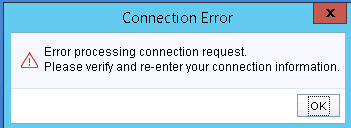
VNX: "Error Processing Connection Request. Please verify and re-enter your connection information"
Summary: When trying to load Unisphere, it stops at a Blue screen with "Error Processing Connection Request. Please verify and re-enter your connection information"
This article applies to
This article does not apply to
This article is not tied to any specific product.
Not all product versions are identified in this article.
Symptoms
Unisphere does not load, and it stops at a Blue screen followed by these alerts.
Error Processing Connection Request. Please verify and re-enter your connection information
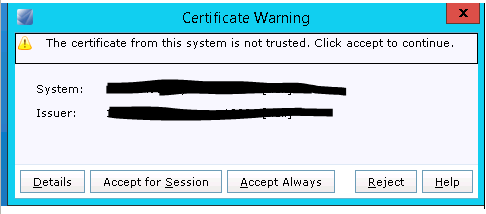
Cause
Due to the JAVA settings in the system, the Unisphere is taking too long to connect to the array which gets failed as there is no proper java configuration.
Resolution
Follow the Knowledge Base article VNX: Unable to open Unisphere - Issues with Java plugin & Browser
If the above KB resolves the issue, attempt the following workaround:
- Uninstall all other Java versions in the system
- Install the "JRE1.7u80"
- Open JAVA Configure >> Security >> Set it to Medium >> Add the IP addresses of VNX storage array to Exception list | Advanced >> Ensure that Mozilla Browser is checked
- Open the Mozilla >> Add Ons >> Disable the Java Deployment toolkit (Never Ask) >> Enable JRE SE (Always Ask)
- Install Unisphere Client
- Set the environment path for JAVA (
My Computer >> Properties >> Advanced Settings >> Environmental Variable >> Path >> Edit >> C:\Program Files (x86)\Java\jre1.8.0_51\bin - Open the Unisphere client
- From the command prompt:
cd <Unisphere Client installation path>run
- From the Mozilla browser
- From the command prompt:
Affected Products
Celerra, CLARiiON, VNX VG10, VNX VG2, VNX VG50, VNX VG8, VNX1 Series, VNX2 Series, VNX5100, VNX/VNXeProducts
VNX5150, VNX5200, VNX5300, VNX5400, VNX5500, VNX5600, VNX5700, VNX5800, VNX7500, VNX7600, VNX8000Article Properties
Article Number: 000056593
Article Type: Solution
Last Modified: 25 Jun 2025
Version: 5
Find answers to your questions from other Dell users
Support Services
Check if your device is covered by Support Services.