USB Type-C Mobile Adapter DA300 with Chrome System Cannot Detect USB Type-C and Type-A Devices Plugged in Simultaneously
Summary: This article provides information about an issue seen where only one or the other of a USB Type-A and USB Type-C external device is detected when plugged simultaneously to a Dell Chromebook through the Dell Type-C DA300 mobile adapter. ...
This article applies to
This article does not apply to
This article is not tied to any specific product.
Not all product versions are identified in this article.
Symptoms
Does your Chromebook only detect either a USB Type-A or Type-C device when both are connected through the Type-C DA300 mobile adapter simultaneously?
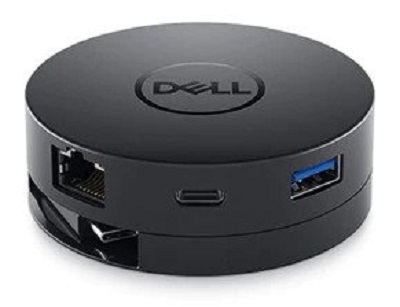
(Fig.1 DA300 Type-C Mobile Adapter)
It has been identified that if any USB Type-C device and a USB Type-A device are connected simultaneously to a Dell Chromebook through the DA300 Type-C Mobile Adapter, then the Chromebook system only detects and picks up one of the two external devices.
(For example, USB flash keys or external hard drives.)
 Note: It has been proven that it does not matter if the Type-A USB device is 2.0 or 3.0 for this issue to occur.
If this is affecting you, please check out the section below for more information.
Cause
No cause information
Resolution
This issue is seen with those external devices that try to pull more than 5V/1.5A through the DA300 Type-C adapter when connected to Chromebooks with a 42Whr battery.
Unfortunately, Dell cannot guarantee that every peripheral is compatible with every system. Chromebooks with 42Whr batteries only supply 5V through the Type-C connector, and this is not enough to power every Type-A or Type-C device available.
These systems are working to the limits of the technology in them and are working as designed.
 Note: Those external devices that pull less than 5V/1.5A or are self-powered are not affected. Those Chromebooks with 51 and 68Whr batteries and the latest BIOS are similarly not affected.
Affected Products
Dell Adapter - Dell USB-C Mobile Adapter - DA300, Latitude 5300 2-in-1 Chromebook, Latitude 5400 ChromebookArticle Properties
Article Number: 000138947
Article Type: Solution
Last Modified: 19 Apr 2025
Version: 6
Find answers to your questions from other Dell users
Support Services
Check if your device is covered by Support Services.