PowerStore: How to upload log files to an existing Service Request
Summary: This article provides steps to upload files to an existing Service Request.
This article applies to
This article does not apply to
This article is not tied to any specific product.
Not all product versions are identified in this article.
Instructions
- Go to https://www.dell.com/support/incidents-online/srsearch
- Click Sign In.
- A business account is required to upload files larger than 50 MB.
- How to Register for Access to Dell Technologies Online Support or Upgrade an Existing Account
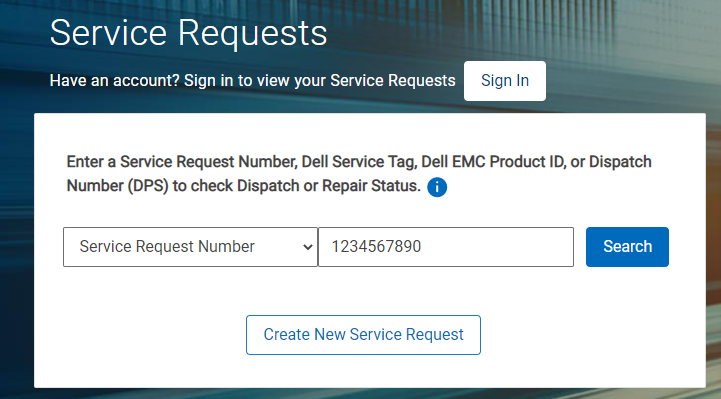
- Enter the Service Request Number value in the space provided.
- Enter the Email Address associated with the Service Request in the display window.
- In the Activity Center panel, click the button labeled Attach Files.
- Select files to upload.
- Click Upload All.
Alternative method using tech direct
- Go to https://tdm.dell.com/file-upload
- Enter the Service tag and Verify.
- Enter the Preferred name, Service Request Number, and the Email Address associated with that Service Request.
- Select files to upload.
Additional Information
| Unsupported File Types | |||
|---|---|---|---|
| exe | ace | ade | adp |
| ani | app | asp | aspx |
| asx | bas | bat | bin |
| cer | chm | cla | class |
| cmd | cnt | vsmacros | com |
| cpl | crt | csh | der |
| docm | fxp | gad | gadget |
| get | grp | hlp | hpj |
| hta | htc | inf | ins |
| isp | its | jar | js |
| jse | ksh | lnk | mad |
| maf | mag | mam | maq |
| mar | mas | mat | mau |
| mav | maw | mcf | mda |
| mdb | mde | mdt | mdw |
| mdz | mhtml | msc | msh |
| msh1 | msh2 | msi | msp |
| mst | ocx | ops | osd |
| pcd | pif | pl | plg |
| prf | prg | ps1 | ps2 |
| psc1 | psc2 | pst | reg |
| run | scf | scr | sct |
| sh | shb | shs | url |
| vb | vbe | vbp | vbs |
| vss | vst | vsw | ws |
| wsc | wsf | wsh | xba |
| xnk | |||
Affected Products
PowerStoreArticle Properties
Article Number: 000205741
Article Type: How To
Last Modified: 15 May 2025
Version: 9
Find answers to your questions from other Dell users
Support Services
Check if your device is covered by Support Services.