PowerProtect VM SQL initial configuration fails ABV0025 "SSL certificates are not present"
Summary: The Microsoft SQL Server Virtual Machine (VM) configuration job fails with exit status ABV0025 indicating that it was unable to register the PowerProtect Agent Service.
This article applies to
This article does not apply to
This article is not tied to any specific product.
Not all product versions are identified in this article.
Symptoms
The PowerProtect Data Manager Appliance is used to protect the vSphere environment. A VMware application-aware protection policy is being configured to protect a Microsoft SQL Server virtual machine (VM). The Microsoft SQL Server VM system configuration job fails with exit status ABV0025 indicating that it was unable to register the PowerProtect Agent Service.
ABV0025: VM Direct engine is unable to configure protection for the virtual machine 'my-sql-server.my-domain.com' on vCenter 'my-vcenter.my-domain.com'.

The VM Direct engine cannot complete protection of this virtual machine because the protection configuration was unsuccessful.

 Review the error details and summary log in the Jobs window, or export the job logs and review the log files for more information. If the issue persists, contact Dell Customer Support.

Read Less
Unable to perform MSSQLDM Agent operation 'configure' on VM xxx.xxx.xxx.xxx (vm-##).  Unsuccessful PowerProtect agent for Microsoft Applications operation 'configure'.  Unable to update persisted settings for PowerProtect Data Manager host 'xxx.xxx.xxx.xxx': Unable to log in to PowerProtect Data Manager host 'xxx.xxx.xxx.xxx'. Received the HTTP code 400 and response 'Invalid FQDN'.

Unable to register PowerProtect Agent Service. SSL certificates are not present.
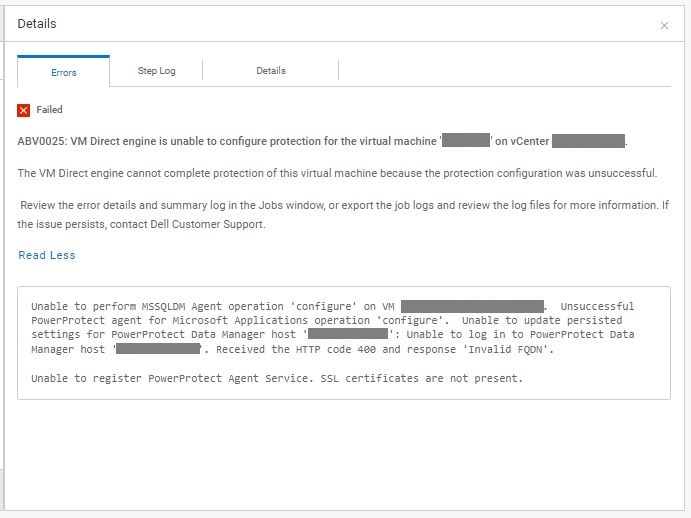
Figure 1: Screenshot of error message ABV0025 indicating that unable to register the PowerProtect Agent Service.
The Microsoft SQL Server VM configuration job export shows:
YYYY-MM-DD HH:MM:SS INFO:   [a267c9eb8362b811;b45952b1439b3df9] MSSQLDM: MSSQLDM: PowerProtect agent for Microsoft Applications version 19.14.0.26 is present on VM xxx.xxx.xxx.xxx (vm-##)
YYYY-MM-DD HH:MM:SS INFO:   [a267c9eb8362b811;b45952b1439b3df9] MSSQLDM: MSSQLDM: MSSQLDM Agent latest available version is '19.14.0.26' (19.14.0.26): emcmsappagent-19.14.0.26.exe
YYYY-MM-DD HH:MM:SS INFO:   [a267c9eb8362b811;b45952b1439b3df9] MSSQLDM: MSSQLDM: connect: Connected to vProxy Agent on VM xxx.xxx.xxx.xxx (vm-##).
YYYY-MM-DD HH:MM:SS INFO:   [a267c9eb8362b811;b45952b1439b3df9] MSSQLDM: MSSQLDM: connect: Host agent lock released.
YYYY-MM-DD HH:MM:SS [a267c9eb8362b811;b45952b1439b3df9]0  msagentcon PowerProtect Data Manager info Full diagnostic logs can be found in the file 'C:\Program Files\DPSAPPS\MSAPPAGENT\logs\msagentcon_cent_20230726181507_a267c9eb8362b811_b45952b1439b3df9_debug.log'.
YYYY-MM-DD HH:MM:SS [a267c9eb8362b811;b45952b1439b3df9]107091  msagentcon PowerProtect Data Manager notice Command line:  C:\Program Files\DPSAPPS\MSAPPAGENT\bin\msagentcon.exe configure -D 3 -I -
YYYY-MM-DD HH:MM:SS [a267c9eb8362b811;b45952b1439b3df9]86738  msagentcon PowerProtect Data Manager notice System Version: 6.2 Build 9200
YYYY-MM-DD HH:MM:SS [a267c9eb8362b811;b45952b1439b3df9]86741  msagentcon PowerProtect Data Manager notice Computer Name: MY-SQL-NAME     User Name: MY-SQL-NAME\Administrator (Administrator)
YYYY-MM-DD HH:MM:SS [a267c9eb8362b811;b45952b1439b3df9]107092  msagentcon PowerProtect Data Manager notice Version information for C:\Program Files\DPSAPPS\MSAPPAGENT\bin\msagentcon.exe:	Original file name: msagentcon.exe	Version: 19.14.0.26.Build.26	Comments:
YYYY-MM-DD HH:MM:SS [a267c9eb8362b811;b45952b1439b3df9]151790  msagentcon PowerProtect Data Manager notice A lockbox path was not specified, falling back to C:\Program Files\DPSAPPS\common\lockbox.
YYYY-MM-DD HH:MM:SS [a267c9eb8362b811;b45952b1439b3df9]199128  msagentcon PowerProtect Data Manager notice Parsed VM instance ID is '6abdd35e-1eac-5a7d-803d-a81dd54e3a0d'.
YYYY-MM-DD HH:MM:SS [a267c9eb8362b811;b45952b1439b3df9]187076  msagentcon PowerProtect Data Manager notice Configure the certificate authorization for PowerProtect Data Manager server 'xxx.xxx.xxx.xxx'.
YYYY-MM-DD HH:MM:SS [a267c9eb8362b811;b45952b1439b3df9]203449  msagentcon PowerProtect Data Manager notice vmDataSourceID: '6abdd35e-1eac-5a7d-803d-a81dd54e3a0d'
YYYY-MM-DD HH:MM:SS [a267c9eb8362b811;b45952b1439b3df9]3  msagentcon PowerProtect Data Manager notice hostname to register with Power Protect Data Manager: 'xxx.xxx.xxx.xxx'
YYYY-MM-DD HH:MM:SS [a267c9eb8362b811;b45952b1439b3df9]203451  msagentcon PowerProtect Data Manager notice Executing the registration script, parameters are hostname and VM DataSource ID.
YYYY-MM-DD HH:MM:SS [a267c9eb8362b811;b45952b1439b3df9]181389  msagentcon PowerProtect Data Manager error Unable to execute discovery command, error: 'Unable to update persisted settings for PowerProtect Data Manager host 'xxx.xxx.xxx.xxx': Unable to log in to PowerProtect Data Manager host 'xxx.xxx.xxx.xxx'. Received the HTTP code 400 and response 'Invalid FQDN'.
    ', 'Unable to register PowerProtect Agent Service. SSL certificates are not present.'
YYYY-MM-DD HH:MM:SS [a267c9eb8362b811;b45952b1439b3df9]181395  msagentcon PowerProtect Data Manager error The operation terminated with an error; details are in the status output file.
The PowerProtect Agent Service (MSAPPAGENT) Service was put in debug by creating the .ddbmcon.debug file in the C:\Program Files\DPSAPPS\MSAPPAGENT\tmp\ directory on the Microsoft SQL Server. The ddbmcon.*.log debug output files in the C:\Program Files\DPSAPPS\MSAPPAGENT\logs\ show:
YYYY-MM-DD HH:MM:SS ddbmcon: libdd_getSVs: Setting the system stable values.
YYYY-MM-DD HH:MM:SS ddbmcon: libdd_lockbox_open: Lockbox could not be opened in the directory 'C:\Program Files\DPSAPPS\common\lockbox\agents.clb'. Error code: -11.
YYYY-MM-DD HH:MM:SS ddbmcon: libdd_lockbox_destroy: Freeing the context and releasing the lockbox application.
Cause
There is a corruption in the agents.clb lockbox that prevents the MSAPPAGENT Service from updating the certificate files.
Resolution
Remove the existing agents.clb lockbox, so a new lockbox is re-created on the Microsoft SQL Server.
- Stop the PowerProtect Agent Service from the
services.mscor command prompt:
net stop agentservice
- Move the content of the C:\Program Files\DPSAPPS\common\lockbox to another directory.
- Start the PowerProtect Agent Service from the
services.mscor command prompt:
net start agentservice
Article Properties
Article Number: 000216374
Article Type: Solution
Last Modified: 03 Dec 2025
Version: 3
Find answers to your questions from other Dell users
Support Services
Check if your device is covered by Support Services.