Error while updating data passphrase: "Failed to open lockbox 'NetWorker installation path'\clb.lb"
Summary:
While updating the data passphrase in the NetWorker properties of NMC, getting error appear as "Failed to open lockbox \clb.lb"
This article applies to
This article does not apply to
This article is not tied to any specific product.
Not all product versions are identified in this article.
Symptoms
Unable to update the data passphrase for encryption or compression directive.
Cause
The /nsr/lockbox folder has been renamed on the NetWorker server. There is no /nsr/lockbox folder.
The "Failed to open lockbox" error can appear due to other causes. See Additional Info.
Resolution
Re-create the lockbox:
-
Stop the NetWorker services on NetWorker Server:
Windows:net stop nsrexecd
Linux:systemctl stop networker -
Go to
/nsrlocation: -
You find the renamed lockbox folder. Rename it back to 'lockbox'
Existing:
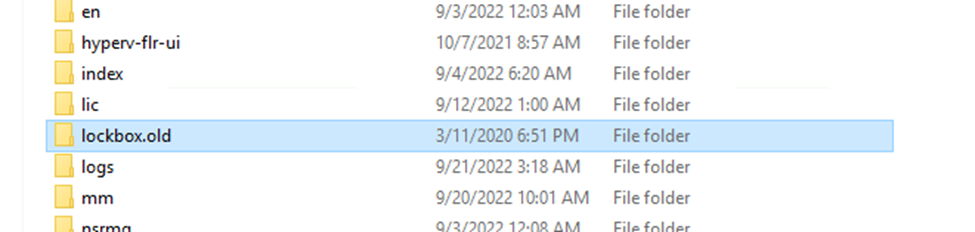
Renamed:

-
Start the NetWorker services on NetWorker Server:
Windows:net start nsrd
Linux:systemctl start networker
Now you could update the NetWorker Server properties with data passphrase without any error.
Additional Information
- NVP-vProxy: New vProxy addition to NMC fails to open the lockbox
- NVP-vProxy: New vProxy registration in the NMC fails to open the lockbox
- NetWorker: Oracle backup fail with lockbox error during any failover of NetWorker server
- NMDA: DB2 backups fail with "Error retrieving password from the Networker lockbox"
- NetWorker: "The lockbox or cryptography library could not be found"
Affected Products
NetWorkerArticle Properties
Article Number: 000203588
Article Type: Solution
Last Modified: 25 Nov 2024
Version: 2
Find answers to your questions from other Dell users
Support Services
Check if your device is covered by Support Services.