Active Pen Cannot be Paired with Dell Display and Peripheral Manager
Summary: This article provides information about Active Pen being unable to be paired with Dell Display and Peripheral Manager (DDPM).
This article applies to
This article does not apply to
This article is not tied to any specific product.
Not all product versions are identified in this article.
Symptoms
Note: This article is no longer being maintained, reference Dell Active Pen is not Listed in the Dell Display and Peripheral Manager for updated information.
Affected Platforms:
- Dell 14 Plus 2-in-1 DB04250
- Dell 16 Plus 2-in-1 DB06250
- Dell 14 Plus 2-in-1 DB04255
- Inspiron 14 7440 2-in-1
- Inspiron 14 7445 2-in-1
- Inspiron 14 7430 2-in-1
- Inspiron 16 7630 2-in-1
- Inspiron 14 7435 2-in-1
- Inspiron 16 7635 2-in-1
Affected Products
- Dell Pro Plus Active Pen PN5122W
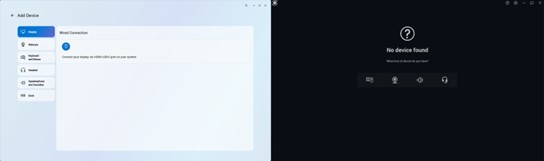
When opening DDPM or Dell Peripheral Manager (DPeM), you are not able to see a pen icon to pair an active pen.
Cause
Driver support for the specific touch panels is not yet included into DDPM and requires an additional driver to be installed.
Resolution
Download and install the Wacom Components Driver for the Dell Pro Plus Active Pen PN5122W.
Dell will release a new DDPM version in September 2025, this version includes the necessary driver.
Note: DPeM is End of Life and no longer updated. DDPM replaced DPeM.
Affected Products
Dell Pro Plus Active Pen PN5122W, Dell 14 Plus 2-in-1 DB04250, Dell 14 Plus 2-in-1 DB04255, Dell 16 Plus 2-in-1 DB06250, Inspiron 14 7430 2-in-1, Inspiron 14 7435 2-in-1, Inspiron 14 7440 2-in-1, Inspiron 14 7445 2-in-1, Inspiron 16 7630 2-in-1
, Inspiron 16 7635 2-in-1
...
Article Properties
Article Number: 000343273
Article Type: Solution
Last Modified: 25 Sept 2025
Version: 5
Find answers to your questions from other Dell users
Support Services
Check if your device is covered by Support Services.