Modos do Dell Data Security Shield
Summary: Este artigo aborda os modos de proteção do Dell Data Security (antigo Dell Data Protection).
This article applies to
This article does not apply to
This article is not tied to any specific product.
Not all product versions are identified in this article.
Symptoms
Produtos afetados:
- Credant Mobile Guardian
- Dell Encryption Enterprise
- Dell Data Protection | Enterprise Edition
- Dell Encryption External Media
- Dell Data Protection | External Media Edition
- Dell Encryption Personal
- Dell Data Protection | Personal Edition
- Dell Data Protection | Security Tools
- Dell Encryption Enterprise for Server
- Dell Data Protection | Server Edition
Plataformas afetadas:
- Windows
O software Dell Data Security (antigo Dell Data Protection) baseado em políticas usa um identificador de modo de proteção para a classificação do produto.
Cause
Advertência:
- O modo de proteção é determinado no momento da instalação do produto e não pode ser modificado manualmente.
- O modo Shield é usado apenas para solucionar problemas de tipo ou status do produto.
Resolution
Os modos de proteção para produtos Dell Data Security são:
| ID | Modo | Produto |
|---|---|---|
| 0 | Desconhecido/Não inicializado | Não inicializado/Não provisionado1 |
| 1 | Modo Enterprise | Escudo Dell Encryption Enterprise\Dell Data Protection Enterprise Edition |
| 2 | Modo independente | Credant Mobile Guardian |
| 3 | Modo somente EME empresarial | Dell Encryption External Media \ Dell Data Protection | Edição de mídia externa |
| 4 | Modo gerenciado localmente | Dell Encryption Personal\Dell Data Protection | Edição Pessoal |
| 5 | Modo Essentials | Proteção de dados da Dell | Ferramentas de segurança2 |
| 6 | Modo de criptografia de servidor | Dell Encryption Enterprise para servidor \ Dell Data Protection | Criptografia do servidor |
| 7 | Modo SaaS | Dell Encryption Enterprise Shield |
1ºTodos os produtos Dell Data Protection permanecem não provisionados até serem ativados.
2O Modo Essencial só ocorre em instalações do Dell Data Protection | Ferramentas de segurança.
Para localizar o Modo Shield:
Advertência: Leva você ao Registro do Windows:
- Editar o Registro pode fazer com que o computador não responda na próxima reinicialização.
- Se você tiver dúvidas sobre como realizar essa etapa, entre em contato por meio dos números de telefone do suporte internacional do Dell Data Security para obter assistência.
- Clique com o botão direito do mouse no menu Iniciar do Windows e selecione Executar.
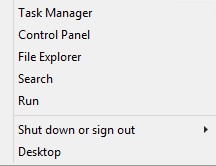
Figura 1: (Somente em inglês) Executar
- Em Executar interface do usuário (IU), digite regedit e pressione OK.
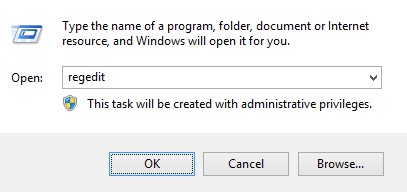
Figura 2: (Somente em inglês) Digite regedit
- Vá para HKEY_LOCAL_MACHINE\SOFTWARE\Credant\CMGShield.
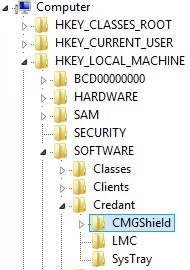
Figura 3: (Somente em inglês) CMGShield
- Localize o SM da chave DWORD.
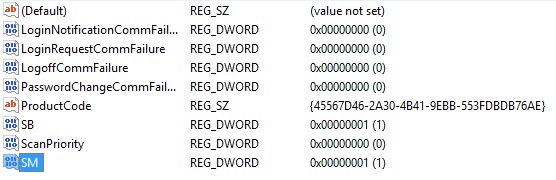
Figura 4: (Somente em inglês) SM
Nota: No exemplo, a chave SM é definida como 1. Isso identifica o modo de proteção Enterprise Edition.
Para entrar em contato com o suporte, consulte Números de telefone do suporte internacional do Dell Data Security.
Acesse o TechDirect para gerar uma solicitação de suporte técnico on-line.
Para obter insights e recursos adicionais, participe do Fórum da comunidade de segurança da Dell.
Additional Information
Videos
Affected Products
Dell EncryptionArticle Properties
Article Number: 000132837
Article Type: Solution
Last Modified: 19 Apr 2026
Version: 11
Find answers to your questions from other Dell users
Support Services
Check if your device is covered by Support Services.