Dell Data Security Shield 模式
Summary: 本文讨论 Dell Data Security(以前称为 Dell Data Protection)盾牌模式。
This article applies to
This article does not apply to
This article is not tied to any specific product.
Not all product versions are identified in this article.
Symptoms
受影响的产品:
- Credant Mobile Guardian
- Dell Encryption Enterprise
- Dell Data Protection | Enterprise Edition
- Dell Encryption External Media
- Dell Data Protection | External Media Edition
- Dell Encryption Personal
- Dell Data Protection | Personal Edition
- Dell Data Protection | Security Tools
- Dell Encryption Enterprise for Server
- Dell Data Protection | Server Edition
受影响的平台:
- Windows
基于策略的 Dell Data Security(以前称为 Dell Data Protection)软件使用屏蔽模式标识符进行产品分类。
Cause
警告:
- 盾牌模式在产品安装时确定,不能手动修改。
- 盾牌模式仅用于对产品类型或状态进行故障处理。
Resolution
Dell Data Security 产品的保护模式包括:
| ID | 模式 | 产品 |
|---|---|---|
| 0 | 未知/未初始化 | 未初始化/未配置1 |
| 1 | 企业模式 | Dell Encryption Enterprise\Dell Data Protection Enterprise Edition Shield |
| 2 | 独立模式 | Credant Mobile Guardian |
| 3 | 仅企业 EME 模式 | Dell Encryption External Media \ Dell Data Protection |External Media Edition |
| 4 | 本地管理模式 | Dell Encryption Personal\Dell Data Protection |个人版 |
| 5 | Essentials 模式 | Dell Data Protection |安全工具2 |
| 6 | 服务器加密模式 | Dell Encryption Enterprise for Server \ Dell Data Protection |服务器加密 |
| 7 | Saas 模式 | Dell Encryption Enterprise Shield |
1所有 Dell Data Protection 产品在激活之前均保持未调配状态。
2基本模式仅在安装 Dell Data Protection |安全工具。
要找到 Shield Mode:
警告:带您进入 Windows 注册表:
- 编辑注册表可能会导致计算机在下次重新启动时无响应。
- 如果您对于执行此步骤感到担忧,请拨打 Dell Data Security 国际支持电话号码联系相关人员以获得帮助。
- 右键单击Windows开始菜单,然后选择Run(运行)。
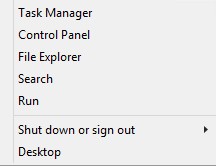
图 1:(仅英文)运行
- 在“运行”用户界面 (UI) 中,键入 regedit ,然后按 确定。
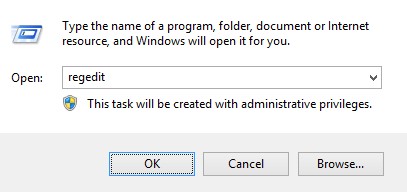
图 2:(仅限英文)键入 regedit
- 转至 HKEY_LOCAL_MACHINE\SOFTWARE\Credant\CMGShield。
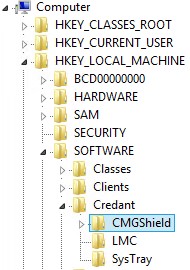
图 3:(仅限英文) CMGShield
- 找到 DWORD 密钥 SM。
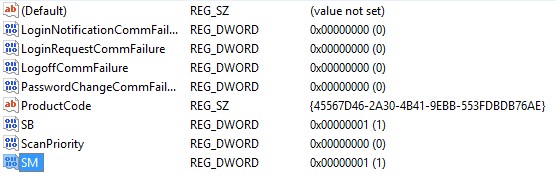
图 4:(仅限英文)Sm
提醒:在示例中,SM 键设置为 1。这将标识盾牌模式企业版。
要联系支持部门,请参阅 Dell Data Security 国际支持电话号码。
转至 TechDirect,在线生成技术支持请求。
要获得更多见解和资源,请加入戴尔安全社区论坛。
Affected Products
Dell EncryptionArticle Properties
Article Number: 000132837
Article Type: Solution
Last Modified: 19 Apr 2026
Version: 11
Find answers to your questions from other Dell users
Support Services
Check if your device is covered by Support Services.