PowerStore: SupportAssist Remote Secure Credentials (RSC) not available when configured using Gateway Server
Summary: SupportAssist Remote Secure Credentials (RSC) not available when configured using Gateway Server.
This article applies to
This article does not apply to
This article is not tied to any specific product.
Not all product versions are identified in this article.
Symptoms
This issue applies only to environments where a Gateway is used to enable SupportAssist and direct communication is blocked by firewall.
Trying to enable RSC in PowerStore Manager may result in an alert:
0x00400703 - Remote Secure Credentials set up failed.
As seen from PowerStore Manager (UI):

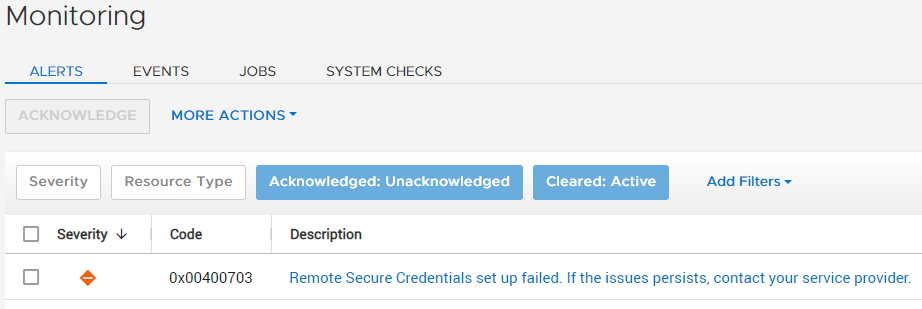
RSC may still show enabled, but it will not work.

As a result of this issue, the Remote Secure Credentials feature cannot be used to their full extent. Dell support personnel can continue to use normal remote servicing functions, but must use the system credentials to access the PowerStore remotely.
Cause
This is a code issue where the RSC configuration and functionality is not routed correctly through the Gateway server, and tries to route this traffic directly from the PowerStore to the Dell SupportAssist backend servers.
If the environment has port 9443 traffic blocked by the firewall rules from PowerStore to the Dell backend servers, the feature Remote Secure Credentials cannot be properly enabled when using Gateway Server to enable SupportAssist.
If the environment has port 9443 traffic blocked by the firewall rules from PowerStore to the Dell backend servers, the feature Remote Secure Credentials cannot be properly enabled when using Gateway Server to enable SupportAssist.
Resolution
Fix:
This issue is addressed in PowerStore OS 2.1 and later.
Workaround:
This can be resolved by configuring the firewall rules to allow the PowerStore to send outgoing traffic using port 9443 directly to the Dell SupportAssist backend servers.
The alert may not clear by itself after disabling RSC in PowerStore Manager. If the alert must be manually cleared, contact Dell EMC Technical Support or your Authorized Service Representative, and quote this Knowledgebase article ID.
Additional Information
For more information on RSC, see the PowerStore Security Configuration Guide.
Affected Products
PowerStoreArticle Properties
Article Number: 000186090
Article Type: Solution
Last Modified: 13 Jun 2025
Version: 10
Find answers to your questions from other Dell users
Support Services
Check if your device is covered by Support Services.