Dell Encryption Enterprise and Personal Vault Corruption Causes Empty Sweep Times to be Reported
Summary: If the SDE vault becomes corrupted in Dell Encryption Enterprise and Personal versions earlier than v10.9, empty sweep times are reported.
This article applies to
This article does not apply to
This article is not tied to any specific product.
Not all product versions are identified in this article.
Symptoms
Affected Product:
- Dell Encryption Enterprise
- Dell Encryption Personal
- Dell Encryption External Media
- Dell Endpoint Security Suite Enterprise
Affected Versions:
- v10.8 and earlier
Affected Operating System:
- Windows
When viewing the endpoint in the Dell Data Security Server console, the Sweep Start and Sweep End dates are blank.
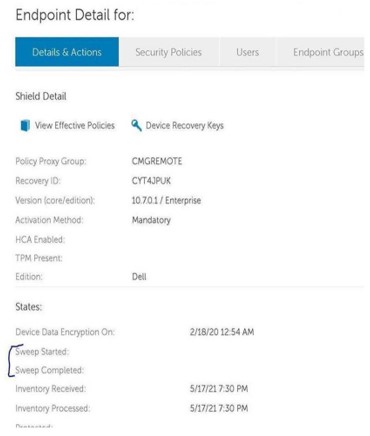
The cmgshield.log files contain lines similar to the following when vault corruption has occurred:
[06.24.21 17:59:00:437      CredFSys.cpp:  476 E] Vault - Failure in reading device cluster 1389 (UCID: ILHQ6MER) - decryption error
[06.24.21 17:59:00:458      CredFSys.cpp:  476 E] Vault - Failure in reading device cluster 1392 (UCID: ILHQ6MER) - decryption error
[06.24.21 17:54:23:610      CredFSys.cpp: 1356 E] Vault - Failed to read pre-existing DAT image
[06.24.21 17:54:23:611      CredFSys.cpp: 2750 E] Vault - Invalid number of  0 clusters needed to store the DAT and the FAT
Cause
The SDE vault contains user and device policies for the endpoint. If the vault becomes corrupted, the device has no policy information to enforce. When this occurs, sweep times in the registry become empty. When inventory is sent from the endpoint to the Dell Data Security server, it reports a blank or null sweep time.
Resolution
To resolve the issue, upgrade to Dell Encryption Enterprise (or Dell Encryption Personal) v10.9 or later. 10.9 has added additional checks for vault corruption detection and repair.
To contact support, reference Dell Data Security International Support Phone Numbers.
Go to TechDirect to generate a technical support request online.
For additional insights and resources, join the Dell Security Community Forum.
Affected Products
Dell Encryption, Dell Endpoint Security Suite EnterpriseArticle Properties
Article Number: 000190108
Article Type: Solution
Last Modified: 21 Aug 2024
Version: 13
Find answers to your questions from other Dell users
Support Services
Check if your device is covered by Support Services.