VxRail: Physical View Missing Due to DNS Resolution Failures
Summary: The article describes how the physical view fails to load because DNS lookups for vCenter and ESXi hosts return errors such as “Temporary failure in name resolution” or “No address associated with hostname,” caused by misconfigured DNS settings on the VxRail manager and its containers. ...
This article applies to
This article does not apply to
This article is not tied to any specific product.
Not all product versions are identified in this article.
Symptoms
Host physical view does not load.
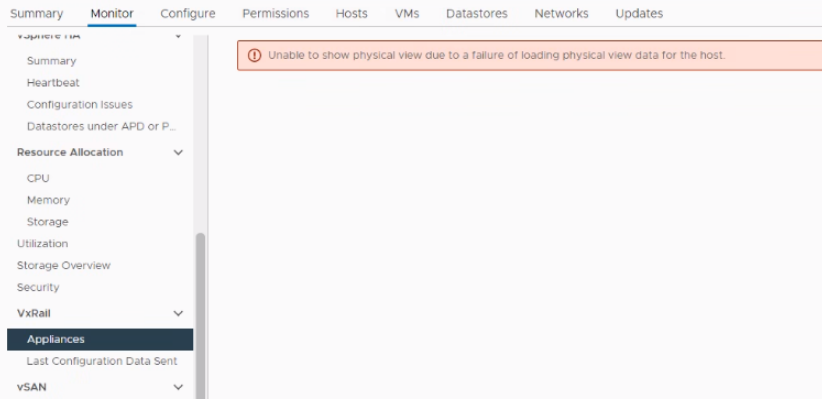
Checking web.log shows:
"2021-12-20T05:11:52.456+0000 ERROR [myScheduler-9] com.emc.mystic.manager.cluster.service.HostEnrichServiceImpl HostEnrichServiceImpl.enrichHostInfo:58 - Failed to fetch host enriched info.
java.lang.NullPointerException: null
Checking short.term.log shows the following error when connecting to ESXi 9090 port: "Temporary failure in name resolution"
"2021-12-20-05:17:18 microservice.do-host "2021-12-20 05:17:18,146 [ERROR] <Dummy-490:140670147712840> linzhi_dataloader.py fetch_async() (67): Query data failed,url:https://ESXI-hostname:9090/rest/ps/private/v1/nodeinfo, Exception:Cannot connect to host ESXI-hostname:9090 ssl:False [Temporary failure in name resolution]"
OR shows the following when connecting to ESXi 9090 port: "No address associated with hostname"
"2022-12-23 08:30:22,706" microservice.do-host "2022-12-23T08:30:21.856095571Z stderr F 2022-12-23 08:30:21,855 [ERROR] <Dummy-719:140226024808520> linzhi_dataloader.py fetch_async() (84): Query data failed,url:https://ESXI-hostname:9090/rest/ps/private/v1/status,Exception:Cannot connect to host ESXI-hostname:9090 ssl:<gevent._ssl3.SSLContext object at 0x7f88e80cb198> [No address associated with hostname]"
OR shows the following when connecting to ESXi 9090 port: "Name or service not known"
"2023-02-03 11:44:18,126" microservice.do-host "2023-02-03T11:44:17.392285551Z stderr F 2023-02-03 11:44:17,392 [ERROR] <Dummy-940:139996724212296> platform_service.py __get_platform() (61): Linzhi service seems not ready, do deeper check to judge platform. exception: HTTPSConnectionPool(host='xxxxxxxxx', port=9090): Max retries exceeded with url: /rest/ps/private/v1/status (Caused by NewConnectionError('<urllib3.connection.HTTPSConnection object at 0x7f5387504438>: Failed to establish a new connection: [Errno -2] Name or service not known',))"
OR shows the following while resolving the field ClusterDomainOwnerQuery.cluster: "Temporary failure in name resolution"
"2022-06-23 13:54:05,524" microservice.do-cluster "2022-06-23T13:54:04.737166669Z stderr F 2022-06-23 13:54:04,736 [ERROR] <Dummy-152:139828974536264> executor.py resolve_or_error() (456): An error occurred while resolving field ClusterDomainOwnerQuery.cluster" "2022-06-23 13:54:05,524" microservice.do-cluster "2022-06-23T13:54:04.737321073Z stderr F socket.gaierror: [Errno -3] Temporary failure in name resolution"
OR shows the following while resolving field ClusterDomainOwnerQuery.cluster: "No address associated with hostname"
"2022-09-08 01:31:18,777" microservice.do-cluster "2022-09-08T01:31:17.881370793Z stderr F 2022-09-08 01:31:17,879 [ERROR] <Dummy-1323:139978918375496> executor.py resolve_or_error() (456): An error occurred while resolving field ClusterDomainOwnerQuery.cluster" "2022-09-08 01:31:18,777" microservice.do-cluster "2022-09-08T01:31:17.881507231Z stderr F socket.gaierror: [Errno -5] No address associated with hostname"
Check name resolution for vCenter and ESXi FQDN on VxRail manager. You may find:
- A. Using
nslookupordigcommand on VxRail manager shows that the hostname resolution is OK but when checking it inside do-cluster container, it fails. - B. Using
nslookupordigcommand on VxRail manager shows that hostname resolution fails for one or some DNS servers
Run the below commands as root user on VxRail manager to test name resolution:
dig VC_FQDN/ESXi_FQDN
nslookup -debug VC_FQDN/ESXi_FQDN
dig VC_FQDN/ESXi_FQDN @127.0.0.1
nslookup -debug VC_FQDN/ESXi_FQDN 127.0.0.1
nslookup VC_FQDN/ESXI_FDQN <DNS_server> //determine which DNS server is not working
Run the below docker commands as root user on VxRail manager to test name resolution inside do-cluster container:
docker exec -it -u 0 $(docker ps -q -f name=do-cluster) dig VC_FQDN/ESXI_FQDN
docker exec -it -u 0 $(docker ps -q -f name=do-cluster) ping VC_FQDN/ESXI_FQDN
For example, the ESXi_FQDN is "esx01.xyz.com", You may find below error from command output:
vxm:~ # docker exec -it -u 0 $(docker ps -q -f name=do-cluster) dig esx01.xyz.com

; <<>> DiG 9.16.6 <<>> esx01.xyz.com
;; global options: +cmd
;; connection timed out; no servers could be reached

vxm:~ # docker exec -it -u 0 $(docker ps -q -f name=do-cluster) ping esx01.xyz.com

ping: esx01.xyz.com: Temporary failure in name resolution
If VxRail Manager version is 7.0.370 and later, run the below kubectl commands on VxRail manager to test name resolution inside do-cluster pod:
kubectl exec -it $(kubectl get pods -o=name | grep do-cluster | sed "s/^.\{4\}//") -- dig VC_FQDN/ESXI_FQDN
kubectl exec -it $(kubectl get pods -o=name | grep do-cluster | sed "s/^.\{4\}//") -- nslookup -debug VC_FQDN/ESXI_FQDN
Cause
- Containers are using VxRail manger as the DNS server. If there is something wrong with VxRail manager DNS service, the hostname resolution fails.
- VxRail manager DNS server is configured with an external public DNS, for example 8.8.8.8.
- VxRail manager DNS server is configured with multiple external DNS and some of them are not working
- VxRail Manager DNS server is configured with external DNS, but in
/etc/dnsmasq.conf auth-serverandauth-zoneconfigured
Resolution
- Check
/etc/resolv.conffile on VxRail manger. If it has any external public DNS records, remove them fromresolv.conffile. - Correct name resolution issue for problematic DNS servers
- Ensure that the DNS server is working. Follow article VxRail: How to change the DNS server IP on VxRail 8.0.x and 7.0.x releases using the rest API to update the correct DNS server for the cluster.
- Check
/etc/dnsmasq.conf, if the VxRail Manager is not running as DNS server for cluster but an external DNS is configured, remove below entries:
auth-server=127.0.0.1,eth0
auth-zone=xx.xx
- Run below command on VxRail manger to restart DNS service:
systemctl restart dnsmasq
- Wait for 15 minutes, then check physical view again.
Contact Dell Support if further assistance is required, reference this article ID.
Affected Products
VxRail SoftwareArticle Properties
Article Number: 000194844
Article Type: Solution
Last Modified: 24 Jul 2026
Version: 16
Find answers to your questions from other Dell users
Support Services
Check if your device is covered by Support Services.